
C编译器无法创建可执行文件(安装Cocoapods)
C编译器无法创建可执行文件(安装Cocoapods)
提问于 2019-11-22 17:13:38
在安装RNPermissions及其依赖项时,我遇到了一个错误。我的编译器或正在安装的软件包似乎出了问题。
错误:
checking whether the C compiler works... no
/Users/si/Library/Caches/CocoaPods/Pods/Release/glog/0.3.4-1de0b/missing: Unknown `--is-lightweight' option
Try `/Users/si/Library/Caches/CocoaPods/Pods/Release/glog/0.3.4-1de0b/missing --help' for more information
configure: WARNING: 'missing' script is too old or missing
configure: error: in `/Users/si/Library/Caches/CocoaPods/Pods/Release/glog/0.3.4-1de0b':
configure: error: C compiler cannot create executables
See `config.log' for more details
全部产出:
$ pod install
Analyzing dependencies
Fetching podspec for `Folly` from `../node_modules/react-native/third-party-podspecs/Folly.podspec`
Fetching podspec for `Permission-Camera` from `../node_modules/react-native-permissions/ios/Camera.podspec`
Fetching podspec for `Permission-LocationAlways` from `../node_modules/react-native-permissions/ios/LocationAlways.podspec`
Fetching podspec for `Permission-LocationWhenInUse` from `../node_modules/react-native-permissions/ios/LocationWhenInUse.podspec`
Fetching podspec for `RNPermissions` from `../node_modules/react-native-permissions`
Fetching podspec for `React` from `../node_modules/react-native/`
Fetching podspec for `yoga` from `../node_modules/react-native/ReactCommon/yoga`
Downloading dependencies
Installing DoubleConversion (1.1.5)
Installing Folly (2018.10.22.00)
Using RNPermissions (2.0.3)
Using React (0.59.10)
Installing boost-for-react-native (1.63.0)
Installing glog (0.3.4)
[!] /bin/bash -c
set -e
#!/bin/bash
set -e

PLATFORM_NAME="${PLATFORM_NAME:-iphoneos}"
CURRENT_ARCH="${CURRENT_ARCH:-armv7}"

export CC="$(xcrun -find -sdk $PLATFORM_NAME cc) -arch $CURRENT_ARCH -isysroot $(xcrun -sdk $PLATFORM_NAME --show-sdk-path)"
export CXX="$CC"

# Remove automake symlink if it exists
if [ -h "test-driver" ]; then
    rm test-driver
fi

./configure --host arm-apple-darwin

# Fix build for tvOS
cat << EOF >> src/config.h

/* Add in so we have Apple Target Conditionals */
#ifdef __APPLE__
#include <TargetConditionals.h>
#include <Availability.h>
#endif

/* Special configuration for AppleTVOS */
#if TARGET_OS_TV
#undef HAVE_SYSCALL_H
#undef HAVE_SYS_SYSCALL_H
#undef OS_MACOSX
#endif

/* Special configuration for ucontext */
#undef HAVE_UCONTEXT_H
#undef PC_FROM_UCONTEXT
#if defined(__x86_64__)
#define PC_FROM_UCONTEXT uc_mcontext->__ss.__rip
#elif defined(__i386__)
#define PC_FROM_UCONTEXT uc_mcontext->__ss.__eip
#endif
EOF

checking for a BSD-compatible install... /usr/bin/install -c
checking whether build environment is sane... yes
checking for arm-apple-darwin-strip... no
checking for strip... strip
checking for a thread-safe mkdir -p... ./install-sh -c -d
checking for gawk... no
checking for mawk... no
checking for nawk... no
checking for awk... awk
checking whether make sets $(MAKE)... yes
checking whether make supports nested variables... yes
checking for arm-apple-darwin-gcc... /Applications/Xcode.app/Contents/Developer/Toolchains/XcodeDefault.xctoolchain/usr/bin/cc -arch undefined_arch -isysroot /Applications/Xcode.app/Contents/Developer/Platforms/iPhoneOS.platform/Developer/SDKs/iPhoneOS13.2.sdk
checking whether the C compiler works... no
/Users/si/Library/Caches/CocoaPods/Pods/Release/glog/0.3.4-1de0b/missing: Unknown `--is-lightweight' option
Try `/Users/si/Library/Caches/CocoaPods/Pods/Release/glog/0.3.4-1de0b/missing --help' for more information
configure: WARNING: 'missing' script is too old or missing
configure: error: in `/Users/si/Library/Caches/CocoaPods/Pods/Release/glog/0.3.4-1de0b':
configure: error: C compiler cannot create executables
See `config.log' for more details回答 7
Stack Overflow用户
回答已采纳
发布于 2019-11-25 13:47:10
GCC更新后,问题就消失了。
brew update
brew upgrade
brew info gcc
brew install gcc
brew cleanupStack Overflow用户
发布于 2020-06-17 21:16:41
开放Xcode
Preferences...
- 选择Xcode goto
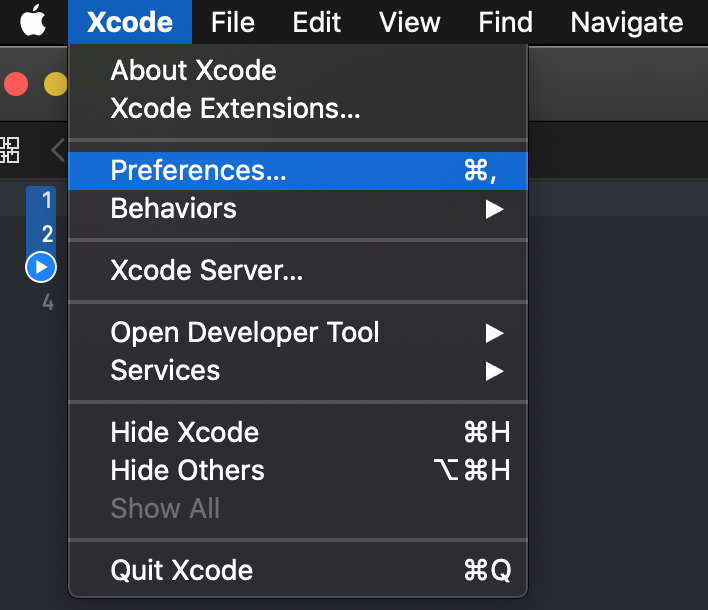
Tools
- 选择位置并设置命令行
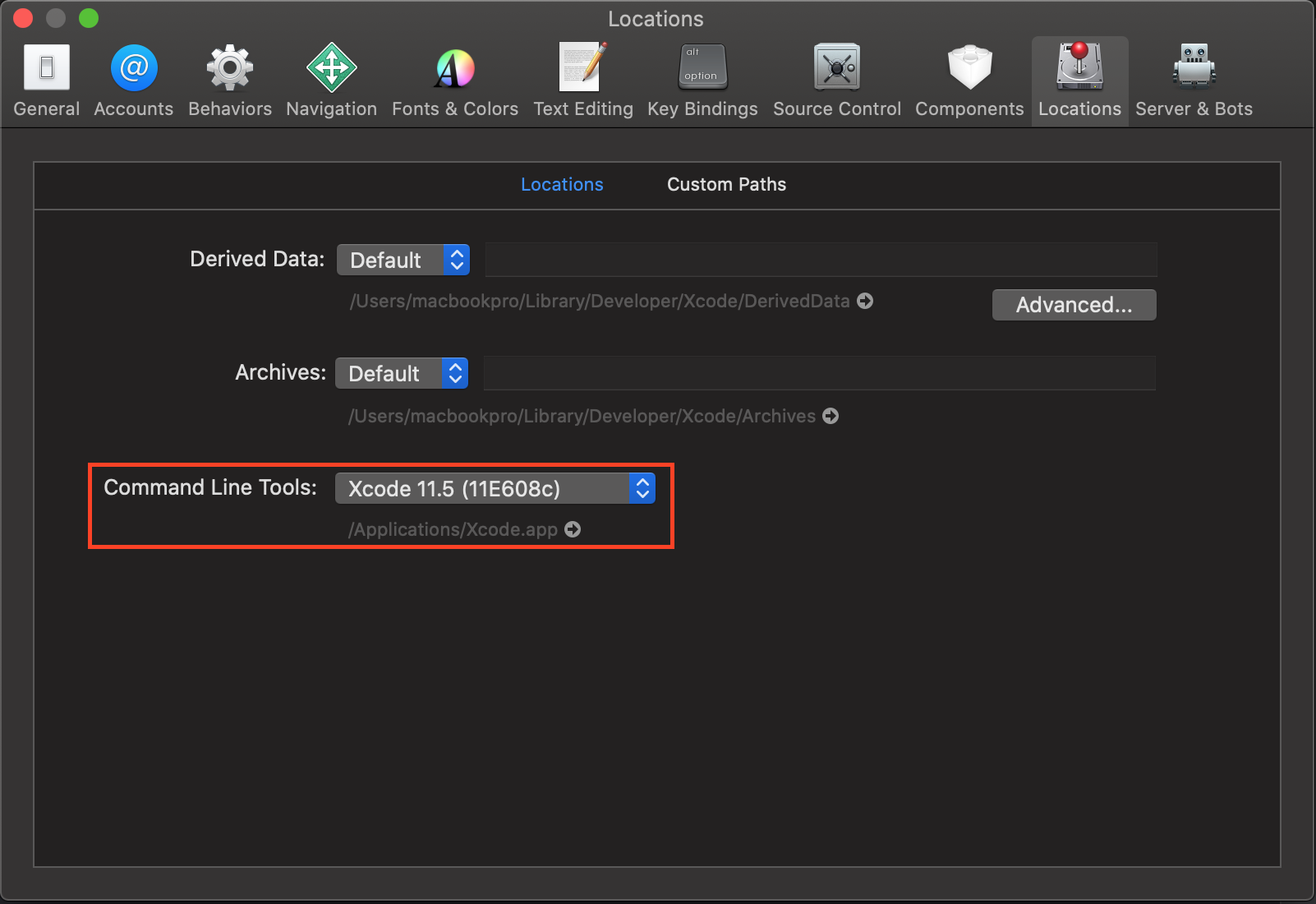
Stack Overflow用户
发布于 2020-04-18 16:38:30
对于我来说,运行sudo xcode-select --reset修复了它。
在此之前,我还用brew upgrade gcc安装/更新了brew upgrade gcc,不确定这是否是先决条件。
页面原文内容由Stack Overflow提供。腾讯云小微IT领域专用引擎提供翻译支持
原文链接:
https://stackoverflow.com/questions/58998884
复制相关文章
相似问题
腾讯云开发者

Copyright © 2013 - 2026 Tencent Cloud. All Rights Reserved. 腾讯云 版权所有
深圳市腾讯计算机系统有限公司 ICP备案/许可证号:粤B2-20090059  粤公网安备44030502008569号
腾讯云计算(北京)有限责任公司 京ICP证150476号 | 京ICP备11018762号