
本地ios构建成功,但app包的路径是错误的
当我运行react本机运行时,ios构建成功并在ios下创建了build文件夹。但是在生成之后,当安装开始时,得到以下错误。当我通过xcode运行该项目时,它将成功运行。我观察到的是,从'DerivedData‘开始的路径是错误的。相反,它应该是“构建”。当我将我的' build‘文件夹重命名为'DerivedData’并重新运行‘react本机运行-ios’时,整个过程成功地完成了,当然是在前面的构建中。
如何将“DerivedData”更改为“构建”?
此错误在我从0.59.9升级到0.60.0之后立即发生。
安装"DerivedData/Build/Products/Debug-iphonesimulator/mobileappname.app“的信息--在处理命令(domain=NSPOSIXErrorDomain,code=2)时遇到错误:未能安装请求的应用程序--在提供的路径上找不到应用程序包。提供到所需应用程序包的有效路径。Print: Entry,":CFBundleIdentifier",不存在错误命令: /usr/libexec/PlistBuddy -c Print:CFBundleIdentifier:-c: Entry,":CFBundleIdentifier",不存在。使用--详细标志运行CLI以获取更多详细信息。错误:命令失败: /usr/libexec/PlistBuddy -c Print:CFBundleIdentifier:-c: Entry,":CFBundleIdentifier",不存在
在checkExecSyncError (child_process.js:616:11) at Object.execFileSync (child_process.js:634:13) at runOnSimulator process._tickCallback (process._tickCallback/process/next_tick.js:68:7)
React原生版本:系统: OS: macOS 10.15二进制文件:节点: 10.15.3 - /usr/local/bin/ Node : 6.13.1 - /usr/local/bin/npm守望者: 4.9.0 -/usr/local/bin/ macOS : iOS SDK: iOS SDK:平台:iOS 13.0,DriverKit 19.0,macOS 10.15,tvOS 13.0,watchOS 6.0 Xcode: 11.0/11A420a - /usr/bin/xcodebuild npmPackages: react: 16.8.6 => 16.8.6 react原生: 0.60.0 => 0.60.0 npmGlobalPackages: create-react-=>原生-app: 1.0.0 -本机-cli: 2.0.1 -=>-原生-git-升级: 0.2.7
复制的步骤
correctly
- react-native
- 使用rn-diff-
- 从0.59.9升级到0.60.0,
- 运行了
运行-ios构建成功,但应用程序安装失败了。
回答 2
Stack Overflow用户
发布于 2020-01-10 04:01:01
解决方案并不明显,react-native-cli试图猜测当前您的计算机上设置了什么xcode构建配置,这就是getBuildPath()函数上正在发生的情况。
function getBuildPath(configuration, appName, isDevice, scheme) {
  let device;

  if (isDevice) {
    device = 'iphoneos';
  } else if (appName.toLowerCase().includes('tvos')) {
    device = 'appletvsimulator';
  } else {
    device = 'iphonesimulator';
  }

  let buildPath = `build/${scheme}/Build/Products/${configuration}-${device}/${appName}.app`; // Check wether app file exist, sometimes `-derivedDataPath` option of `xcodebuild` not works as expected.

  if (!_fs().default.existsSync(_path().default.join(buildPath))) {
    return `DerivedData/Build/Products/${configuration}-${device}/${appName}.app`;
  }

  return buildPath;
}诀窍不是修补这个文件,而是首先正确地设置xcode配置,Xcode > Preferences > Locations (见图)
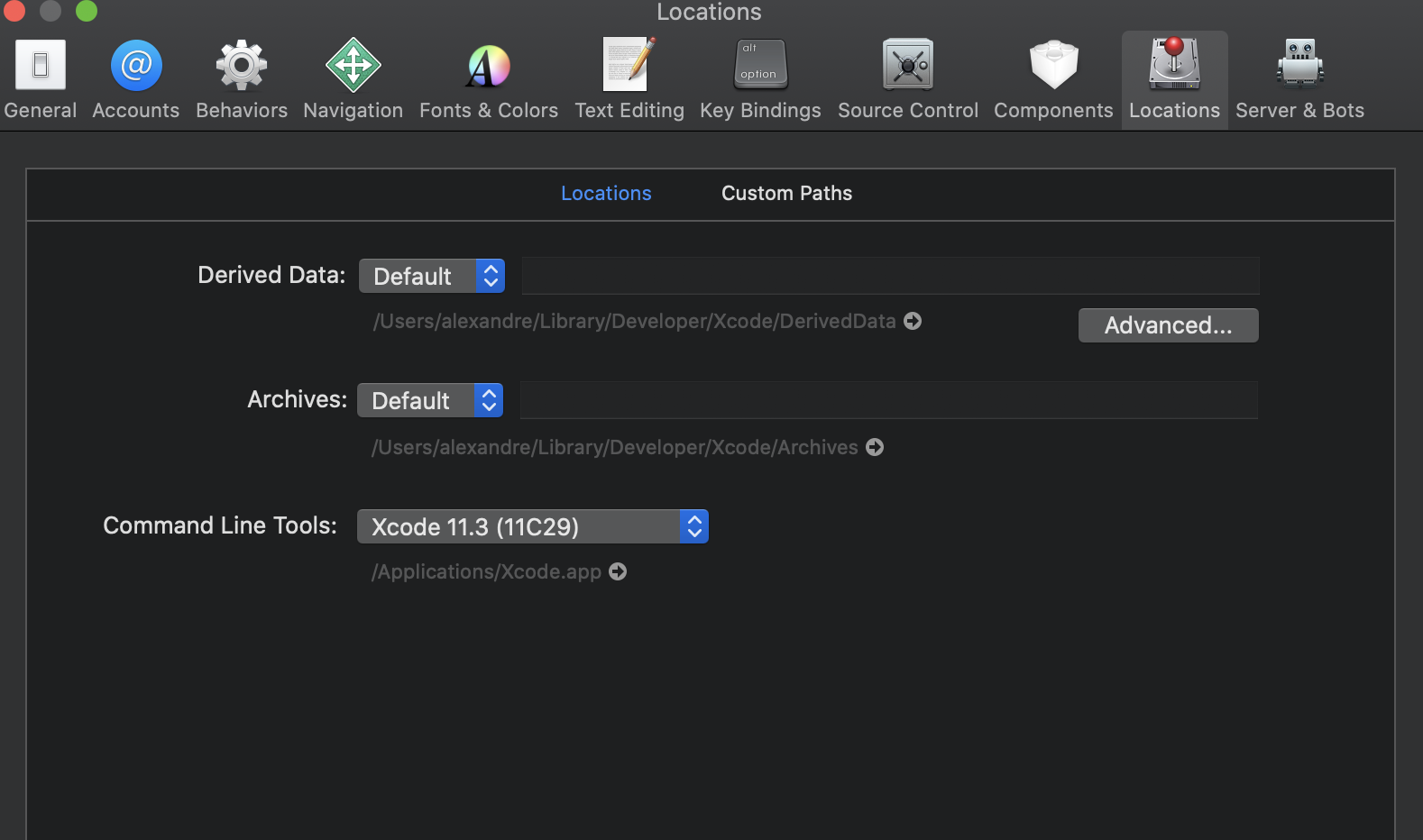
和Xcode > Preferences > Locations > Advanced
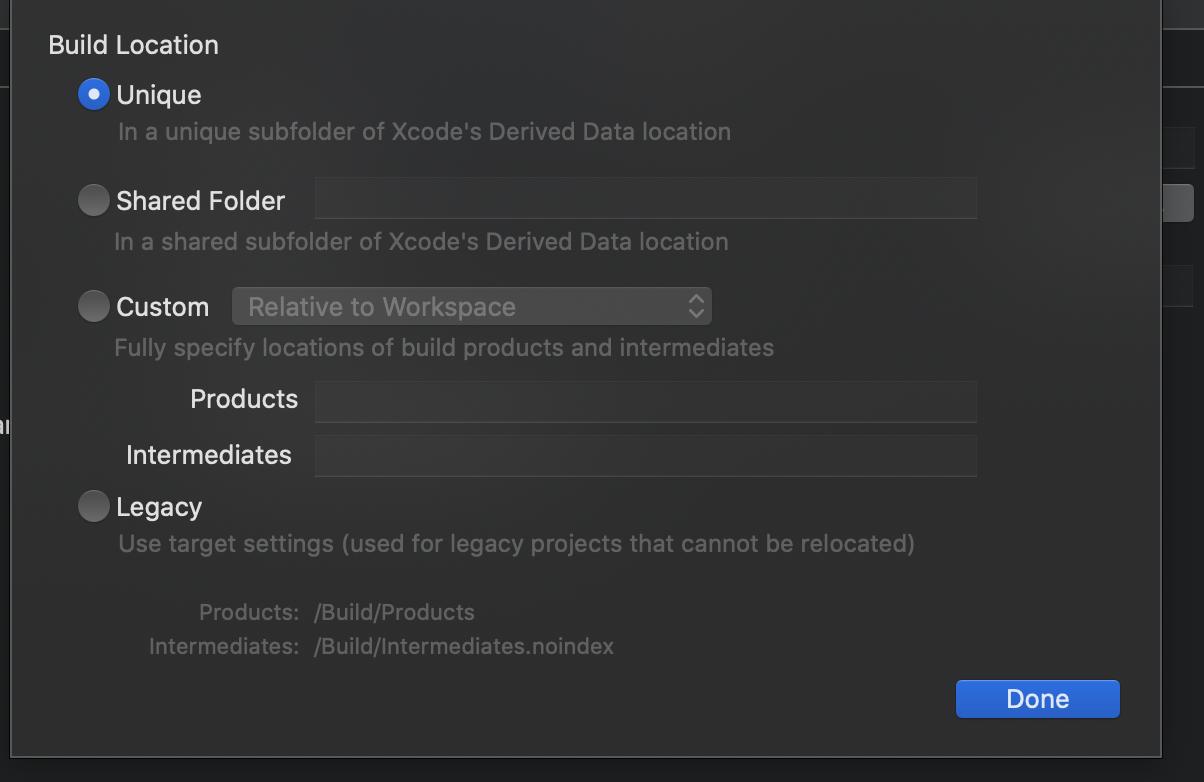
一旦完成,您必须清理构建文件夹,否则,react-native-cli仍然会假设xcode没有像预期的那样运行,这将继续产生相同的错误。
cd ios && rm -rf build
现在可以执行npx react-native run-ios了,一切都会好起来的。
我花了相当长的时间才弄明白这一点,我认为react-native-cli应该输出更多关于引擎盖下面发生的事情的细节,这样人们才不会被阻塞。
Stack Overflow用户
发布于 2019-11-28 12:28:05
问题解决了。我不得不在@react本地社区中编辑一个文件。
如果其他人有相同的问题解决方案如下。
File location:
-> file:
    -> node_modules
        -> @react-native-community
          -> cli-platform-ios
                -> build
                    -> commands
                        -> runIOS
-> index.js line 314变化:DerivedData/Build/Products/${configuration}-${device}/${appName}.app
致:build/Build/Products/${configuration}-${device}/${appName}.app
Cheers.https://stackoverflow.com/questions/59082912
复制相似问题
腾讯云开发者

Copyright © 2013 - 2026 Tencent Cloud. All Rights Reserved. 腾讯云 版权所有
深圳市腾讯计算机系统有限公司 ICP备案/许可证号:粤B2-20090059  粤公网安备44030502008569号
腾讯云计算(北京)有限责任公司 京ICP证150476号 | 京ICP备11018762号