
运行Nuget还原时获取NU1202错误
我有一个.NET框架解决方案,我正试图在Azure DevOps上设置一个管道。但是,在试图还原包时,我遇到了一个错误:
NU1202: Package AppCenter.Analytics.Metrics 1.1.0 is not compatible with net40 (.NETFramework,Version=v4.0). Package AppCenter.Analytics.Metrics 1.1.0 supports: netstandard1.0 (.NETStandard,Version=v1.0)还有更多像这样的。这是正确的-这个软件包不兼容net40,但它不应该重要。解决方案中有几个项目,但是最老的.NET版本是4.5,所以我无法确定v4.0是从哪里来的。其他可能相关的事项:
- 构建输出报告的NuGet版本为5.3.1.6268,MSBuild版本为16.3.2.50909。
- 该解决方案在本地恢复和正确构建。
- 我注意到.sln.metaproj文件中有一个"v4.0“:
<TargetFrameworkVersion>v4.0</TargetFrameworkVersion>。这似乎很重要,但我不知道它是从哪里来的,也不知道如何改变它。Azure没有看到这个文件,因为它被git忽略了,但是我想知道是什么导致了这个4.0。
下面是pipeline.yaml的一个片段:
pool:
  vmImage: 'windows-latest'

variables:
  solution: '**/*.sln'
  buildPlatform: 'Any CPU'
  buildConfiguration: 'Release 2019'

steps:
- task: NuGetToolInstaller@1

- task: NuGetCommand@2
  inputs:
    command: 'restore'
    restoreSolution: '$(solution)'
    feedsToUse: 'select'
    vstsFeed: '#####'
这里有一个冒犯的csproj文件。针对Revit的多个版本和查找Rhino的位置有一些有趣的事情,但是我看不到任何可能导致试图为.NET v4.0安装软件包的事情:
<?xml version="1.0" encoding="utf-8"?>
<Project ToolsVersion="12.0" DefaultTargets="Build" xmlns="http://schemas.microsoft.com/developer/msbuild/2003">
  <PropertyGroup>
    <Rhino7DefaultInstallDir>$([MSBuild]::GetRegistryValueFromView('HKEY_LOCAL_MACHINE\SOFTWARE\McNeel\Rhinoceros\7.0\Install', 'Path', null, RegistryView.Registry64))</Rhino7DefaultInstallDir>
    <Rhino7DebugInstallDir>$([MSBuild]::GetRegistryValueFromView('HKEY_CURRENT_USER\Software\McNeel\Rhinoceros\7.0-WIP-Developer-Debug-trunk\Install', 'Path', null, RegistryView.Registry64))</Rhino7DebugInstallDir>
    <Rhino7InstallDir>$([MSBuild]::ValueOrDefault('$(Rhino7DebugInstallDir)', '$(Rhino7DefaultInstallDir)'))</Rhino7InstallDir>
    <Rhino7DefaultPluginsDir>$([MSBuild]::GetRegistryValueFromView('HKEY_LOCAL_MACHINE\SOFTWARE\McNeel\Rhinoceros\7.0\Install', 'Default Plug-ins Folder', null, RegistryView.Registry64))</Rhino7DefaultPluginsDir>
    <Rhino7DebugPluginsDir>$([MSBuild]::GetRegistryValueFromView('HKEY_CURRENT_USER\Software\McNeel\Rhinoceros\7.0-WIP-Developer-Debug-trunk\Install', 'Default Plug-ins Folder', null, RegistryView.Registry64))</Rhino7DebugPluginsDir>
    <Rhino7PluginsDir>$([MSBuild]::ValueOrDefault('$(Rhino7DebugPluginsDir)', '$(Rhino7DefaultPluginsDir)'))</Rhino7PluginsDir>
  </PropertyGroup>
  <Import Project="..\..\packages\Costura.Fody.3.3.3\build\Costura.Fody.props" Condition="Exists('..\..\packages\Costura.Fody.3.3.3\build\Costura.Fody.props')" />
  <PropertyGroup Condition="$(Configuration.Contains('2018'))">
    <TargetFrameworkVersion>v4.6.2</TargetFrameworkVersion>
    <RevitVersion>2018</RevitVersion>
  </PropertyGroup>
  <PropertyGroup Condition="$(Configuration.Contains('2019'))">
    <TargetFrameworkVersion>v4.7.2</TargetFrameworkVersion>
    <RevitVersion>2019</RevitVersion>
  </PropertyGroup>
  <PropertyGroup Condition="$(Configuration.Contains('2020'))">
    <TargetFrameworkVersion>v4.7.2</TargetFrameworkVersion>
    <RevitVersion>2020</RevitVersion>
  </PropertyGroup>
  <PropertyGroup>
    <!-- Common ruleset shared by all projects -->
    <CodeAnalysisRuleset>$(SolutionDir)solution.ruleset</CodeAnalysisRuleset>
  </PropertyGroup>
  <ItemGroup>
    <AdditionalFiles Include="$(SolutionDir)stylecop.json" />
  </ItemGroup>
  <PropertyGroup>
    <Configuration Condition=" '$(Configuration)' == '' ">Debug</Configuration>
    <Platform Condition=" '$(Platform)' == '' ">AnyCPU</Platform>
    <ProductVersion>9.0.30729</ProductVersion>
    <SchemaVersion>2.0</SchemaVersion>
    <ProjectGuid>{D6C256D4-B518-464F-9E68-CB282202E846}</ProjectGuid>
    <OutputType>Library</OutputType>
    <AppDesignerFolder>Properties</AppDesignerFolder>
    <RootNamespace>Namespace</RootNamespace>
    <AssemblyName>AssemblyName</AssemblyName>
    <TargetFrameworkProfile />
    <NuGetPackageImportStamp>
    </NuGetPackageImportStamp>
  </PropertyGroup>
  <PropertyGroup Condition="'$(Configuration)|$(Platform)' == 'Debug 2018|AnyCPU'">
    <DebugSymbols>true</DebugSymbols>
    <OutputPath>bin\Debug 2018\</OutputPath>
    <DefineConstants>TRACE;DEBUG;REVIT_2018</DefineConstants>
    <DebugType>full</DebugType>
    <PlatformTarget>AnyCPU</PlatformTarget>
    <ErrorReport>prompt</ErrorReport>
    <LangVersion>7.3</LangVersion>
  </PropertyGroup>
  <PropertyGroup Condition="'$(Configuration)|$(Platform)' == 'Release 2018|AnyCPU'">
    <DebugSymbols>true</DebugSymbols>
    <OutputPath>bin\Release 2018\</OutputPath>
    <PlatformTarget>AnyCPU</PlatformTarget>
    <DefineConstants>REVIT_2018</DefineConstants>
    <Optimize>true</Optimize>
    <LangVersion>7.3</LangVersion>
  </PropertyGroup>
  <PropertyGroup Condition="'$(Configuration)|$(Platform)' == 'Debug 2019|AnyCPU'">
    <DebugSymbols>true</DebugSymbols>
    <OutputPath>bin\Debug 2019\</OutputPath>
    <DefineConstants>TRACE;DEBUG;REVIT_2018; REVIT_2019</DefineConstants>
    <DebugType>portable</DebugType>
    <PlatformTarget>AnyCPU</PlatformTarget>
    <ErrorReport>prompt</ErrorReport>
    <LangVersion>7.3</LangVersion>
  </PropertyGroup>
  <PropertyGroup Condition="'$(Configuration)|$(Platform)' == 'Release 2019|AnyCPU'">
    <DebugSymbols>true</DebugSymbols>
    <OutputPath>bin\Release 2019\</OutputPath>
    <PlatformTarget>AnyCPU</PlatformTarget>
    <DefineConstants>REVIT_2018; REVIT_2019</DefineConstants>
    <Optimize>true</Optimize>
    <LangVersion>7.3</LangVersion>
    <DebugType>portable</DebugType>
  </PropertyGroup>
  <PropertyGroup Condition="'$(Configuration)|$(Platform)' == 'Debug 2020|AnyCPU'">
    <DebugSymbols>true</DebugSymbols>
    <OutputPath>bin\Debug 2020\</OutputPath>
    <DefineConstants>TRACE;DEBUG;REVIT_2018; REVIT_2019; REVIT_2020</DefineConstants>
    <DebugType>full</DebugType>
    <PlatformTarget>AnyCPU</PlatformTarget>
    <ErrorReport>prompt</ErrorReport>
    <LangVersion>7.3</LangVersion>
  </PropertyGroup>
  <PropertyGroup Condition="'$(Configuration)|$(Platform)' == 'Release 2020|AnyCPU'">
    <DebugSymbols>true</DebugSymbols>
    <OutputPath>bin\Release 2020\</OutputPath>
    <PlatformTarget>AnyCPU</PlatformTarget>
    <DefineConstants>REVIT_2018; REVIT_2019; REVIT_2020</DefineConstants>
    <Optimize>true</Optimize>
    <LangVersion>7.3</LangVersion>
  </PropertyGroup>
  <ItemGroup>
    <Reference Include="Microsoft.VisualBasic" />
    <Reference Include="PresentationCore" />
    <Reference Include="PresentationFramework" />
    <Reference Include="System" />
    <Reference Include="System.Data" />
    <Reference Include="System.Drawing" />
    <Reference Include="System.Management.Automation, Version=3.0.0.0, Culture=neutral, PublicKeyToken=31bf3856ad364e35, processorArchitecture=MSIL">
      <SpecificVersion>False</SpecificVersion>
      <HintPath>C:\Program Files (x86)\Reference Assemblies\Microsoft\WindowsPowerShell\3.0\System.Management.Automation.dll</HintPath>
    </Reference>
    <Reference Include="System.Windows.Forms" />
    <Reference Include="System.Xml" />
    <Reference Include="WindowsBase" />
  </ItemGroup>
  <ItemGroup>
    ... Files ...
  </ItemGroup>
  <ItemGroup>
    <EmbeddedResource Include="Properties\Resources.resx">
      <SubType>Designer</SubType>
      <Generator>ResXFileCodeGenerator</Generator>
      <LastGenOutput>Resources.Designer.cs</LastGenOutput>
    </EmbeddedResource>
  </ItemGroup>
 ... More Files in ItemGroups ...
  <ItemGroup>
    ... Project References ...
  </ItemGroup>
  <ItemGroup>
    <PackageReference Include="AppCenter.Analytics.Metrics">
      <Version>1.1.0</Version>
    </PackageReference>
    <PackageReference Include="Microsoft.AppCenter.Analytics">
      <Version>2.6.2</Version>
    </PackageReference>
    <PackageReference Include="Microsoft.AppCenter.Crashes">
      <Version>2.6.2</Version>
    </PackageReference>
    <PackageReference Include="Microsoft.CodeAnalysis.FxCopAnalyzers">
      <Version>2.9.8</Version>
      <IncludeAssets>runtime; build; native; contentfiles; analyzers; buildtransitive</IncludeAssets>
      <PrivateAssets>all</PrivateAssets>
    </PackageReference>
    <PackageReference Include="StyleCop.Analyzers">
      <Version>1.1.118</Version>
      <IncludeAssets>runtime; build; native; contentfiles; analyzers; buildtransitive</IncludeAssets>
      <PrivateAssets>all</PrivateAssets>
    </PackageReference>
  </ItemGroup>
  <Choose>
    <When Condition="$(Configuration.Contains('Debug'))">
      <ItemGroup>
        <Reference Include="Eto">
          <HintPath>$(Rhino7InstallDir)Eto.dll</HintPath>
          <Private>False</Private>
        </Reference>
        <Reference Include="RhinoCommon">
          <HintPath>$(Rhino7InstallDir)RhinoCommon.dll</HintPath>
          <Private>False</Private>
        </Reference>
        <Reference Include="Rhino.UI">
          <HintPath>$(Rhino7InstallDir)Rhino.UI.dll</HintPath>
          <Private>False</Private>
        </Reference>
        <Reference Include="GH_IO">
          <HintPath>$(Rhino7PluginsDir)Grasshopper\GH_IO.dll</HintPath>
          <Private>False</Private>
        </Reference>
        <Reference Include="Grasshopper">
          <HintPath>$(Rhino7PluginsDir)Grasshopper\Grasshopper.dll</HintPath>
          <Private>False</Private>
        </Reference>
        <Reference Include="RevitAPI">
          <HintPath>C:\Program Files\Autodesk\Revit $(RevitVersion)\RevitAPI.dll</HintPath>
          <Private>False</Private>
        </Reference>
        <Reference Include="RevitAPIUI">
          <HintPath>C:\Program Files\Autodesk\Revit $(RevitVersion)\RevitAPIUI.dll</HintPath>
          <Private>False</Private>
        </Reference>
        <Reference Include="AdWindows">
          <HintPath>C:\Program Files\Autodesk\Revit $(RevitVersion)\AdWindows.dll</HintPath>
          <Private>False</Private>
        </Reference>
      </ItemGroup>
    </When>
    <Otherwise>
      <ItemGroup>
        <PackageReference Include="RhinoCommon" Version="7.0.19274.12465-wip" IncludeAssets="compile; build" />
        <PackageReference Include="Grasshopper" Version="7.0.19274.12465-wip" IncludeAssets="compile; build" />
        <PackageReference Include="Revit_All_Main_Versions_API_x64" Version="$(RevitVersion).0.*" IncludeAssets="build; compile" />
      </ItemGroup>
    </Otherwise>
  </Choose>
  <Import Project="$(MSBuildToolsPath)\Microsoft.CSharp.targets" />
  <PropertyGroup>
    <ResolveAssemblyWarnOrErrorOnTargetArchitectureMismatch>None</ResolveAssemblyWarnOrErrorOnTargetArchitectureMismatch>
  </PropertyGroup>
</Project>
我还没有弄清楚应该检查什么或者如何调试它。谢谢!
回答 1
Stack Overflow用户
发布于 2019-12-04 05:32:56
我注意到.sln.metaproj文件中有一个"v4.0“。我还没有弄清楚应该检查什么或者如何调试它。
一些可能有助于解决问题和解决问题的技巧:
#1.我认为应该将解决方案文件夹中的.sln.metaproj和项目文件夹中的.csproj.metaproj排除在源代码管理之外。至少不建议将这些文件发布到Azure Devops Repos。
查看它们的内容,我们可以找到类似<ProjectConfiguration Project="{xxx}" AbsolutePath="C:\Users\xxx\source\repos\...>的内容,它是本地机器中的绝对路径。在构建管道中使用宿主代理时,这些路径无效。
#2.另外,我检查了Nuget Restore任务的日志,并确认了xx.xx.metaproj文件的内容不会影响nuget restore进程。所以我认为你的问题不是由此引起的。
#3 NU1202表示包与当前项目不兼容。查看Nuget Restore任务的日志,您将看到如下所示:

错误信息将告诉我们是哪个项目导致了问题。在xx.csproj中打开Devops Repos文件以检查其内容。我假设项目的版本是v4.0,或者它的一个targetFrameworks(多目标)是v4.0。如果该项目是sdk格式的项目,您可能需要使用dotnet restore任务来还原软件包。
更新:
请参阅这里,nuget restore命令不会接收和识别构建配置。因此,对于这种情况,nuget无法访问条件为propertyGroup的$(Configuration.Contains('xxx'))。然后,它相当于nuget restore xx.sln=>nuget还原一个TargetFrameworkVersion为empty.And的项目,然后nuget将考虑该项目使用默认的4.0。所以问题就发生了。
复制步骤:
1.创建一个简单的.net框架4.7项目,将其添加到xx.csproj中
    <PackageReference Include="AppCenter.Analytics.Metrics">
      <Version>1.1.0</Version>
</PackageReference>2.对<!--<TargetFrameworkVersion>v4.7</TargetFrameworkVersion>-->的评论
3.保存所有和nuget restore xx.sln,同样的问题发生:

可能的解决办法:
nuget restore不会接受类似于nuget restore xx.sln -property:Configuration=xxx的命令,比如nuget pack命令。因此,除非我们用在propertyGroup中定义有效的 TargetFramework版本,否则始终会发生此问题。(我想这不是你想要的,但在这种情况下,这个问题是无法回避的)
因此,我认为更好的选择是使用msbuild /t:restore而不是nuget restore。对于VS2017和更高版本,msbuild包含了restore选项本身。它适用于那些使用.net fx格式的基于PackageReference的项目。
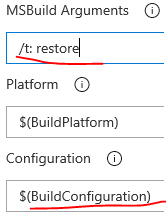
因此,您可以使用VS build任务和参数/t:restore来恢复包,而不是使用Nuget还原(这不适合您的自定义csproj脚本)。
https://stackoverflow.com/questions/59166166
复制相似问题
腾讯云开发者

Copyright © 2013 - 2026 Tencent Cloud. All Rights Reserved. 腾讯云 版权所有
深圳市腾讯计算机系统有限公司 ICP备案/许可证号:粤B2-20090059  粤公网安备44030502008569号
腾讯云计算(北京)有限责任公司 京ICP证150476号 | 京ICP备11018762号