
统一运动平台的奇异输出
首先,很抱歉,这篇文章写得不太好,我花了几个小时调试这个,而且压力很大。我试图建立一个统一的移动平台,可以在不同的方向之间移动,我不想让世界上无数的游戏对象占用宝贵的处理能力,所以我尝试使用一些我可以通过编辑器添加到脚本中的东西。
唯一的问题是,它似乎正在以令人难以置信的速度做这件事:
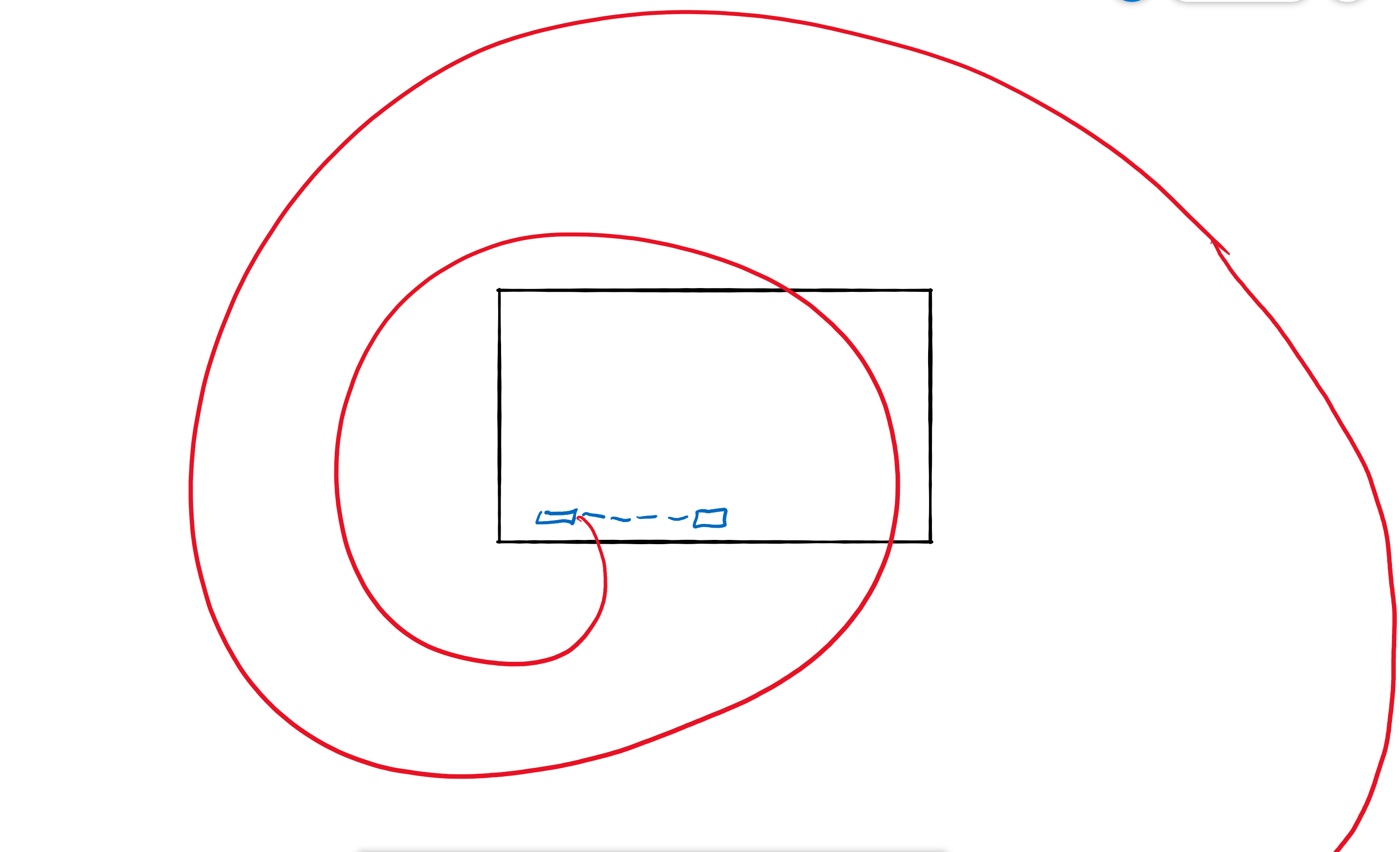
黑色=摄像机视图,蓝色=平台和它应该去的路标点,红色=它目前正在做什么。
我花了几个小时试图找到一个解决办法,但我不知道它为什么要这样做。
我在平台上的剧本:
public Vector3[] localWaypoints;
    Vector3[] globalWaypoints;

    public float speed;
    public bool cyclic;
    public float waitTime;
    [Range(0, 2)]
    public float easeAmount;

    int fromWaypointIndex;
    float percentBetweenWaypoints;
    float nextMoveTime;

    void Start()
    {

        globalWaypoints = new Vector3[localWaypoints.Length];
        for (int i = 0; i < localWaypoints.Length; i++)
        {
            globalWaypoints[i] = localWaypoints[i] + transform.position;
        }
    }

    void Update()
    {


        Vector3 velocity = CalculatePlatformMovement();
        transform.Translate(velocity);
    }

    float Ease(float x)
    {
        float a = easeAmount + 1;
        return Mathf.Pow(x, a) / (Mathf.Pow(x, a) + Mathf.Pow(1 - x, a));
    }

    Vector3 CalculatePlatformMovement()
    {

        if (Time.time < nextMoveTime)
        {
            return Vector3.zero;
        }

        fromWaypointIndex %= globalWaypoints.Length;
        int toWaypointIndex = (fromWaypointIndex + 1) % globalWaypoints.Length;
        float distanceBetweenWaypoints = Vector3.Distance(globalWaypoints[fromWaypointIndex], globalWaypoints[toWaypointIndex]);
        percentBetweenWaypoints += Time.deltaTime * speed / distanceBetweenWaypoints;
        percentBetweenWaypoints = Mathf.Clamp01(percentBetweenWaypoints);
        float easedPercentBetweenWaypoints = Ease(percentBetweenWaypoints);

        Vector3 newPos = Vector3.Lerp(globalWaypoints[fromWaypointIndex], globalWaypoints[toWaypointIndex], easedPercentBetweenWaypoints);

        if (percentBetweenWaypoints >= 1)
        {
            percentBetweenWaypoints = 0;
            fromWaypointIndex++;

            if (!cyclic)
            {
                if (fromWaypointIndex >= globalWaypoints.Length - 1)
                {
                    fromWaypointIndex = 0;
                    System.Array.Reverse(globalWaypoints);
                }
            }
            nextMoveTime = Time.time + waitTime;
        }

        return newPos - transform.position;
    }


    struct PassengerMovement
    {
        public Transform transform;
        public Vector3 velocity;
        public bool standingOnPlatform;
        public bool moveBeforePlatform;

        public PassengerMovement(Transform _transform, Vector3 _velocity, bool _standingOnPlatform, bool _moveBeforePlatform)
        {
            transform = _transform;
            velocity = _velocity;
            standingOnPlatform = _standingOnPlatform;
            moveBeforePlatform = _moveBeforePlatform;
        }
    }

    void OnDrawGizmos()
    {
        if (localWaypoints != null)
        {
            Gizmos.color = Color.red;
            float size = .3f;

            for (int i = 0; i < localWaypoints.Length; i++)
            {
                Vector3 globalWaypointPos = (Application.isPlaying) ? globalWaypoints[i] : localWaypoints[i] + transform.position;
                Gizmos.DrawLine(globalWaypointPos - Vector3.up * size, globalWaypointPos + Vector3.up * size);
                Gizmos.DrawLine(globalWaypointPos - Vector3.left * size, globalWaypointPos + Vector3.left * size);
            }
        }
}UPDATE:在进一步测试时发现,如果我的localWaypoint数组中的第一个对象设置为0,0,0,而我的第二个对象设置为1,00,0,0,那么平台将向右螺旋,确保在其螺旋式上升时到达路径点,然后螺旋式地出现在上面的图像中。但是,如果我将第一个对象设置为0,0,0,第二个对象设置为-1,0,0,那么该对象将以与以前相同的方式工作,但将像该图像中显示的那样向左螺旋。(第二张图片也被更新了,以显示这个盘子是如何在螺旋状的情况下到达两个方向点的。)
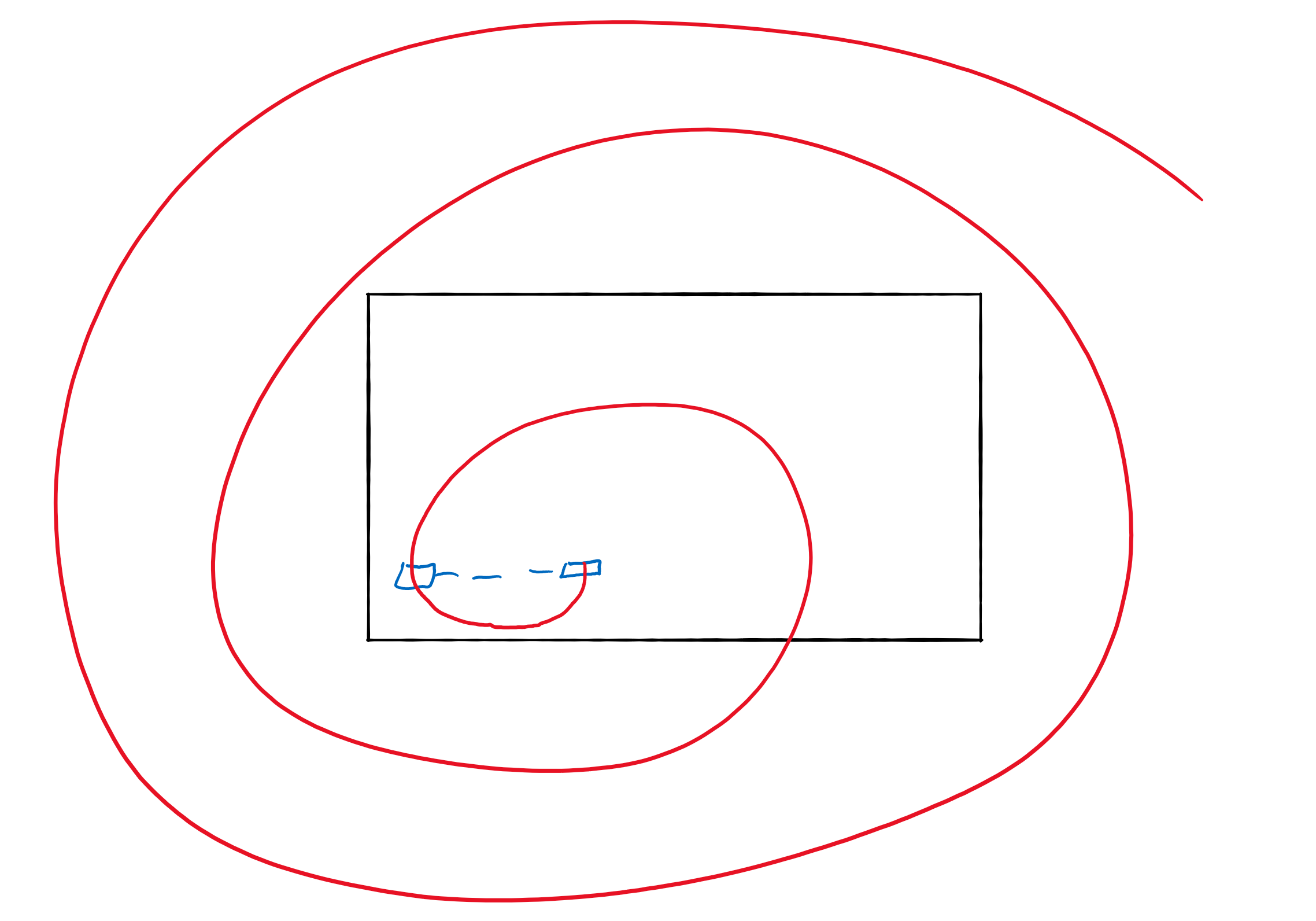
我还注意到,如果我将两个路径点设置为0,0,0,那么平台将保持不变,这2件事证明了这与处理路径点的方式有关,而与其他脚本或父对象干扰无关。
回答 1
Stack Overflow用户
发布于 2019-12-05 19:52:18
使用更新的数字(0,0,0,1,0,0)在我的测试应用程序中工作。但是,如果我在物体的Y轴上旋转,我就会看到像你看到的行为。在“更新”中,如果更改:
transform.Translate(velocity);至
transform.Translate(velocity, Space.World); 你应该看到你想要的行为。请注意,“transform.Translate(速度)”与“transform.Translate(流速,Space.Self)”相同。你的翻译正在旋转。
如果您很好奇,请查看以下内容,了解如何应用转换中的值:https://gamedev.stackexchange.com/questions/138358/what-is-the-transformation-order-when-using-the-transform-class
https://stackoverflow.com/questions/59182886
复制相似问题
腾讯云开发者

Copyright © 2013 - 2026 Tencent Cloud. All Rights Reserved. 腾讯云 版权所有
深圳市腾讯计算机系统有限公司 ICP备案/许可证号:粤B2-20090059  粤公网安备44030502008569号
腾讯云计算(北京)有限责任公司 京ICP证150476号 | 京ICP备11018762号