
IMPORTDATA没有从XML抓取实时数据
我正在使用Google的IMPORTDATA函数从从API中提取的XML文件中获取信息,但是我拖到工作表中的信息并不是最新的。
如何修改我的工作表以获取最新的数据?
比较表:E/编辑?usp=共享 (LiveScores工作表)
到XML:https://www67.myfantasyleague.com/2019/export?TYPE=liveScoring&L=64741&APIKEY=&W=14&DETAILS=1&JSON=0
在两组数据中都要遵守id="0015"。
工作表状态为<franchise id="0005" score="0.00" gameSecondsRemaining="21600" playersYetToPlay="6" playersCurrentlyPlaying="0" isHome="0">
XML声明为<franchise id="0015" score="11.14" gameSecondsRemaining="20004" playersYetToPlay="4" playersCurrentlyPlaying="2"> (此数据用于当前正在进行的足球比赛,因为我正在编写此示例,因此上面的示例可能不准确,但它不会是0.00分。
任何帮助都会很棒的,谢谢!
回答 2
Stack Overflow用户
发布于 2019-12-06 02:22:23
你试过使用IMPORTXML吗?Google Sheets IMPORTXML页面
在IMPORTXML中,您只需使用Inspect元素特性来提取xpath。
希望这能有所帮助。如果我还能帮上忙的话请告诉我。
编辑:导入数据时要更改的说明
- 在工具栏中转到脚本编辑器
- 现在,在脚本中,粘贴下面列出的代码
/**
 * Go through all sheets in a spreadsheet, identify and remove all spreadsheet
 * import functions, then replace them a while later. This causes a "refresh"
 * of the "import" functions. For periodic refresh of these formulas, set this
 * function up as a time-based trigger.
 *
 * Caution: Formula changes made to the spreadsheet by other scripts or users
 * during the refresh period COULD BE OVERWRITTEN.
 *
 * From: https://stackoverflow.com/a/33875957/1677912
 */
function RefreshImports() {
  var lock = LockService.getScriptLock();
  if (!lock.tryLock(5000)) return;             // Wait up to 5s for previous refresh to end.
  // At this point, we are holding the lock.

  var id = "YOUR-SHEET-ID";
  var ss = SpreadsheetApp.openById(id);
  var sheets = ss.getSheets();

  for (var sheetNum=0; sheetNum<sheets.length; sheetNum++) {
    var sheet = sheets[sheetNum];
    var dataRange = sheet.getDataRange();
    var formulas = dataRange.getFormulas();
    var tempFormulas = [];
    for (var row=0; row<formulas.length; row++) {
      for (col=0; col<formulas[0].length; col++) {
        // Blank all formulas containing any "import" function
        // See https://regex101.com/r/bE7fJ6/2
        var re = /.*[^a-z0-9]import(?:xml|data|feed|html|range)\(.*/gi;
        if (formulas[row][col].search(re) !== -1 ) {
          tempFormulas.push({row:row+1,
                             col:col+1,
                             formula:formulas[row][col]});
          sheet.getRange(row+1, col+1).setFormula("");
        }
      }
    }

    // After a pause, replace the import functions
    Utilities.sleep(5000);
    for (var i=0; i<tempFormulas.length; i++) {
      var cell = tempFormulas[i];
      sheet.getRange( cell.row, cell.col ).setFormula(cell.formula)
    }

    // Done refresh; release the lock.
    lock.releaseLock();
  }
}
这段代码片段来自定期刷新IMPORTXML()电子表格函数
- 最后,也是最起码的,替换“您的工作表ID”。
注意:我没有亲自测试过这段代码,我不能为它提供担保。我建议制作一个副本,然后在那里进行测试。
希望这解决了您的数据没有像您想要的那样经常导入的问题。如果您想手动获取“新鲜”数据,只需删除/剪切导入函数并将其粘贴回。
Stack Overflow用户
发布于 2019-12-06 22:01:22
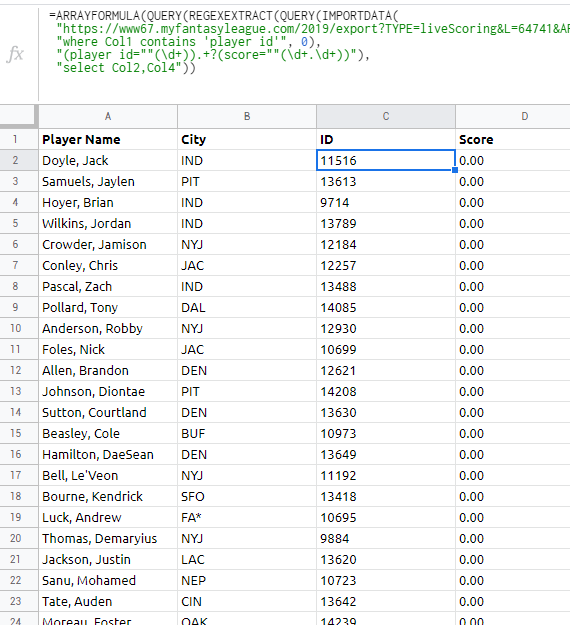
在A2中尝试
=ARRAYFORMULA(IFNA(VLOOKUP(C2:C, PlayerList!A:F, {2, 6}, 0)))在C2
=ARRAYFORMULA(QUERY(REGEXEXTRACT(QUERY(IMPORTDATA(
 "https://www67.myfantasyleague.com/2019/export?TYPE=liveScoring&L=64741&APIKEY=&W=14&DETAILS=1&JSON=0?273"),
 "where Col1 contains 'player id'", 0),
 "(player id=""(\d+)).+?(score=""(\d+.\d+))"),
 "select Col2,Col4"))
https://stackoverflow.com/questions/59205766
复制相似问题
腾讯云开发者

Copyright © 2013 - 2026 Tencent Cloud. All Rights Reserved. 腾讯云 版权所有
深圳市腾讯计算机系统有限公司 ICP备案/许可证号:粤B2-20090059  粤公网安备44030502008569号
腾讯云计算(北京)有限责任公司 京ICP证150476号 | 京ICP备11018762号