
角光滑网格,按列分组时不可见的排序图标
角光滑网格,按列分组时不可见的排序图标
提问于 2019-12-06 11:01:20
在我的应用程序中,我使用的是角度光滑的网格。网格如下所示:
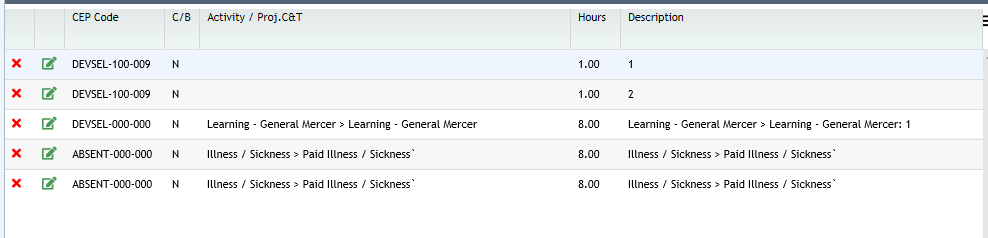
现在,当我按CEP代码分组记录时,下面是按CEP代码分组的代码:
groupByCEPCode() {
this.dataViewObj.setGrouping({
  getter: 'CEPCODE',
  formatter: (g) => `CEP Code:  ${g.value} <span style='color:green'>(${g.count} item(s))</span>`,
  comparer: (a, b) => Sorters.string(a.value, b.value, SortDirectionNumber.asc),
  aggregateCollapsed: false,
  lazyTotalsCalculation: true    } as Grouping);
}
在分组网格上,如下所示:
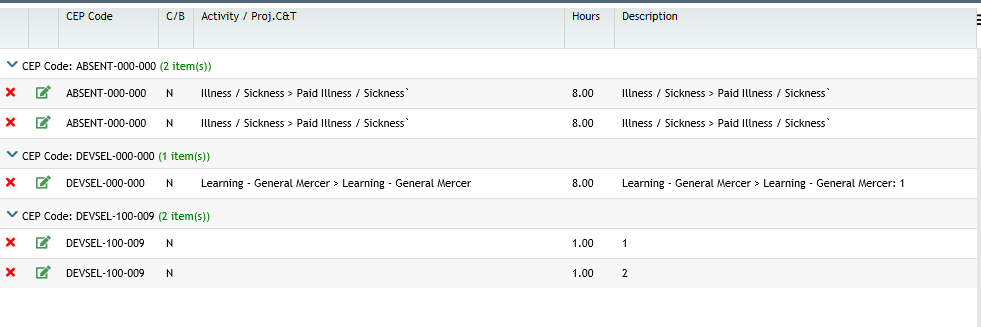
我想达到以下几点:
- 在按任何字段(例如CEPCode )分组时,该字段将显示bydefault的升序排序图标。(可以看到排序图标在按此字段分组的CEP Code列中不可见)
- 根据CEP代码进行排序时不进行排序(当记录按CEP代码分组时)
注意:我已经为CEPCode字段启用了可排序属性。
回答 1
Stack Overflow用户
发布于 2019-12-09 15:30:46
排序图标实际上与排序本身完全分离,在图标和实际排序之间没有联系。当直接从列进行排序时,SortService将负责添加必要的图标,但当您通过分组方法(在SortService之外)调用它时,则负责添加必要的排序图标。
您可以添加一个列it/sortAsc对数组的排序图标(如果是降序,则将布尔值设置为false)
this.angularGrid.slickGrid.setSortColumns([{ columnId: 'duration', sortAsc: true }]);如果您调用另一个不需要任何排序图标的分组,您还需要通知网格必须删除这些图标,您可以通过传递一个空数组来做到这一点。
this.angularGrid.slickGrid.setSortColumns([]);comparer是按持续时间升序分组和排序的完整示例,它定义了排序(这也是SortService知识之外的)。
groupByDuration() {
    this.dataviewObj.setGrouping({
      getter: 'duration',
      formatter: (g) => `Duration: ${g.value} <span style="color:green">(${g.count} items)</span>`,
      aggregators: [
        new Aggregators.Avg('percentComplete'),
        new Aggregators.Sum('cost')
      ],
      comparer: (a, b) => Sorters.numeric(a.value, b.value, SortDirectionNumber.asc),
      aggregateCollapsed: false,
      lazyTotalsCalculation: true
    } as Grouping);

    // you need to manually add the sort icon(s) in UI
    this.angularGrid.slickGrid.setSortColumns([{ columnId: 'duration', sortAsc: true }]);
}我已经更新了棱角-贫民窟GitHub演示页面来反映这一点。
页面原文内容由Stack Overflow提供。腾讯云小微IT领域专用引擎提供翻译支持
原文链接:
https://stackoverflow.com/questions/59211861
复制相关文章
相似问题
腾讯云开发者

Copyright © 2013 - 2026 Tencent Cloud. All Rights Reserved. 腾讯云 版权所有
深圳市腾讯计算机系统有限公司 ICP备案/许可证号:粤B2-20090059  粤公网安备44030502008569号
腾讯云计算(北京)有限责任公司 京ICP证150476号 | 京ICP备11018762号