
Alexa余数API (REST )-无效的承载令牌
我正试图通过POSTMan发送警报/余数到我的技能。
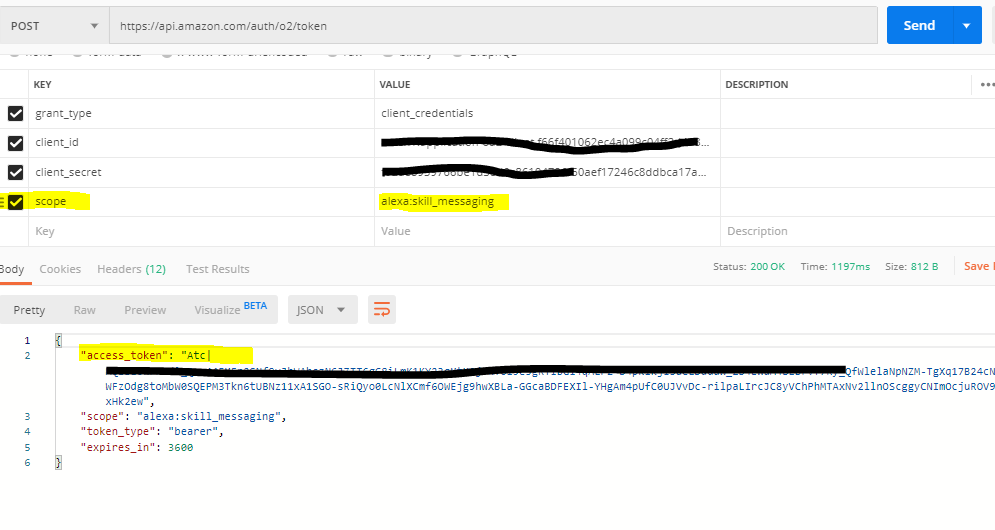
"alexa:skill_messaging“选项1:具有作用域的身份验证令牌API
POST /auth/o2/token HTTP/1.1
Host: api.amazon.com
Content-Type: application/x-www-form-urlencoded
User-Agent: PostmanRuntime/7.20.1
Accept: */*
Cache-Control: no-cache
Postman-Token: 2ae7afa3-c3f8-493f-b6e3-2db1e44e3a17,a4e45e8e-d0eb-4b3f-a612-e7d1959fdbe6
Host: api.amazon.com
Accept-Encoding: gzip, deflate
Content-Length: 236
Connection: keep-alive
cache-control: no-cache

grant_type=client_credentials&client_id=******************&client_secret=***********17a4f7b348982bdb4&scope=alexa%3Askill_messaging
屏幕:
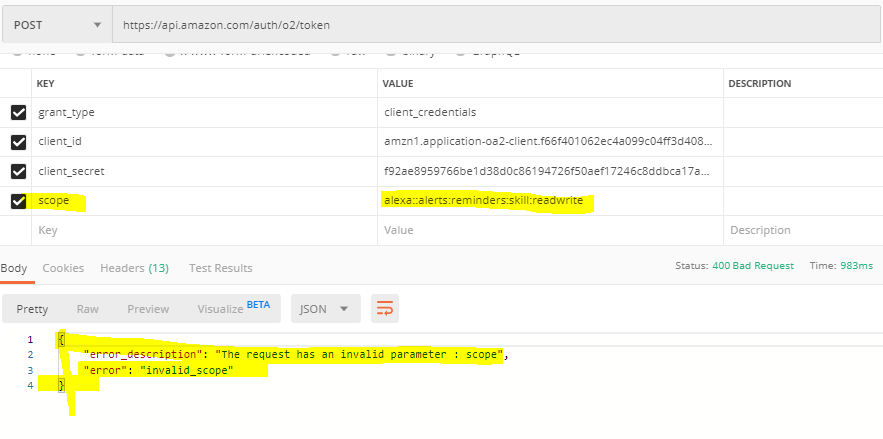
具有作用域"alexa::alerts:reminders:skill:readwrite"的身份验证令牌API
POST /auth/o2/token HTTP/1.1
Host: api.amazon.com
Content-Type: application/x-www-form-urlencoded
User-Agent: PostmanRuntime/7.20.1
Accept: */*
Cache-Control: no-cache
Postman-Token: 2ae7afa3-c3f8-493f-b6e3-2db1e44e3a17,c6765f77-6e35-419f-b614-780dae20ad4e
Host: api.amazon.com
Accept-Encoding: gzip, deflate
Content-Length: 236
Connection: keep-alive
cache-control: no-cache

grant_type=client_credentials&client_id=**************************&client_secret=************************&scope=alexa%3A%3Aalerts%3Areminders%3Askill%3Areadwrite
"alexa:skill_messaging"步骤2:使用由Scope “alexa:skill_messaging”生成的令牌提交警报请求的获取无效标记
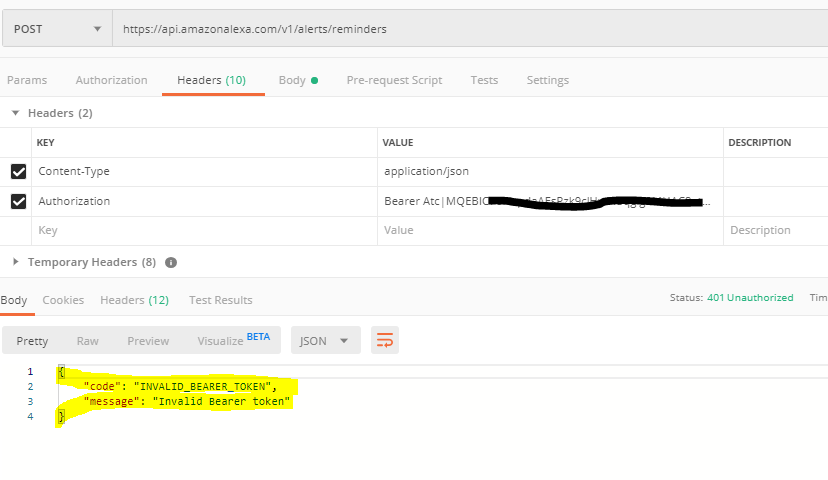
如果我遗漏了什么,请告诉我,在哪里可以找到Alexa Authenictaion令牌API的不同范围?
回答 1
Stack Overflow用户
发布于 2020-03-04 04:01:18
不幸的是,
“这是提醒API的一个限制--您需要使用会话内访问令牌来创建提醒。您也可以在会话之外运行GET、UPDATE和DELETE操作,因此查看https://developer.amazon.com/docs/smapi/alexa-reminders-api-reference.html#in-session-and-out-of-session-behavior-for-alexa-reminders-api以获得更多信息。”
只有与设备对话,才有可能获得会话访问令牌来创建提醒。
由技能(技能消息传递API)创建的非会话-获取提醒:
    const IncomingMessageHandler = {
        canHandle(handlerInput) {
            const request = handlerInput.requestEnvelope.request;
            return request.type === 'Messaging.MessageReceived'
        },
        async handle(handlerInput) {
            const { requestEnvelope, context } = handlerInput;
            console.log(`Message content: ${JSON.stringify(requestEnvelope.request.message)}`);

            try {
              const client = handlerInput.serviceClientFactory.getReminderManagementServiceClient();
              const remindersResponse = await client.getReminders();
              console.log(JSON.stringify(remindersResponse));
            } catch (error) {
              console.log(`error message: ${error.message}`);
              console.log(`error stack: ${error.stack}`);
              console.log(`error status code: ${error.statusCode}`);
              console.log(`error response: ${error.response}`);
            }

            context.succeed();
        }
}https://developer.amazon.com/pt-BR/docs/alexa/smapi/skill-messaging-api-reference.html
https://stackoverflow.com/questions/59233162
复制相似问题
腾讯云开发者

Copyright © 2013 - 2026 Tencent Cloud. All Rights Reserved. 腾讯云 版权所有
深圳市腾讯计算机系统有限公司 ICP备案/许可证号:粤B2-20090059  粤公网安备44030502008569号
腾讯云计算(北京)有限责任公司 京ICP证150476号 | 京ICP备11018762号