
从<p>而不是<table>中的html表中提取数据
从<p>而不是<table>中的html表中提取数据
提问于 2019-12-10 14:33:58
我一直在使用pd.read_html尝试从url中提取数据,但是这些数据列在
标签而不是。我可能在这里错过了一个简单的教训,但我不知道用什么函数来获得一个好的结果(一个表),而不是我得到的长字符串。如有任何建议,将不胜感激!我使用了这两种方法,得到了相同的结果:
`import requests import pandas as pd url ='http://www.linfo.org/acronym_list.html' dfs = pd.read_html(url, header =0) df = pd.concat(dfs) df`import pandas as pd
url ='http://www.linfo.org/acronym_list.html'
data = pd.read_html(url, header=0)
data[0]Out1
ABCDEFGHIJKLMNOPQRSTUVWXYZ高级微设备API应用编程接口ARP地址解析协议ARPANET高级研究项目代理网络作为自主系统ASCII美国标准信息交换代码AT&T美国电话电报公司ATA先进技术附件ATM异步传输模式B字节BELUG Bellevue Linux用户组BGP边界网关协议
回答 1
Stack Overflow用户
回答已采纳
发布于 2019-12-10 16:04:15
我使用BeautifulSoup解析请求html每个标记p和br,最后的结果是一个dataframe...later,您可以将它导出到一个excel文件中.我希望这能帮助您
from bs4 import BeautifulSoup
import requests
import pandas as pd

result = requests.get('http://www.linfo.org/acronym_list.html')
c = result.content
soup = BeautifulSoup(c, "html.parser")
samples = soup.find_all("p")

rows_list = []

for row in samples:
    tagstrong = row.find_all("strong")
    for x in tagstrong:
        #print(x.get_text())
        tagbr = row.find_all("br")
        for y in tagbr:
            new_row = {'letter':x.get_text(), 'content':y.next}
            rows_list.append(new_row)

df1 = pd.DataFrame(rows_list)
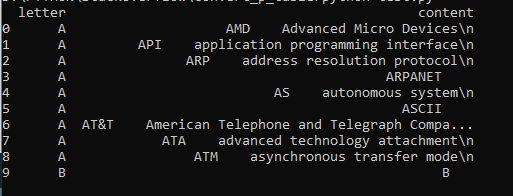
print(df1.head(10))
其结果是:
页面原文内容由Stack Overflow提供。腾讯云小微IT领域专用引擎提供翻译支持
原文链接:
https://stackoverflow.com/questions/59269575
复制相关文章
相似问题
腾讯云开发者

Copyright © 2013 - 2026 Tencent Cloud. All Rights Reserved. 腾讯云 版权所有
深圳市腾讯计算机系统有限公司 ICP备案/许可证号:粤B2-20090059  粤公网安备44030502008569号
腾讯云计算(北京)有限责任公司 京ICP证150476号 | 京ICP备11018762号