
在python网络中创建与主图相同边缘样式/宽度的节点类型子图
我正在尝试创建一个基于我创建的表示项目团队数据网络的主图的子图。其中节点是团队成员,边缘是它们之间的数据流。
项目团队由不同的项目角色组成:项目经理、项目助理、工程师等。网络中的节点根据该节点的项目角色有一定的颜色。
数据流知道某些频率(低、中、高、高)和值(低、中、高、高)。边缘具有基于数据流频率和基于数据流值的样式的一定宽度。
我的主要图表如下:
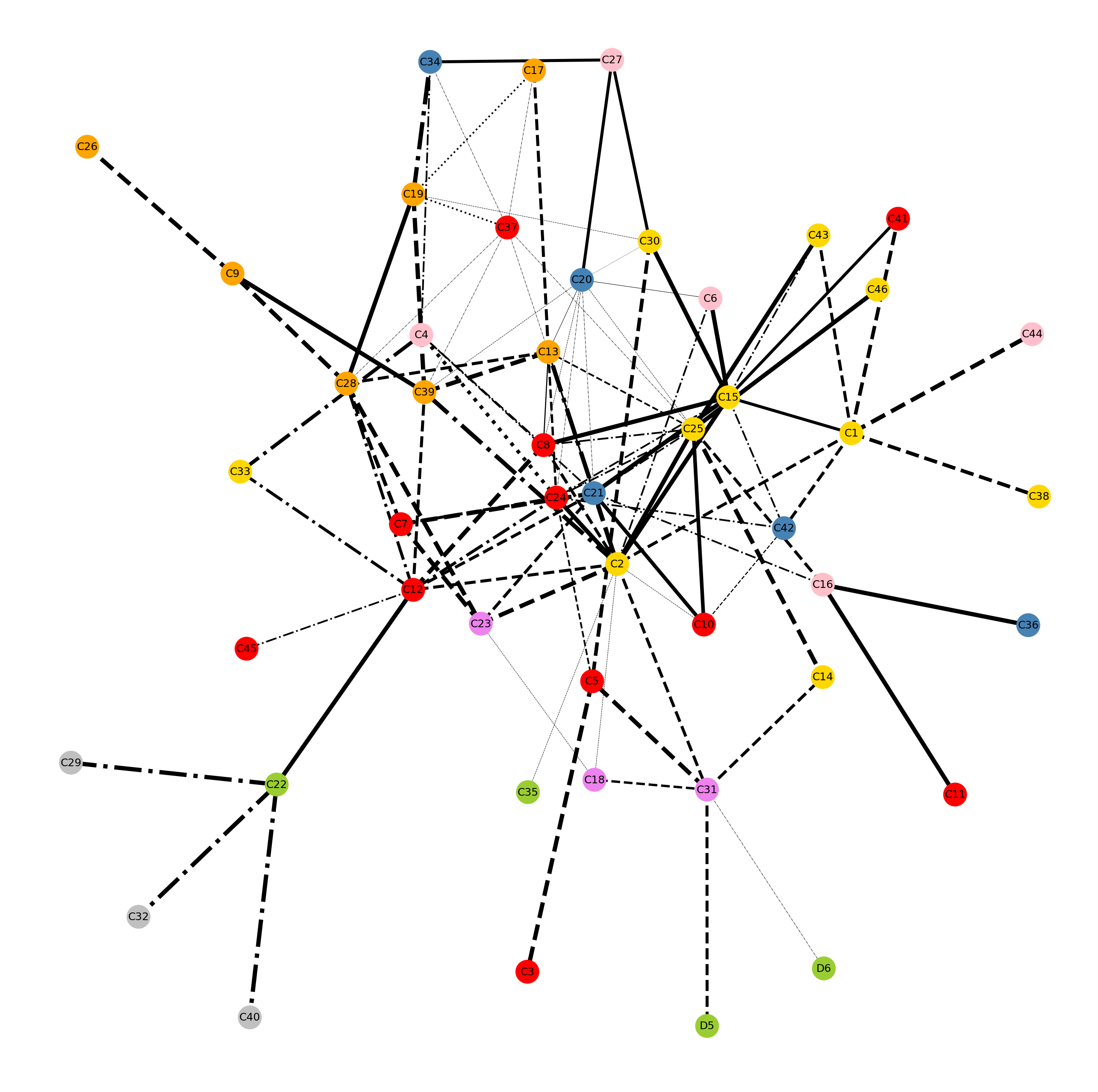
现在,我想创建一个子图,它只突出显示项目经理(黄色节点)和它们之间具有相同边宽和样式的边。我已经成功地创建了黄色节点的子图,但是我不知道如何维护正确的边宽和样式。以下是我的两个结果:
选项1:黄色节点的子图,边宽固定(5.0),样式(实心)。问题是它没有显示任何关于频率/值的信息。
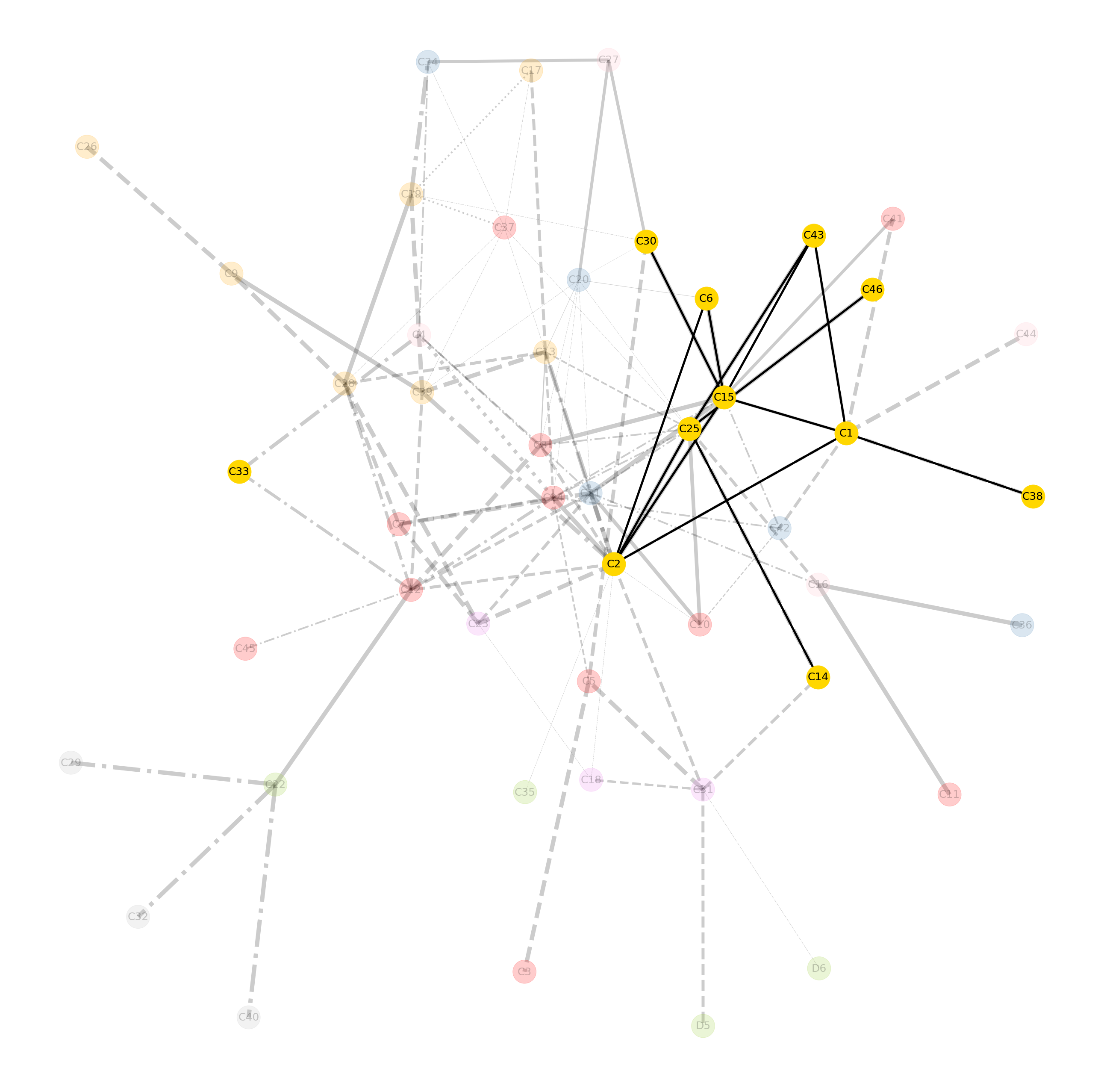
我使用代码:
Graph_C_PDM = C.subgraph(nodelist_PDM)
plt.figure(figsize=(35,35))
pos = nx.kamada_kawai_layout(C)
nx.draw(C, pos, with_labels=True, alpha=0.2, edges=edges_C, width=edge_frequency_C, style=edge_value_C, edge_color='black', node_color=node_colors_C, node_size=3000, font_size=25)
nx.draw(Graph_C_PDM, pos, with_labels=True, edges=edges_C, width=5, style='solid', edge_color='black', node_color='gold', node_size=3000, font_size=25)
plt.savefig('Graph_C_PDM.pdf')
选项2:具有边宽和主图样式列表的黄色节点的子图。问题是它显示了来自主图列表的错误的边宽和样式。
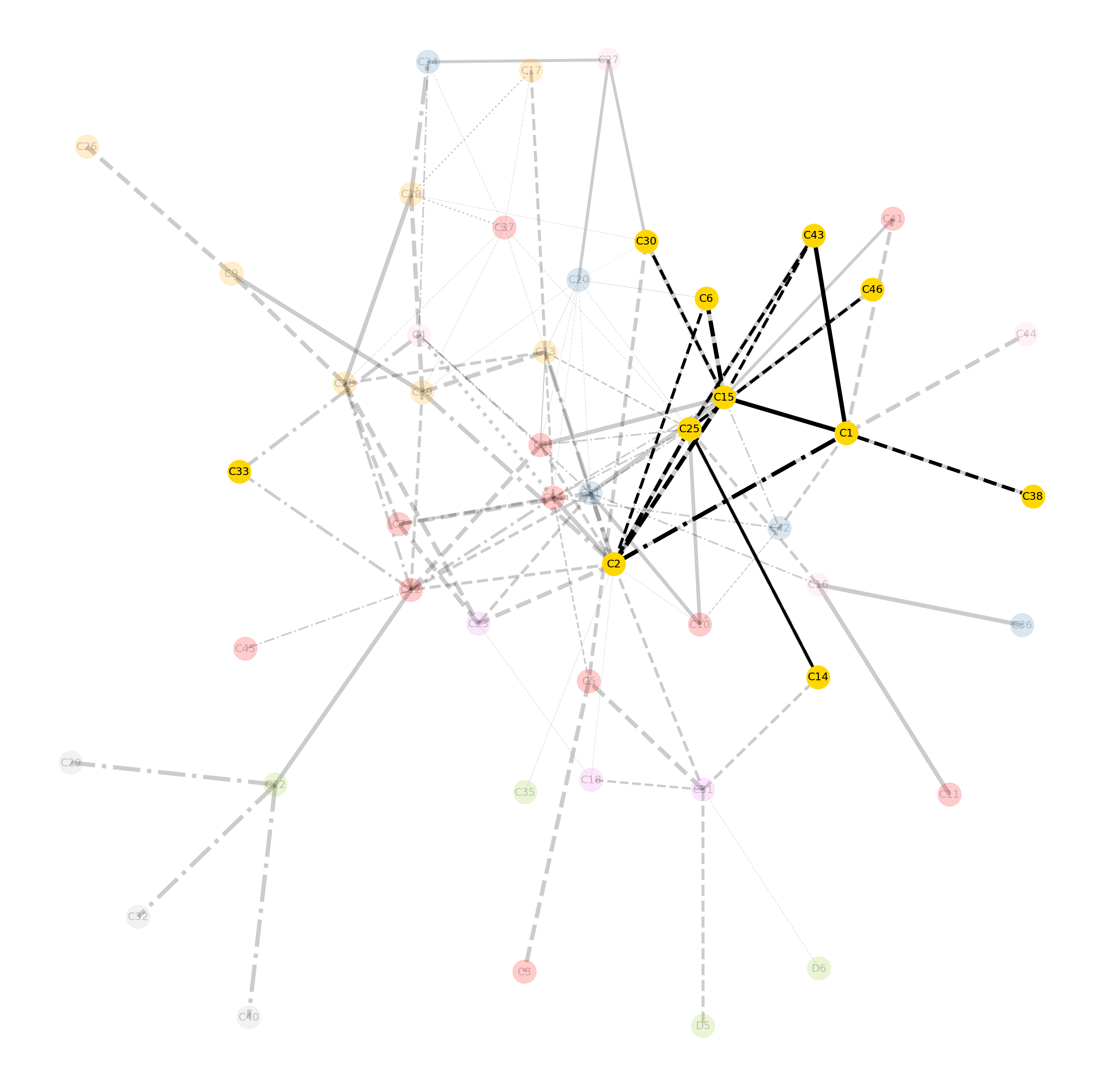
我使用代码:
Graph_C_PDM = C.subgraph(nodelist_PDM)
plt.figure(figsize=(35,35))
pos = nx.kamada_kawai_layout(C)
nx.draw(C, pos, with_labels=True, alpha=0.2, edges=edges_C, width=edge_frequency_C, style=edge_value_C, edge_color='black', node_color=node_colors_C, node_size=3000, font_size=25)
nx.draw(Graph_C_PDM, pos, with_labels=True, edges=edges_C, width=edge_frequency_C, style=edge_value_C, edge_color='black', node_color='gold', node_size=3000, font_size=25)
plt.savefig('Graph_C_PDM.pdf')
我认为我应该创建两个单独的列表,它们只捕获项目经理(黄色节点)之间的边缘频率和边缘值。但我不知道该怎么做。
有人能帮帮我吗?
完整代码:
#Project C
#step 3.1: Create the empty graph.
C = nx.Graph()
#step 3.2: Call edges from pandas dataframe and set edge attributes by associated dataframe columns.
C = nx.from_pandas_edgelist(df_C, source='source', target='target', edge_attr=['edge_frequency','edge_value', 'edge_weight'])
#step 3.3: Create list of edges.
edges_C =C.edges()
#print(edges_C)
#step 3.4: Create edge list with edge frequency values from each row in the edge list.
edge_frequency_C = [C[u][v]['edge_frequency'] for u,v in edges_C]
#step 3.5: Create list with 'edge value' values from each row in the edge list.
edge_value_C = [C[u][v]['edge_value'] for u,v in edges_C]
#step 3.6: Create list with 'edge weight' values from each row in the edge list.
edge_weight_C = [C[u][v]['edge_weight'] for u,v in edges_C]
# print(edge_frequency_C)
# print(edge_value_C)
# print(edge_weight_C)

#Project C
#step 4.1: Retrieve the node and role information from the csv dataframes for each row and applicable columns.
node_attributes_C = []
for index, rows in df_C.iterrows():
    source_attributes_C = [rows.source, rows.source_role, rows.source_color]
    target_attributes_C = [rows.target, rows.target_role, rows.target_color]
    node_attributes_C.append(source_attributes_C)
    node_attributes_C.append(target_attributes_C)
#print(node_attributes_C)
#step 4.2: Remove duplicates to create a list of unique nodes and their associated attribute.
new_node_attributes_C = []
for item in node_attributes_C:
    if item not in new_node_attributes_C:
        new_node_attributes_C.append(item)
node_attributes_C=new_node_attributes_C
#print(node_attributes_C)
#print(len(node_attributes_C))
#step 4.3: Transform list [] format into dictionary format {key:value} for setting node attributes.
dict_node_roles_C={item[0]:item[1] for item in node_attributes_C}
dict_node_colors_C={item[0]:item[2] for item in node_attributes_C}
#print(dict_node_attributes_C)
#step 4.4: Set node attributes from the created dictionary to the existing nodes in the network.
nx.set_node_attributes(C, dict_node_roles_C, 'Role')
nx.set_node_attributes(C, dict_node_colors_C, 'Color')
#print(C.nodes(data=True))

#Project C
# step 5.1: Create empty list for adding node colors.
node_colors_C = []
#step 5.2: Retrieve the node color from each row of the unique node list and add it to the color list.
for item in node_attributes_C:
    node_colors_C.append(item[2])
# print(node_colors_C)

#Project C
#step 6.1: Set the size of the plot figure being big enough to present the graph.
plt.figure(figsize=(35,35))
#step 6.2: Set the layout style of the graph, here the Kamada Kawai layout is choosen.
pos = nx.kamada_kawai_layout(C)
#step 6.3: Creating the graph including desired graph, node and edge settings.
Graph_C = (nx.draw(C, pos, with_labels=True,edgelist=edges_C, width=edge_frequency_C, style=edge_value_C, edge_color='black', node_color=node_colors_C, node_size=3000, font_size=25))
#step 6.4: Saving the graph as a PDF file.
plt.savefig('Graph_C.pdf')
#step 6.5: Visualizing the graph.
plt.show(Graph_C)

# Step 7: Creating the role specific nodelists.
nodelist_PDM = []
for (u,v) in C.nodes(data=True):
    if v['Role'] == 'Project / Design management':
        nodelist_PDM.append(u)
print(nodelist_PDM)

# Step 8: Mapping the data sharing networks for specific roles in the project.
# Project / Design management
Graph_C_PDM = C.subgraph(nodelist_PDM)
plt.figure(figsize=(35,35))
pos = nx.kamada_kawai_layout(C)
nx.draw(C, pos, with_labels=True, alpha=0.2, edges=edges_C, width=edge_frequency_C, style=edge_value_C, edge_color='black', node_color=node_colors_C, node_size=3000, font_size=25)
nx.draw(Graph_C_PDM, pos, with_labels=True, edges=edges_C, width=edge_frequency_C, style=edge_value_C, edge_color='black', node_color='gold', node_size=3000, font_size=25)
plt.savefig('Graph_C_PDM.pdf')回答 1
Stack Overflow用户
发布于 2020-01-06 11:12:34
,我认为我应该创建两个单独的列表,它们只捕获项目经理(黄色节点)之间的边缘频率和边缘值。但我不知道该怎么做。
您可以通过检查对应的边缘是否仅包含表示项目经理的节点来筛选边缘数据列表。例如:
edges_PDM = []
edge_frequency_PDM = []
edge_value_PDM = []
for ii, (a, b) in in enumerate(edges_C):
    if a in node_list_PDM and b in node_list_PDM:
        edges_PDM.append((a, b))
        edge_frequency_PDM.append(edge_frequency_C[ii])
        edge_value_PDM.append(edge_value_C[ii])
换句话来说,这是一个被问得很好的第一个问题。下一次,如果您还包括一些示例数据,那么任何试图回答您的问题的人都可以很容易地确定答案是否真正得到正确的结果,这将是很好的。
https://stackoverflow.com/questions/59478393
复制相似问题
腾讯云开发者

Copyright © 2013 - 2026 Tencent Cloud. All Rights Reserved. 腾讯云 版权所有
深圳市腾讯计算机系统有限公司 ICP备案/许可证号:粤B2-20090059  粤公网安备44030502008569号
腾讯云计算(北京)有限责任公司 京ICP证150476号 | 京ICP备11018762号