
read本机TypeError:无法读取未定义的属性“timeSlots”
read本机TypeError:无法读取未定义的属性“timeSlots”
提问于 2019-12-27 05:20:35
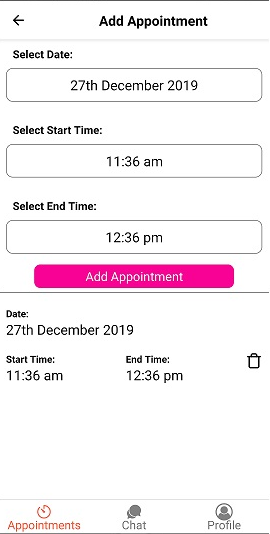
当用户按下“添加约会按钮”时,我希望显示选定的日期、启动时间和结束时间。但是,当我按add约会按钮时,数据会被添加到我的数据库中,但是它无法在FlatList上显示它。
下面提供的代码片段(如果需要完整的代码,我可以提供):
export default class FrCreateScreen extends Component {
  addTimeDateAppt() {
    let self = this;
    AsyncStorage.getItem('my_token').then(keyValue => {
      console.log('Freelancer Create Screen (keyValue): ', keyValue);
      axios({
        method: 'post',
        url: Constants.API_URL + 'appointment_f/create_appointment/',
        //responseType: 'json',
        data: {
          app_date_start: this.state.textAppointmentDate,
          start_time: this.state.textAppointmentTime,
          end_time: this.state.textEndTime,
        },
        headers: {
          'X-API-KEY': Constants.API_KEY,
          Authorization: keyValue,
        },
      })
        .then(function(response) {
          this.setState({
            timeSlots: [
              ...this.state.timeSlots,
              {
                apptdate: this.state.textAppointmentDate,
                appttime: this.state.textAppointmentTime,
                endTime: this.state.textEndTime,
              },
            ],
          });
          console.log(response.data);
        })
        .catch(function(error) {
          console.log('Create Error: ', error);
        });
    });
  }

  deleteDateTime = id => {
    const filteredData = this.state.timeSlots.filter(item => item.id !== id);
    this.setState({ timeSlots: filteredData });
  };

  render() {
    return (
      <ScrollView>
        {this.getAppointmentDatePage()}
        {this.getAppointmentTimePage()}
        {this.getEndTimePage()}
        <TouchableOpacity
          style={styles.addContainer}
          onPress={() => this.addTimeDateAppt()}
        >
          <Text style={styles.addText}> Add Appointment </Text>
        </TouchableOpacity>
        <View>
          <FlatList
            data={this.state.timeSlots}
            keyExtractor={({ id }, index) => index.toString()}
            renderItem={({ item, index }) => {
              return (
                <View style={styles.containerList}>
                  <View style={styles.dateList}>
                    <Text style={{ fontWeight: 'bold' }}>Date: </Text>
                    <Text style={styles.textTime}>{item.apptdate}</Text>
                  </View>
                  <View style={styles.row}>
                    <View>
                      <Text style={{ fontWeight: 'bold' }}>Start Time:</Text>
                      <Text style={styles.textTime}>{item.appttime}</Text>
                    </View>
                    <View>
                      <Text style={{ fontWeight: 'bold' }}>End Time:</Text>
                      <Text style={styles.textTime}>{item.endTime}</Text>
                    </View>
                    <TouchableOpacity
                      onPress={() => this.deleteDateTime(item.index)}
                    >
                      <Feather name="trash" style={styles.icon} />
                    </TouchableOpacity>
                  </View>
                </View>
              );
            }}
          />
        </View>
      </ScrollView>
    );
  }
}
截图:
回答 1
Stack Overflow用户
回答已采纳
发布于 2019-12-27 06:33:03
这个错误意味着'state‘不存在。
您是否尝试将该方法更改为箭头函数,即
addTimeDateAppt = () => {...}这将将方法绑定到组件的实例,而对“this.state”的引用将有效。
此外,您已经声明变量'self‘指向'this',但在方法中继续使用'this’。不确定这是否有意为之,但如果使用箭头语法,则不应该需要它。
页面原文内容由Stack Overflow提供。腾讯云小微IT领域专用引擎提供翻译支持
原文链接:
https://stackoverflow.com/questions/59496321
复制相关文章
相似问题
腾讯云开发者

Copyright © 2013 - 2026 Tencent Cloud. All Rights Reserved. 腾讯云 版权所有
深圳市腾讯计算机系统有限公司 ICP备案/许可证号:粤B2-20090059  粤公网安备44030502008569号
腾讯云计算(北京)有限责任公司 京ICP证150476号 | 京ICP备11018762号