
SingleChildScrollView不可滚动。
SingleChildScrollView不可滚动。
提问于 2019-12-28 10:38:23
此小部件呈现时除不可滚动外,没有任何错误。
SingleChildScrollView(
    child: Column(
      children: [
        ListView(
          shrinkWrap: true,
          children: [
            ListTile(
              title: Row(
                children: const [
                    Expanded(child: Text('text'),),
                    Expanded(child: Text('text'),),
                ],
              ),
            ),
          ],
        ),
        RapportList(), // this is not scrollable
      ],
    ),
),其中,RapportList()是一个状态小部件,它构建一个
ListView.builder(
  shrinkWrap: true,
  itemCount: _rapports.length,
  itemBuilder: (context, index) {
    return ListTile(
      title: Row(
        children: <Widget>[
...我试图用ListView.builder包装SingleChildScrollView,但没有结果。它仍然不能滚动。
回答 3
Stack Overflow用户
回答已采纳
发布于 2019-12-28 12:02:06
我想你只需要补充一下:
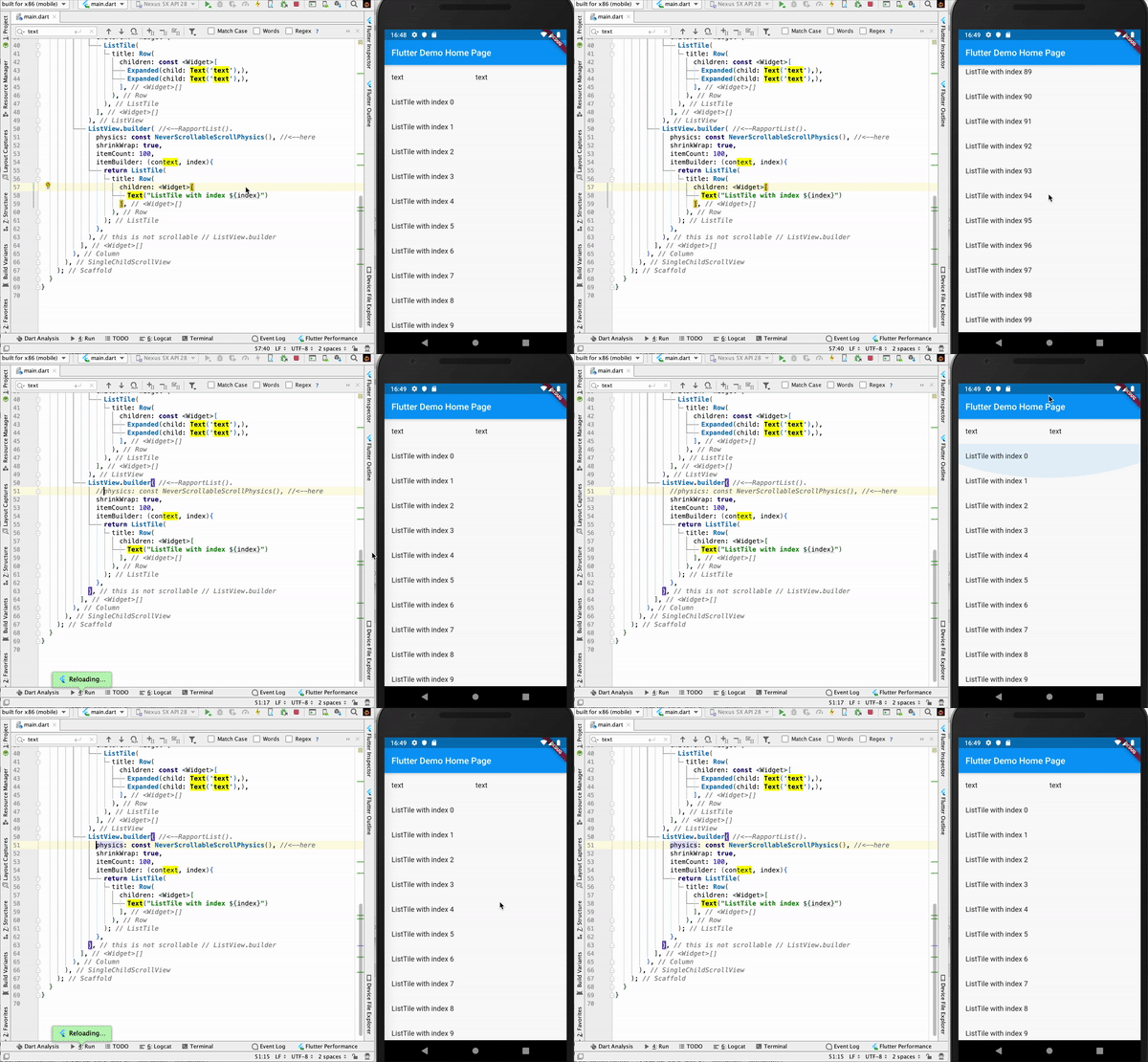
physics: const NeverScrollableScrollPhysics(),敬你的RapportList()。
下面是我测试的代码:
import 'package:flutter/material.dart';

void main() => runApp(MyApp());

class MyApp extends StatelessWidget {
  @override
  Widget build(BuildContext context) {
    return MaterialApp(
      title: 'Flutter Demo',
      theme: ThemeData(
        primarySwatch: Colors.blue,
      ),
      home: MyHomePage(title: 'Flutter Demo Home Page'),
    );
  }
}

class MyHomePage extends StatefulWidget {
  MyHomePage({Key key, this.title}) : super(key: key);
  final String title;

  @override
  _MyHomePageState createState() => _MyHomePageState();
}

class _MyHomePageState extends State<MyHomePage> {
  @override
  Widget build(BuildContext context) {
    return Scaffold(
      appBar: AppBar(
        title: Text(widget.title),
      ),
      body: SingleChildScrollView(
        child: Column(
          children: <Widget>[
            ListView(
              shrinkWrap: true,
              children: <Widget>[
                ListTile(
                  title: Row(
                    children: const <Widget>[
                      Expanded(child: Text('text'),),
                      Expanded(child: Text('text'),),
                    ],
                  ),
                ),
              ],
            ),
            ListView.builder( //<--RapportList().
              physics: const NeverScrollableScrollPhysics(), //<--here
              shrinkWrap: true,
              itemCount: 100,
              itemBuilder: (context, index){
                return ListTile(
                  title: Row(
                    children: <Widget>[
                      Text("ListTile with index ${index}")
                    ],
                  ),
                );
              },
            ),
          ],
        ),
      ),
    );
  }
}这样,RapportList()就不会滚动,当您尝试“滚动”它的一个元素时,您将滚动整个SingleChildScrollView();。
Stack Overflow用户
发布于 2022-06-01 19:04:28
用SingleChildScrollView扩展的小部件包装
Stack Overflow用户
发布于 2019-12-28 11:06:40
@override
  Widget build(BuildContext context) {
    // TODO: implement build
    return Scaffold(body:  SingleChildScrollView(
    child: Column(
      children: <Widget>[
        ListView(
          shrinkWrap: true,
          children: <Widget>[
            ListTile(
              title: Row(
                children: const <Widget>[
                    Expanded(child: Text('text'),),
                    Expanded(child: Text('text'),),
                ],
              ),
            ),
          ],
        ),
        SizedBox(height: 6000,),
        Text("...."),
        Container(
        ),
      ],
    ),
)
    );
  }
}页面原文内容由Stack Overflow提供。腾讯云小微IT领域专用引擎提供翻译支持
原文链接:
https://stackoverflow.com/questions/59510116
复制相关文章
相似问题
腾讯云开发者

Copyright © 2013 - 2026 Tencent Cloud. All Rights Reserved. 腾讯云 版权所有
深圳市腾讯计算机系统有限公司 ICP备案/许可证号:粤B2-20090059  粤公网安备44030502008569号
腾讯云计算(北京)有限责任公司 京ICP证150476号 | 京ICP备11018762号