
TCPDF全页表
我尝试了许多使表与页面(A4)相匹配的方法,如图片所示:
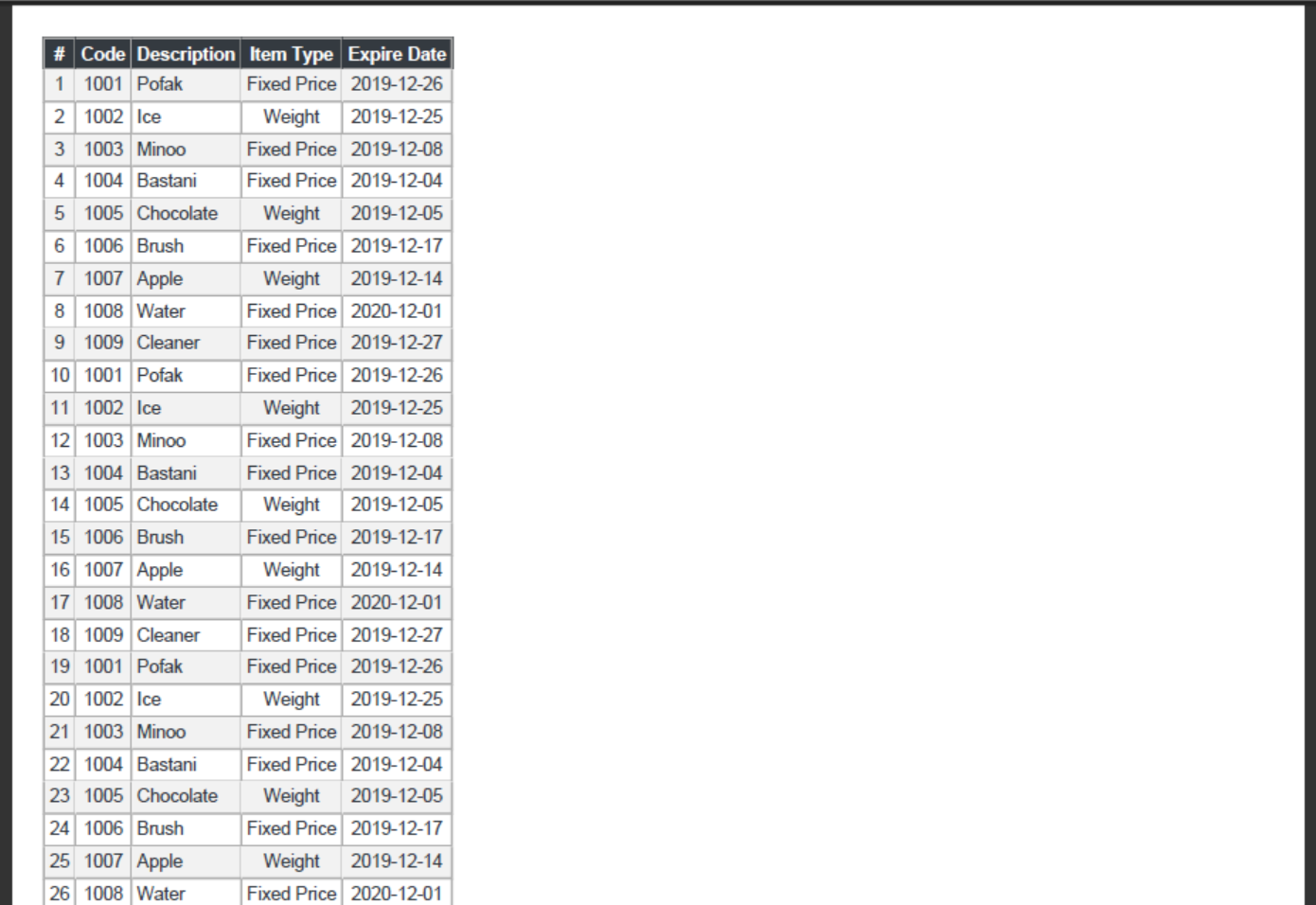
我搜索了很多,但在网上找不到有用的东西。我使用的是动态表,除了表的宽度之外,一切都很好。这是我的代码:
$content = '<table><thead><tr><th class="bg-dark text-white" align="center">#</th><th align="center" class="bg-dark text-white">Code</th><th align="left" class="bg-dark text-white">Description</th><th align="center" class="bg-dark text-white">Item Type</th></tr></thead><tbody><tr style="background-color: #f2f2f2;"><td align="center">1</td><td align="center">1001</td><td align="left">Pofak</td><td align="center">Fixed Price</td></tr><tr ><td align="center">2</td><td align="center">1002</td><td align="left">Ice</td><td align="center">Weight</td></tr><tr style="background-color: #f2f2f2;"><td align="center">3</td><td align="center">1003</td><td align="left">Minoo</td><td align="center">Fixed Price</td></tr><tr ><td align="center">4</td><td align="center">1004</td><td align="left">Bastani</td><td align="center">Fixed Price</td></tr><tr style="background-color: #f2f2f2;"><td align="center">5</td><td align="center">1005</td><td align="left">Chocolate</td><td align="center">Weight</td></tr><tr ><td align="center">6</td><td align="center">1006</td><td align="left">Brush</td><td align="center">Fixed Price</td></tr><tr style="background-color: #f2f2f2;"><td align="center">7</td><td align="center">1007</td><td align="left">Apple</td><td align="center">Weight</td></tr><tr ><td align="center">8</td><td align="center">1008</td><td align="left">Water</td><td align="center">Fixed Price</td></tr><tr style="background-color: #f2f2f2;"><td align="center">9</td><td align="center">1009</td><td align="left">Cleaner</td><td align="center">Fixed Price</td></tr><tr ><td align="center">10</td><td align="center">1001</td><td align="left">Pofak</td><td align="center">Fixed Price</td></tr><tr style="background-color: #f2f2f2;"><td align="center">11</td><td align="center">1002</td><td align="left">Ice</td><td align="center">Weight</td></tr><tr ><td align="center">12</td><td align="center">1003</td><td align="left">Minoo</td><td align="center">Fixed Price</td></tr><tr style="background-color: #f2f2f2;"><td align="center">13</td><td align="center">1004</td><td align="left">Bastani</td><td align="center">Fixed Price</td></tr><tr ><td align="center">14</td><td align="center">1005</td><td align="left">Chocolate</td><td align="center">Weight</td></tr><tr style="background-color: #f2f2f2;"><td align="center">15</td><td align="center">1006</td><td align="left">Brush</td><td align="center">Fixed Price</td></tr></tbody></table>';
$newContent = '
    <style type="text/css">
    table{width:100%;}
    table, table td, table th{
        border-collapse: collapse;
        border: solid 1px #ababab;
    }
    .text-dark, table td{
        color: #343a40;
    }
    .text-white{
        color: #ffffff;
    }
    table td,
    table th {
        font-size: 11px;
        padding: 3px;
        line-height: 1.2;
        font-family:arial;
    }

    .bg-dark {
        background-color: #343a40;
    }
    .bg-secondary {
        background-color: #6c757d;
    }
    .bg-white {
        background-color: #ffffff;
    }
    .text-left {
        text-align: left;
    }
    .text-right {
        text-align: right;
    }
    .text-center {
        text-align: center;
    }
    </style>
    ';
    $newContent .= '<page>'.$content.'</page>';

    try {
        $html2pdf = new Html2Pdf('P', 'A4', 'en', true, 'UTF-8', 5);
        $html2pdf->pdf->SetDisplayMode('real');
        $html2pdf->writeHTML($newContent);
        $PDFName = "ItemLists_".date('Y.m.d_H.i.s').".pdf";
        $html2pdf->output($PDFName, 'I');
    } catch (Html2PdfException $x) {
        $html2pdf->clean();

        $formatter = new ExceptionFormatter($x);
        echo $formatter->getHtmlMessage();
    }
非常感谢
回答 3
Stack Overflow用户
发布于 2020-01-04 05:56:47
Html2PDF不使用TCPDF的HTML解析器/呈现系统。它实现了它自己的,并且它的实现不会自动增长列来填充100%的空间。
因此,在Html2PDF中,不仅需要在表上设置100%的宽度,还需要为每个单元格设置百分比宽度。(由于width属性在Html2PDF中有一些奇怪的行为,所以使用CSS来设置宽度。)
TCPDF的本机writeHTML将每个列设置为相同的宽度,否则没有任何规范。(例如,一个4列表的所有单元格都在25%),但是它不支持您正在使用的CSS,因此标记需要进行一些调整才能走上这条路线。
要在Html2PDF中模仿这一基本行为,只需显式地向单元格添加等效宽度即可。例如,向table td, table th样式规则添加宽度规范。
下面是一个四列表的CSS规则示例:
table { width: 100%; }
table th, table td { width: 25%; }
当然,当您指定适合您的内容的宽度时,它看起来最好。
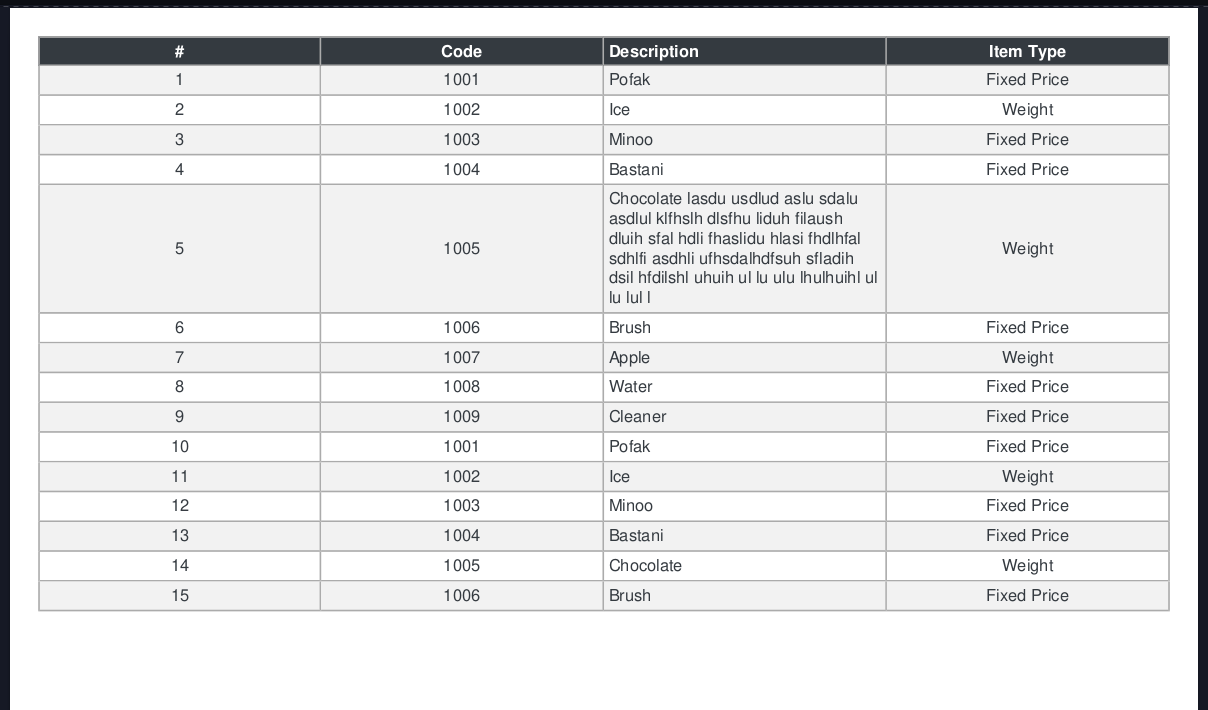
更新
我将在下面留下一些关于TCPDF的讨论,因为它会在某种程度上导致为Html2pdf创建一个可能有用的类。TCPDF有一些测量字符串长度的有用方法。如果您测量列内字符串的大小,则可以创建自己的自动列筛选器。
我在https://github.com/b65sol/random-classes的github上创建了一个概念证明类。
首先,我们使用类来中介HTML的构造。这就是用来设置加长的列类,我们不需要解析HTML来提取我们正在测量的内容。
然后我们必须选择一些策略来选择我们的列宽。例如,下面的演示将测量列,并根据最长的word查找每个列的最小宽度百分比。然后,根据最长的单词和最长的完整单元格内容之间的差异,按比例分配任何额外的空间。我不会认为这个产品已经准备好了,因为它是一个概念的证明,但我希望你(或其他搜索者)发现它是一个有用的起点。
下面的关键部分是:$tablebuilder->determine_column_widths_by_minimum_strategy('100%', 'aaa')
第一个参数提供我们正在使用的大小引用(当我需要它使测量有用时,页面的大小是100%),第二个参数提供了一些预设的填充字符来添加到我们的度量中,以考虑文本样式和表填充的差异。
下面是它运行的一个演示:https://b65sol.com/so/59517311_new.php
类本身在这里可用:https://github.com/b65sol/random-classes
演示的代码在这里:
<?php
require 'vendor/autoload.php';
include 'random-classes/html2pdf-full-table-optimizer.php';
use Spipu\Html2Pdf\Html2Pdf;

//First let's build a random table!
$wordlist = ['Chocolate', 'Cake', 'Brownies', 'Cupcakes', 'Coreshock', 'Battery', 'Lead', 'Acid', 'Remilia'];
$wordlist2 = ['Reinforcement Learning', 'Initial Latent Vectors', 'Bag-of-Words', 'Multilayer Perceptron Classifier',
  'Deconvolutional Neural Network', 'Convolutional Neural Network'];
$number_of_columns = rand(3,11);
$number_of_rows = rand(8, 15);
$possible_column_names = ['Unit', 'Description', 'Variable', 'Moon', 'Cheese', 'Lollipop', 'Orange', 'Gir', 'Gaz', 'Zim', 'Dib'];
$possible_column_content_generators = [
  function() {return rand(10,100); },
  function() {return rand(1000, 1999); },
  function() use ($wordlist) {return $wordlist[rand(0, count($wordlist)-1)]; },
  function() use ($wordlist) {return $wordlist[rand(0, count($wordlist)-1)] . ' '. $wordlist[rand(0, count($wordlist)-1)];},
  function() use ($wordlist2) {return $wordlist2[rand(0, count($wordlist2)-1)];},
];

shuffle($possible_column_names);
$list_of_generators = [];
$column_classes = [];
$column_names = [];
for($i = 0; $i < $number_of_columns; $i++) {
  $list_of_generators[$i] = $possible_column_content_generators[rand(0, count($possible_column_content_generators)-1)];
  $column_classes[$i] = ['text-left', 'text-right', 'text-center'][rand(0,2)];
  $column_names[$i] = $possible_column_names[$i];
}
//Got our random stuff, onward to generator!

try {
    $html2pdf = new Html2Pdf('P', 'A4', 'en', true, 'UTF-8', 5);
    $html2pdf->pdf->SetDisplayMode('real');
    $tablebuilder = new Html2PdfTableOptimizer($html2pdf->pdf, '11px', 'helvetica');

    //run table builder... using random data for testing.
    for($i = 0; $i < $number_of_columns; $i++) {
      /*Add a header cell, content is the first parameter, CSS class attribute is second.*/
      $tablebuilder->add_header_cell($column_names[$i], $column_classes[$i] . ' bg-dark text-white');
    }

    for($i = 0; $i < $number_of_rows; $i++) {
      //Start a row.
      $tablebuilder->start_data_row();
      for($col = 0; $col < $number_of_columns; $col++) {
        //Add content and our column classes for td elements
        $tablebuilder->add_data_row_cell($list_of_generators[$col](), $column_classes[$col]);
      }
      //End the row.
      $tablebuilder->end_data_row();
    }
    //Get the table HTML.
    $render = $tablebuilder->render_html();

    $newContent = '
      <style type="text/css">
      table{width:100%;}
      table, table td, table th{
          border-collapse: collapse;
          border: solid 1px #ababab;
      }
      .text-dark, table td{
          color: #343a40;
      }
      .text-white{
          color: #ffffff;
      }
      table td,
      table th {
          font-size: 11px;
          padding: 3px;
          line-height: 1.2;
          font-family:arial;
      }

      .bg-dark {
          background-color: #343a40;
      }
      .bg-secondary {
          background-color: #6c757d;
      }
      .bg-white {
          background-color: #ffffff;
      }
      .row-even {
        background-color: #d1d1d1;
      }
      .text-left {
          text-align: left;
      }
      .text-right {
          text-align: right;
      }
      .text-center {
          text-align: center;
      }

      '.$tablebuilder->determine_column_widths_by_minimum_strategy('100%', 'aaa').'

      </style>
      ';
      $newContent .= '<page>'.$render.'</page>';

      if(!empty($_GET['html'])) {
        echo $newContent;
      } else {
        $html2pdf->writeHTML($newContent);
        $PDFName = "ItemLists_".date('Y.m.d_H.i.s').".pdf";
        $html2pdf->output($PDFName, 'I');
      }
} catch (Html2PdfException $x) {
    $html2pdf->clean();

    $formatter = new ExceptionFormatter($x);
    echo $formatter->getHtmlMessage();
}更新的端
如果您不想显式地指定宽度,可以使用TCPDF的writeHTML,而不是使用Html2PDF库,但是所要做的就是使用大小相等的列。实际上,如果您只指定一个或两个,我认为它会重新计算列的大小,但我是不正确的。此外,TCPDF还存在与Html2PDF相同的一些限制--如果指定一个列的大小,它不会自动调整其他列的大小以适应。
它也不像浏览器那样调整列到内容的大小。这实际上很难做好,所以我并不惊讶TCPDF没有尝试它。一种潜在的低效率解决方案是使用大小“比例”标记您的列,并根据所选择的比例大小列的多少,动态计算每个列的宽度。(例如,数字列是“小”的,而描述列将是“大的”,因此它会出现两个小列,每个小列10%,单个描述列80%。两次,5%,大柱,各45%。这需要一些实验。)
Stack Overflow用户
发布于 2020-01-01 01:33:36
使用PDF的服务器端并不适合CSS。你试过只使用HTML吗?
例如:
<table width="100%">
  <!-- your table code -->
</table>
另外,你也可以尝试:
<table style="width: 100%;">
  <!-- your table code -->
</table>下面是一个CodePen,它在浏览器中演示了这一点。https://codepen.io/tinacious/pen/PowJRbb
Stack Overflow用户
发布于 2020-01-05 06:19:42
图片:
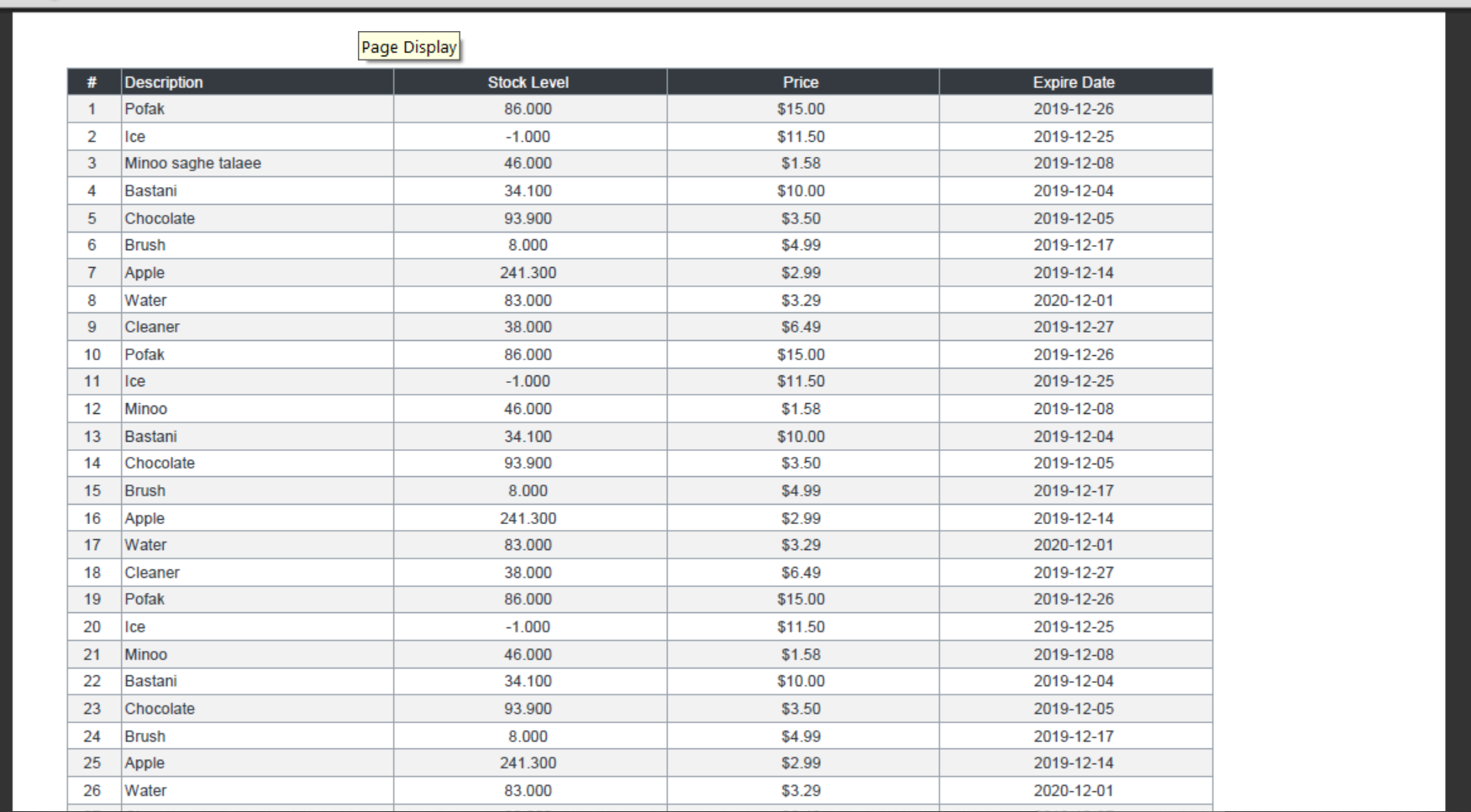
对于这种类型的表,我认为最好的方法是使用这种方法:
table th, table td { width:<?=floor(100 / count($cols))?>%;}在TCPDF上,他们没有做任何特别的事情,但是表格并不适合在页面上。
https://stackoverflow.com/questions/59517311
复制相似问题
腾讯云开发者

Copyright © 2013 - 2026 Tencent Cloud. All Rights Reserved. 腾讯云 版权所有
深圳市腾讯计算机系统有限公司 ICP备案/许可证号:粤B2-20090059  粤公网安备44030502008569号
腾讯云计算(北京)有限责任公司 京ICP证150476号 | 京ICP备11018762号