
发送命令“Emulation.setDeviceMetricsOverride”在chrome.debugger中不工作
发送命令“Emulation.setDeviceMetricsOverride”在chrome.debugger中不工作
提问于 2020-01-01 02:42:34
每当用户点击扩展图标时,我都会编写一个扩展来模仿移动设备。这只是扩展的第一个版本,所以所有的东西都是硬编码的。
我基本上成功地附加到current选项卡,但我不知道为什么我的命令不能像预期的那样工作。我使用Chrome 版本79和协议版本命令是1.3。我目前执行的步骤是:
- 将附加到当前铬选项卡。
- 使用Browser.getVersion检查我是否使用了正确的协议版本
- 使用Emulation.canEmulate确保铬可以模仿移动设备。
- 使用Emulation.clearDeviceMetricsOverride来清除所有度量(如果有的话)。
- 使用Emulation.setUserAgentOverride覆盖当前用户代理。
- 利用Emulation.setDeviceMetricsOverride对移动设备进行仿真。
- 启用使用Emulation.setTouchEmulationEnabled的触摸事件来模拟移动事件。
下面是上述步骤的代码:
function EmulateMobileDevice(tabId) {

var protocolVersion = '1.3';
chrome.debugger.attach({
    tabId: tabId
}, protocolVersion, function() {
    if (chrome.runtime.lastError) {
        alert(chrome.runtime.lastError.message);
        return;
    }

    // Browser.getVersion
    chrome.debugger.sendCommand({
        tabId: tabId
    }, "Browser.getVersion", {}, function(response) {
        console.log(response);
    });

    // Emulation.canEmulate
    chrome.debugger.sendCommand({
        tabId: tabId
    }, "Emulation.canEmulate", {}, function(response) {
        console.log(response);
    });

    // Emulation.clearDeviceMetricsOverride
    chrome.debugger.sendCommand({
        tabId: tabId
    }, "Emulation.clearDeviceMetricsOverride", {}, function(response) {
        console.log(response);

        // Emulation.setUserAgentOverride
        chrome.debugger.sendCommand({
            tabId: tabId
        }, "Emulation.setUserAgentOverride", {
            userAgent: 'Mozilla/5.0 (iPhone; CPU iPhone OS 11_0 like Mac OS X) AppleWebKit/604.1.38 (KHTML, like Gecko) Version/11.0 Mobile/15A372 Safari/604.1',
            acceptLanguage: 'en',
            platform: 'mobile'
        }, function(response) {
            console.log(response);
            //Emulation.setDeviceMetricsOverride
            chrome.debugger.sendCommand({
                tabId: tabId
            }, "Emulation.setDeviceMetricsOverride", {
                width: 0,
                height: 0,
                deviceScaleFactor: 0,
                mobile: true,
                screenOrientation: { type: 'portraitPrimary', angle: 1}
            }, function(response) {
                console.log(response);

                // Emulation.setTouchEmulationEnabled
                chrome.debugger.sendCommand({
                    tabId: tabId
                }, "Emulation.setTouchEmulationEnabled", {
                    enabled: true
                }, function(response) {
                    console.log(response);
                });
            });
        });
}); });}我引用了@paulirish实现的相同的想法,但他在协议版本1.1中演示了这里,该版本目前已被否决。我还阅读了来自这里的协议版本1.3的文档。不幸的是,我无法让它工作。
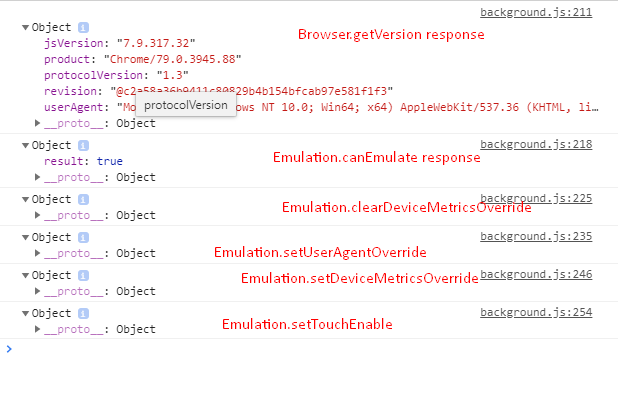
下面是我登录的上述方法的后台脚本的屏幕截图。
非常感谢。
回答 2
Stack Overflow用户
发布于 2022-08-30 06:20:40
我认为您需要在修改DeviceMetricsOverride之后重新加载页面
chrome.tabs.reload(tabId);
Stack Overflow用户
发布于 2020-01-10 13:03:18
如果你能简要说明你想用你的代码做些什么,
到目前为止,代码将只显示选项卡,因为当宽度、高度和deviceScaleFactor设置为‘0’(零)时,它会将网站设置为默认大小,但由于您指定了移动的真正默认滚动条,因此会更改(它可能会根据您的css隐藏)。
页面原文内容由Stack Overflow提供。腾讯云小微IT领域专用引擎提供翻译支持
原文链接:
https://stackoverflow.com/questions/59549696
复制相关文章
相似问题
腾讯云开发者

Copyright © 2013 - 2026 Tencent Cloud. All Rights Reserved. 腾讯云 版权所有
深圳市腾讯计算机系统有限公司 ICP备案/许可证号:粤B2-20090059  粤公网安备44030502008569号
腾讯云计算(北京)有限责任公司 京ICP证150476号 | 京ICP备11018762号