
FCM推送通知-图像不推送
我有一个问题,我试图通过http发送FCM通知。当我发送以下有效载荷时:
{
     "notification" : {
         "body" : "test Notification",
         "title": "test Notification",
         "image" : "https://www.fillmurray.com/640/360"
     },


"to":"firebasetoken",
"priority":"high"
}
我在移动设备上收到通知,但通知只包含标题和正文。我试着把图像转换成图像,但也没有效果。
我希望按以下方式显示我的通知。
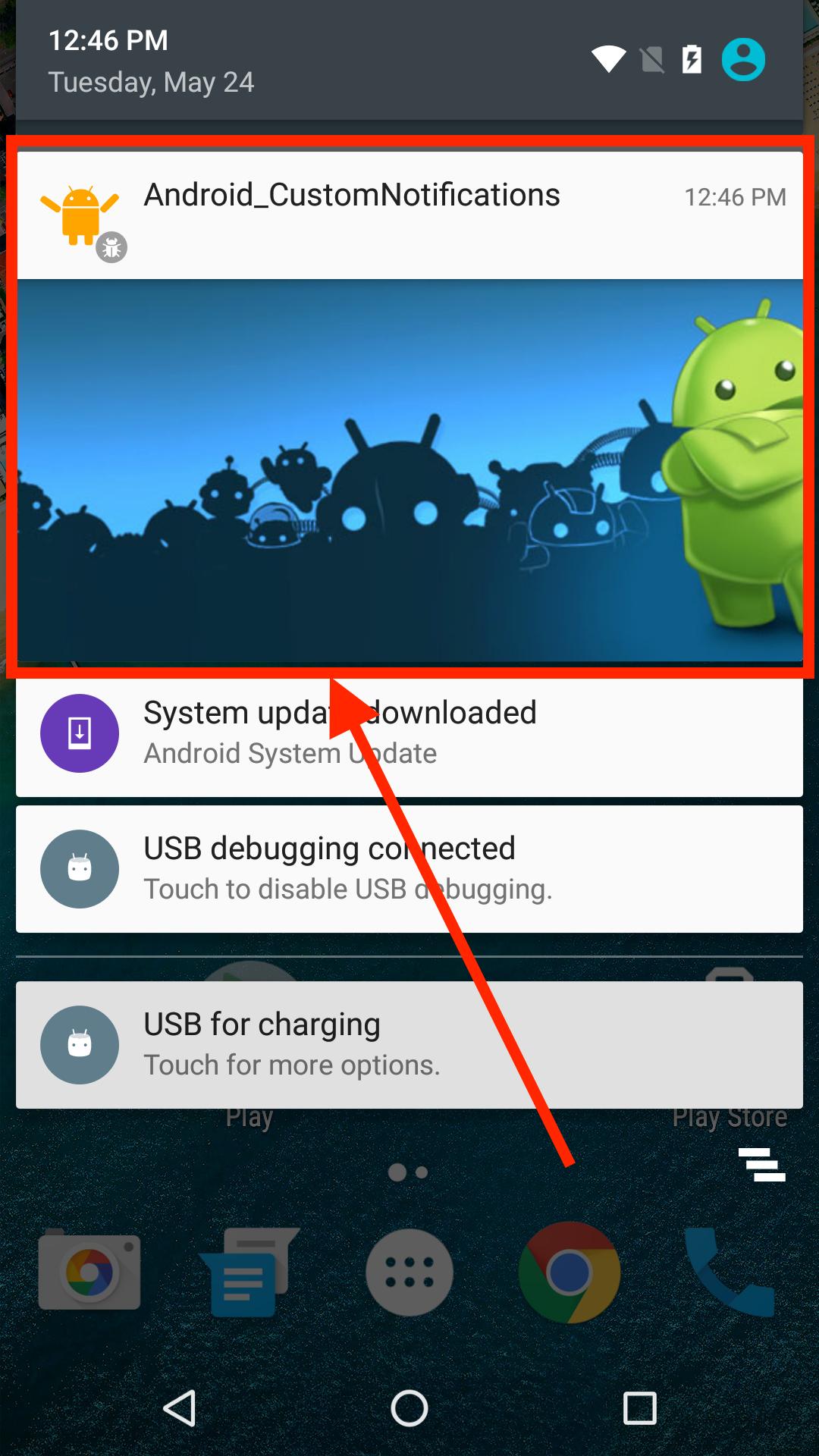
我会感激你的帮助。我在去年年初试过,这个有效载荷很好。
回答 2
Stack Overflow用户
发布于 2020-01-03 09:25:25
这是因为您使用的是不支持图像有效负载的遗留HTTP。尝试迁移到HTTP,您将能够发送图像有效负载。按照这些链接。迁移指南。在通知有效负载中发送图像
在迁移到HTTP v1时,您将需要oAuth令牌,如果您不知道如何生成它,我将在这里逐步提供指南。
要创建oAuth令牌,请执行以下步骤。
步骤1.从firebase控制台获取serviceaccount文件。
转到firebase,->项目,设置->服务帐户选项卡,然后单击下载json文件。json文件包含一些凭据信息。
步骤2.生成令牌
生成令牌将需要使用节点、python或java运行一些程序代码,这里我将使用节点。
用下面的代码创建generatekey.js文件,并在代码中更改json文件的路径。
var {google} = require("googleapis");

// Load the service account key JSON file.
var serviceAccount =
require("path/to/downloaded.json"); //change path to your downloaded json file

// Define the required scopes.
var scopes = [
  "https://www.googleapis.com/auth/userinfo.email",
  "https://www.googleapis.com/auth/firebase.messaging"
 ];

// Authenticate a JWT client with the service account.
var jwtClient = new google.auth.JWT(serviceAccount.client_email,
null,serviceAccount.private_key,scopes);

// Use the JWT client to generate an access token.
jwtClient.authorize(function(error, tokens) {
if (error) {
  console.log("Error making request to generate access token:",
  error);
} else if (tokens.access_token === null) {
console.log("Provided service account does not have permission to generate access tokens");
} else {
  var accessToken = tokens.access_token;
  console.log(accessToken);

  // See the "Using the access token" section below for information
  // on how to use the access token to send authenticated requests to
  // the Realtime Database REST API.
}
});
从终端运行generatekey.js文件,命令节点genereatekey.js,它将打印OAuth2令牌。
Stack Overflow用户
发布于 2022-09-15 12:54:49
试一试
const message = {
         "notification" : {
            "body" : "test Notification",
            "title": "test Notification",
         "android": {
            "notification": {
             imageUrl: 'https://www.fillmurray.com/640/360'}
}https://stackoverflow.com/questions/59575085
复制相似问题
腾讯云开发者

Copyright © 2013 - 2026 Tencent Cloud. All Rights Reserved. 腾讯云 版权所有
深圳市腾讯计算机系统有限公司 ICP备案/许可证号:粤B2-20090059  粤公网安备44030502008569号
腾讯云计算(北京)有限责任公司 京ICP证150476号 | 京ICP备11018762号