
如何在StyleFrame中迭代行?
我想通过迭代行来找到有色的单元格。
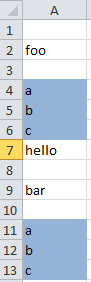
我知道如何迭代列,但不知道行。
在熊猫中,它将是
for i in range(0, len(df.index), 1):
print(df.loc[i, 1])但是StyleFrame没有loc。我如何迭代它并检查彩色单元格?
谢谢!
回答 1
Stack Overflow用户
发布于 2020-01-02 20:56:20
StyleFrame维护者在这里..。那是个有趣的..。
这里的问题由两个部分组成:
- Pandas‘
read_excel( StyleFrame使用)的默认行为是跳过空行。谢天谢地,它接受一个关键字参数来改变这种行为,StyleFrame的read_excel将所有它不知道的关键字参数传递给Pandas。因此,这个问题可以很容易地解决:
skip_blank_lines=False)
- The StyleFrame.read_excel('test.xlsx',read_style=True,第二个问题/问题行为是openpyxl将背景未被更改(或根据电子表格软件设置为“自动”或“无填充”)的单元格的背景色设置为"000000“(黑色)。
这在StyleFrame中引入了一个bug,老实说,我不知道为什么直到现在才出现。
要解决这个问题,您可以对StyleFrame的代码做一个小小的更改。styler.py中的第111号行(假设您使用的是2.0.5版本的StyleFrame)应该从
bg_color = openpyxl_style.fill.fgColor.rgb
至
bg_color = openpyxl_style.fill.fgColor.rgb如果openpyxl_style.fill.patternType不是其他的utils.colors.white
此更改将包含在下一个版本中。。
然后,在解决了上述两个问题之后,解决实际问题变得相对容易(尽管并不像我所希望的那样容易):
from StyleFrame import StyleFrame, utils

def only_cells_with_colored_background(cell):
    return cell if cell.style.bg_color not in {utils.colors.white, 'FFFFFFFF'} else np.nan

sf = StyleFrame.read_excel('test.xlsx', read_style=True, skip_blank_lines=False)
sf = StyleFrame(sf.applymap(only_cells_with_colored_background).dropna(axis=(0, 1),
                how='all'))
print(sf)
威尔输出
   Unnamed: 0
2           a
3           b
4           c
9           a
10          b
11 c我计划在将来的版本中实现一个.style访问器,因此希望上面的示例将像下面这样简单
sf = StyleFrame.read_excel('test.xlsx', read_style=True, skip_blank_lines=False)
sf = sf.loc[~(sf['Unnamed: 0'].style.bg_color == utils.colors.white)]https://stackoverflow.com/questions/59568546
复制相似问题
腾讯云开发者

Copyright © 2013 - 2026 Tencent Cloud. All Rights Reserved. 腾讯云 版权所有
深圳市腾讯计算机系统有限公司 ICP备案/许可证号:粤B2-20090059  粤公网安备44030502008569号
腾讯云计算(北京)有限责任公司 京ICP证150476号 | 京ICP备11018762号