
如何隐藏UIContextMenuInteraction/UITargetedPreview黑色背景?
如何隐藏UIContextMenuInteraction/UITargetedPreview黑色背景?
提问于 2020-01-07 15:14:14
我想将UIContextMenuInteraction添加到带有一些透明部件的UIView中。当用户与此视图交互时,iOS以黑色背景显示此视图。
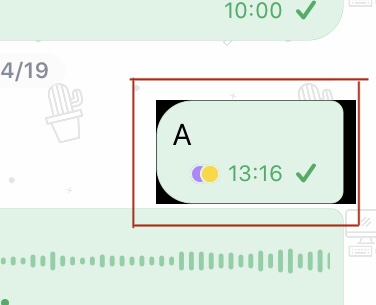
是否有可能使这些部分透明或改变颜色?
回答 3
Stack Overflow用户
回答已采纳
发布于 2020-01-12 12:07:21
终于找到了解决办法!如果要显示自定义曲线,则需要实现此函数:
func contextMenuInteraction(_ interaction: UIContextMenuInteraction, previewForHighlightingMenuWithConfiguration configuration: UIContextMenuConfiguration) -> UITargetedPreview? {
    let previewTarget = UIPreviewTarget(container: self.view, center: center)
    let previewParams = UIPreviewParameters()

    var topLeft : CGFloat = 8
    var topRight : CGFloat = 9
    var bottomRight : CGFloat = 10
    var bottomLeft : CGFloat = 11

    let topLeftRadius = CGSize(width: topLeft, height: topLeft)
    let topRightRadius = CGSize(width: topRight, height: topRight)
    let bottomLeftRadius = CGSize(width: bottomLeft, height: bottomLeft)
    let bottomRightRadius = CGSize(width: bottomRight, height: bottomRight)

    previewParams.visiblePath = UIBezierPath(shouldRoundRect: TheExactRectYouWantToShow, topLeftRadius: topLeftRadius, topRightRadius: topRightRadius, bottomLeftRadius: bottomLeftRadius, bottomRightRadius: bottomRightRadius)
    let targetView = UITargetedPreview(view: YourViewToShow, parameters: previewParams, target: previewTarget)
    return targetView
}
在这里,我们在定制的形状视图周围画一个UIBezierPath。要做到这一点,您可能也需要这个扩展:
extension UIBezierPath {
convenience init(shouldRoundRect rect: CGRect, topLeftRadius: CGSize = .zero, topRightRadius: CGSize = .zero, bottomLeftRadius: CGSize = .zero, bottomRightRadius: CGSize = .zero){

    self.init()

    let path = CGMutablePath()

    let topLeft = rect.origin
    let topRight = CGPoint(x: rect.maxX, y: rect.minY)
    let bottomRight = CGPoint(x: rect.maxX, y: rect.maxY)
    let bottomLeft = CGPoint(x: rect.minX, y: rect.maxY)

    if topLeftRadius != .zero{
        path.move(to: CGPoint(x: topLeft.x+topLeftRadius.width, y: topLeft.y))
    } else {
        path.move(to: CGPoint(x: topLeft.x, y: topLeft.y))
    }

    if topRightRadius != .zero{
        path.addLine(to: CGPoint(x: topRight.x-topRightRadius.width, y: topRight.y))
        path.addCurve(to:  CGPoint(x: topRight.x, y: topRight.y+topRightRadius.height), control1: CGPoint(x: topRight.x, y: topRight.y), control2:CGPoint(x: topRight.x, y: topRight.y+topRightRadius.height))
    } else {
         path.addLine(to: CGPoint(x: topRight.x, y: topRight.y))
    }

    if bottomRightRadius != .zero{
        path.addLine(to: CGPoint(x: bottomRight.x, y: bottomRight.y-bottomRightRadius.height))
        path.addCurve(to: CGPoint(x: bottomRight.x-bottomRightRadius.width, y: bottomRight.y), control1: CGPoint(x: bottomRight.x, y: bottomRight.y), control2: CGPoint(x: bottomRight.x-bottomRightRadius.width, y: bottomRight.y))
    } else {
        path.addLine(to: CGPoint(x: bottomRight.x, y: bottomRight.y))
    }

    if bottomLeftRadius != .zero{
        path.addLine(to: CGPoint(x: bottomLeft.x+bottomLeftRadius.width, y: bottomLeft.y))
        path.addCurve(to: CGPoint(x: bottomLeft.x, y: bottomLeft.y-bottomLeftRadius.height), control1: CGPoint(x: bottomLeft.x, y: bottomLeft.y), control2: CGPoint(x: bottomLeft.x, y: bottomLeft.y-bottomLeftRadius.height))
    } else {
        path.addLine(to: CGPoint(x: bottomLeft.x, y: bottomLeft.y))
    }

    if topLeftRadius != .zero{
        path.addLine(to: CGPoint(x: topLeft.x, y: topLeft.y+topLeftRadius.height))
        path.addCurve(to: CGPoint(x: topLeft.x+topLeftRadius.width, y: topLeft.y) , control1: CGPoint(x: topLeft.x, y: topLeft.y) , control2: CGPoint(x: topLeft.x+topLeftRadius.width, y: topLeft.y))
    } else {
        path.addLine(to: CGPoint(x: topLeft.x, y: topLeft.y))
    }

    path.closeSubpath()
    cgPath = path
}
这是:
extension UIView {

func roundCorners(topLeft: CGFloat = 0, topRight: CGFloat = 0, bottomLeft: CGFloat = 0, bottomRight: CGFloat = 0) {//(topLeft: CGFloat, topRight: CGFloat, bottomLeft: CGFloat, bottomRight: CGFloat) {
    let topLeftRadius = CGSize(width: topLeft, height: topLeft)
    let topRightRadius = CGSize(width: topRight, height: topRight)
    let bottomLeftRadius = CGSize(width: bottomLeft, height: bottomLeft)
    let bottomRightRadius = CGSize(width: bottomRight, height: bottomRight)
    let maskPath = UIBezierPath(shouldRoundRect: bounds, topLeftRadius: topLeftRadius, topRightRadius: topRightRadius, bottomLeftRadius: bottomLeftRadius, bottomRightRadius: bottomRightRadius)
    let shape = CAShapeLayer()
    shape.path = maskPath.cgPath
    layer.mask = shape
}
}Stack Overflow用户
发布于 2020-08-19 13:49:47
更改上下文菜单背景色的简单解决方案
func contextMenuInteraction(_ interaction: UIContextMenuInteraction, previewForHighlightingMenuWithConfiguration configuration: UIContextMenuConfiguration) -> UITargetedPreview? {
    let previewTarget = UIPreviewTarget(container: self, center: <#your-view>.center)
    let previewParams = UIPreviewParameters()
    previewParams.backgroundColor = .clear

    return UITargetedPreview(view: <#your-view>, parameters: previewParams, target: previewTarget)
}Stack Overflow用户
发布于 2021-03-09 20:25:45
正如MAGiGO所说,您可以使用previewForHighlightingContextMenuWithConfiguration和previewForDismissingContextMenuWithConfiguration委托方法来创建您自己的UITargetedPreview,并将其背景色设置为清除。
func collectionView(_ collectionView: UICollectionView, previewForHighlightingContextMenuWithConfiguration configuration: UIContextMenuConfiguration) -> UITargetedPreview?
{
    guard let indexPath = configuration.identifier as? IndexPath,
          let cell = collectionView.cellForItem(at: indexPath)
          else
    {
        return nil
    }

    let targetedPreview = UITargetedPreview(view: cell)
    targetedPreview.parameters.backgroundColor = .clear
    return targetedPreview
}

func collectionView(_ collectionView: UICollectionView, previewForDismissingContextMenuWithConfiguration configuration: UIContextMenuConfiguration) -> UITargetedPreview?
{
    guard let indexPath = configuration.identifier as? IndexPath,
          let cell = collectionView.cellForItem(at: indexPath)
          else
    {
        return nil
    }

    let targetedPreview = UITargetedPreview(view: cell)
    targetedPreview.parameters.backgroundColor = .clear
    return targetedPreview
}

func collectionView(_ collectionView: UICollectionView, contextMenuConfigurationForItemAt indexPath: IndexPath, point: CGPoint) -> UIContextMenuConfiguration?
{
 return UIContextMenuConfiguration(identifier: NSIndexPath(item: indexPath.item, section: indexPath.section), previewProvider: nil) { elements -> UIMenu? in
....注意:我们将NSIndexPath作为标识符传递给它,因为它需要符合NSCopying协议。
页面原文内容由Stack Overflow提供。腾讯云小微IT领域专用引擎提供翻译支持
原文链接:
https://stackoverflow.com/questions/59631151
复制相关文章
相似问题
腾讯云开发者

Copyright © 2013 - 2026 Tencent Cloud. All Rights Reserved. 腾讯云 版权所有
深圳市腾讯计算机系统有限公司 ICP备案/许可证号:粤B2-20090059  粤公网安备44030502008569号
腾讯云计算(北京)有限责任公司 京ICP证150476号 | 京ICP备11018762号