
用引号解析命令行args
用引号解析命令行args
提问于 2020-01-08 02:01:34
好的,我按空格(如命令提示符)吐槽命令行参数,但问题是,如果用户试图键入“有空格但被引用的DoStuff参数”,就不能正确地分割它。我正在使用控制台应用程序。我尝试这样做: baseCommand是用户输入未解析的字符串,而secondCommand应该是第二个参数。
int firstQuoteIndex = baseCommand.IndexOf('"');

if (firstQuoteIndex != -1)
{
    int secondQuoteIndex = baseCommand.LastIndexOf('"');
    secondCommand = baseCommand.Substring(firstQuoteIndex,
        secondQuoteIndex - firstQuoteIndex + 1).Replace("\"", "");
}
这很好,但是首先,它很混乱,其次,如果用户输入这样的内容,我不知道如何做到这一点:
DoSomething "second arg that has spaces" "third arg that has spaces"请记住,如果arg(s)没有引号,用户不必输入引号。有人有什么建议吗谢谢。
回答 2
Stack Overflow用户
回答已采纳
发布于 2020-01-08 02:44:07
我确信有一种更优雅的方法可以做到这一点,但有一种方法是一次只遍历命令行一个字符,跟踪是否“在引用的字符串中”,并在执行过程中构建参数,当您遇到一个尾引号或一个不在引号内的空格时,将它们添加到列表中。
例如:
public static List<string> ParseCommandLine(string cmdLine)
{
    var args = new List<string>();
    if (string.IsNullOrWhiteSpace(cmdLine)) return args;

    var currentArg = new StringBuilder();
    bool inQuotedArg = false;

    for (int i = 0; i < cmdLine.Length; i++)
    {
        if (cmdLine[i] == '"')
        {
            if (inQuotedArg)
            {
                args.Add(currentArg.ToString());
                currentArg = new StringBuilder();
                inQuotedArg = false;
            }
            else
            {
                inQuotedArg = true;
            }
        }
        else if (cmdLine[i] == ' ')
        {
            if (inQuotedArg)
            {
                currentArg.Append(cmdLine[i]);
            }
            else if (currentArg.Length > 0)
            {
                args.Add(currentArg.ToString());
                currentArg = new StringBuilder();
            }
        }
        else
        {
            currentArg.Append(cmdLine[i]);
        }
    }

    if (currentArg.Length > 0) args.Add(currentArg.ToString());

    return args;
}
用法可能类似于:
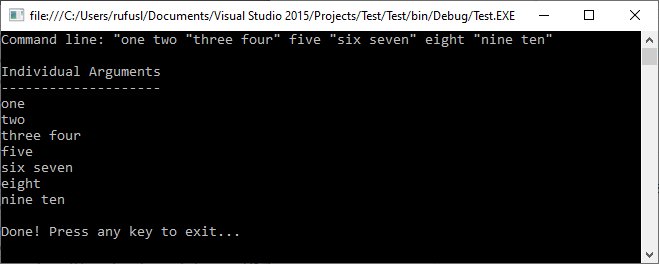
public static void Main()
{
    var args = "one two \"three four\" five \"six seven\" eight \"nine ten";

    Console.WriteLine($"Command line: \"{args}\"\n");
    Console.WriteLine("Individual Arguments");
    Console.WriteLine("--------------------");
    Console.WriteLine(string.Join(Environment.NewLine, ParseCommandLine(args)));

    GetKeyFromUser("\nDone! Press any key to exit...");
}
输出
Stack Overflow用户
发布于 2020-01-08 02:44:00
你可以用跟随Regex来达到这个目的。
[\""].+?[\""]|[^ ]+例如,
var commandList = Regex.Matches(baseCommand, @"[\""].+?[\""]|[^ ]+")
                .Cast<Match>()
                .Select(x => x.Value.Trim('"'))
                .ToList();
示例1输入
DoSomething "second arg that has spaces" thirdArgumentWithoutSpaces输出
Command List
------------
DoSomething
second arg that has spaces
thirdArgumentWithoutSpaces
示例2输入
DoSomething "second arg that has spaces" "third Argument With Spaces"输出
Command List
------------
DoSomething
second arg that has spaces
third Argument With Spaces页面原文内容由Stack Overflow提供。腾讯云小微IT领域专用引擎提供翻译支持
原文链接:
https://stackoverflow.com/questions/59638467
复制相关文章
相似问题
腾讯云开发者

Copyright © 2013 - 2026 Tencent Cloud. All Rights Reserved. 腾讯云 版权所有
深圳市腾讯计算机系统有限公司 ICP备案/许可证号:粤B2-20090059  粤公网安备44030502008569号
腾讯云计算(北京)有限责任公司 京ICP证150476号 | 京ICP备11018762号