
如何添加关闭图标按钮垫基本芯片在角材料?
我使用mat-basic-chip (非样式芯片)创建了一个自定义样式芯片列表,如官方文件所示
我的芯片看起来像

现在,我想将close buttons添加到我的芯片中,作为默认的mat-chips有

下面是mat-basic-chip的模板
<mat-basic-chip *ngFor="let signal of signals">
                    <div matLine class="text-center">{{signal .name}}</div>
                    <div matLine class="mt-sm-n1 text-center"><small>(Default)</small></div>
</mat-basic-chip>
根据官方文档,除了mat芯片类之外,还接收mat基本芯片CSS类。因此,这里是.chip的CSS,用于定制芯片的样式:
.mat-basic-chip {
  display: inline-block;
  clear: right;
  background-color: rgba(0, 0, 0, 0.2);
  border-radius: 1vh;
  padding: .7vh 0vh .7vh .7vh;
  margin-right: 2vh;
  margin-top:1vh;
  min-width: 15vh;
}回答 5
Stack Overflow用户
发布于 2020-01-22 13:06:10
如何将移除按钮添加到垫基芯片中
您可以使用普通芯片mat-chip与您的所有自定义,如在图片中,而不改变任何css。
我以mat-chip水果的基本例子为例。现将其改为:
<mat-chip
  *ngFor="let fruit of fruits"
  [selectable]="selectable"
  [removable]="removable"
  (removed)="remove(fruit)">
  <div>
    <div matLine>{{fruit}}</div>
    <div matLine><small>(Default)</small></div>
  </div>
  <mat-icon matChipRemove *ngIf="removable">cancel</mat-icon>
</mat-chip>修改示例:https://stackblitz.com/angular/mjygopomxvq
定制你的垫片
这种方法是官方支持和推荐的。有关更多信息,请参阅
使用它,您可以添加color属性来为不同的状态进行自定义。为此,修改.mat-chip.mat-custom类,而mat-custom可以是任何东西。只是mat-...必须是一样的。
SCSS
.mat-chip.mat-primary {
    background-color: blue;
    color: white;
}

.mat-chip.mat-accent {
    background-color: yellow;
    color: black;
}

/* Your implementation from the description */

.mat-chip.mat-anything {
    background-color: rgba(0, 0, 0, 0.2);
    border-radius: 1vh;
    padding: .7vh 0vh .7vh .7vh;
    margin-right: 2vh;
    margin-top:1vh;
}
HTML
<mat-chip-list>
  <mat-chip color="primary" selected>Primary</mat-chip>
  <mat-chip color="accent" selected>Accent</mat-chip>
  <mat-chip color="anything" selected>
    <div>
      <div matLine>Anything</div>
      <div matLine><small>(Default)</small></div>
    </div>
    <mat-icon matChipRemove>cancel</mat-icon>
  </mat-chip>
</mat-chip-list>
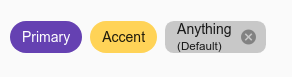
供您参考的演示: https://stackblitz.com/edit/angular-v5xq8y
请随意留下一些反馈。
Stack Overflow用户
发布于 2020-01-08 14:23:11
您可以单击其他文档中的view source按钮来查看它们是如何做到的。他们在芯片中添加了一个像这样的垫子图标:
<mat-chip *ngFor="let fruit of fruits" [selectable]="selectable"
         [removable]="removable" (removed)="remove(fruit)">
  {{fruit.name}}
  <mat-icon matChipRemove *ngIf="removable">cancel</mat-icon>
</mat-chip>
你不需要在这里重新发明轮子并为移除按钮编写自己的图标,它已经完成了。
仔细查看官方文件,然后按view source按钮。
祝好运!
Stack Overflow用户
发布于 2020-01-16 09:26:46
你可以很容易地做到这一点,上周我得到了这个解决方案,在
mat-chips中我需要同样的东西。
SCSS
  .mat-chip-list-wrapper {
    margin: 1px 0 !important;
    .mat-standard-chip {
      padding: 0 $space-5 !important;
      display: flex;
      .mat-icon {
        font-size: 17px;
      }
    }
}<mat-chip-list class="mat-chip-list-wrapper" aria-label="Selected list">
<mat-chip>Hello
<mat-icon matChipRemove >cancel</mat-icon>
</mat-chip>
</mat-chip-list>https://stackoverflow.com/questions/59647710
复制相似问题
腾讯云开发者

Copyright © 2013 - 2026 Tencent Cloud. All Rights Reserved. 腾讯云 版权所有
深圳市腾讯计算机系统有限公司 ICP备案/许可证号:粤B2-20090059  粤公网安备44030502008569号
腾讯云计算(北京)有限责任公司 京ICP证150476号 | 京ICP备11018762号