
SVG圆应适应CSS网格高度,不重叠。
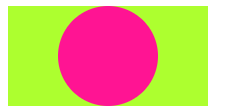
在下面的示例中,圆圈适应网格宽度并保持其高宽比。当容器宽度缩小时,圆圈也随之缩小.
然而,当高度小于宽度时(第二个方框),圆圈不会缩小网格外的重叠,而是有办法在保持高宽比的同时也适应高度吗?
.container {
	display: grid;
	background-color: greenyellow;
	margin: 5px;
	min-height: 10px;
	min-width: 10px;
}

.portrait {
		max-height: 100px;
		max-width: 200px;
}

.landscape {
		max-height: 200px;
		max-width: 100px;
}

.aspect-ratio {
	grid-column: 1;
	grid-row: 1;
	background-color: deeppink;
	border-radius: 50%;
 align-self: center;
	justify-self: center;
}<div class="container landscape">
<svg class="aspect-ratio" viewBox="0 0 1 1"></svg>
</div>
<div class="container portrait">
<svg class="aspect-ratio" viewBox="0 0 1 1"></svg>
</div>
结果应该如下所示:
回答 2
Stack Overflow用户
发布于 2020-01-16 17:52:51
在花了一段时间处理这个问题之后,我觉得这不是网格布局的问题。
由于您从未为SVG定义height/max-height或width/max-width,因此正在计算的是width:auto和height:auto。
注意:我提出了max-height/max-width,因为这些优先于width/height值。
那么,为什么你的景观布局工作,而你的肖像布局不起作用?因为宽度“优先”于你的身高。
这就是为什么,在块布局中,汽车高度是基于后代的总高度,而汽车宽度是基于包含的块宽度。
这意味着您的SVG从其容器中获取width,从其后代获取height。
在您的示例中,您的SVG没有后代,但是有一个具有定义的最大宽度的父级。但这对SVG的高度意味着什么?
SVG正在通过阴谋诡计比率来计算它的高度
如果正确地指定了‘svg’元素上的‘viewBox’:
- 让viewbox是由‘svg’元素的‘viewbox’属性定义的视图框
- 返回viewbox.width / viewbox.height
你的兴趣比率是1/1 = 1
所以你强迫你的height=width
解决方案
解决方案是根据父div的比例将width或margin设置为SVG。
在您给出的示例中,您的比例为2:1,因此您的SVG应该有width:50%或margin: 0 25%。
这意味着,如果您想要设置不同的比例,您必须相应地调整(见下面代码中的纵向1-3)。
如果height不是一个约束,则可以避免为每个比例设置CSS规则,因为您可以为您的SVG和容器定义一个width,让元素调整height以保持您的纵横比。
我还添加了最后一个示例,如果有人不关心保持高宽比,但需要将SVG包含在一个集合height和width容器中。
.container {
  display: grid;
  background-color: greenyellow;
  margin: 5px;
  min-height: 10px;
  min-width: 10px;
}

.portrait {
  max-height: 100px;
  max-width: 200px;
}


/* Add 25% margin left and right to center the image  OR set the image width to 50% */

.portrait>.aspect-ratio {
  margin: 0 25%;
  /*
    or

    width:50%;
  */
}

.landscape {
  max-height: 200px;
  max-width: 100px;
}

.aspect-ratio {
  grid-column: 1;
  grid-row: 1;
  background-color: deeppink;
  border-radius: 50%;
  align-self: center;
  justify-self: center;
}


/* Set fixed max-height and max-width rule (33% proportion)  */

.portrait-1-3 {
  max-height: 100px;
  max-width: 300px;
}


/* Align image with the new proportion */

.portrait-1-3>.aspect-ratio {
  margin: 0 33.33%;
  /*
    or

    width:33.3%;
  */
}


/* Removed max-height and let the container adjust the height according to the max-width rule and the proportion set  */

.portrait-any-height {
  max-width: 400px;
}


/* Height will be adjusted through the width/margin defined here, so 10% width will correspond to 40px of height (10%*400px)*(aspect ratio=1)*/

.portrait-any-height>.aspect-ratio {
   width:10%;
}


/* Set fixed max-height and max-width rule (proportion doesn't matter)  */

.portrait-squeezed {
  max-height: 100px;
  max-width: 300px;
}


/* Make sure SVG complies with the the given max with and height (squeezing your svg)  */

.portrait-squeezed>.aspect-ratio {
  max-height: inherit;
  max-width: inherit;
}<div class="container landscape">
<svg class="aspect-ratio" viewBox="0 0 1 1"></svg>
</div>
<div class="container portrait">
<svg class="aspect-ratio" viewBox="0 0 1 1"></svg>
</div>
<div class="container portrait-1-3">
<svg class="aspect-ratio" viewBox="0 0 1 1"></svg>
</div>
<div class="container portrait-any-height">
<svg class="aspect-ratio" viewBox="0 0 1 1"></svg>
</div>
<div class="container portrait-squeezed">
<svg class="aspect-ratio" viewBox="0 0 1 1"></svg>
</div>
请注意,我对SVG的工作不是很精通,这是研究和大量实验的结果!我很高兴收到对我的答复的任何调整和/或更正。
Stack Overflow用户
发布于 2020-01-21 13:26:29
添加到容器的特定高度和宽度旁边的最大高度和最大宽度。
大众和vh单位可以用来使这种布局更加灵活。
  max-height: 100px;
  max-width: 200px;
  width: 100vw;
height: 100vh;通过这种方式,可以将max-width: 100%; max-height: 100%;设置为svg,并且不会重叠。
-编辑-
由于svg已经以正确的高宽比呈现,因此将svg背景移动到svg本身中是安全的,这样可以获得预期的结果:C极化标记将完成此任务。
是否可以在掩码内用另一个圆圈标记来模拟边界半径?
然后,svg的所有其他元素都应该放在一个蒙面组中。ie:<g mask="url(#mask)">
.container {
  display: grid;
  background-color: greenyellow;
  margin: 5px;
  min-height: 10px;
  min-width: 10px;
}

.portrait {
  max-height: 100px;
  max-width: 200px;
  width: 100vw;
  height: 100vh;
}

.landscape {
  max-height: 200px;
  max-width: 100px;
  width: 100vw;
  height: 100vh;
}

.aspect-ratio {
  grid-column: 1;
  grid-row: 1;
  align-self: center;
  justify-self: center;
  max-width: 100%;
  max-height: 100%;
}

.aspect-ratio .bkg{
  fill: deeppink;
}<div class="container landscape">
<svg class="aspect-ratio" viewBox="0 0 1 1">
<mask id="mask">
<circle cx=".5" cy=".5" r=".5" fill="#fff"/>
</mask>
<circle cx=".5" cy=".5" r=".5" class="bkg"/>
<g mask="url(#mask)">
</g>
</svg>
</div>
<div class="container portrait">
<svg class="aspect-ratio"viewBox="0 0 1 1">
<mask id="mask">
<circle cx=".5" cy=".5" r=".5" fill="#fff"/>
</mask>
<circle cx=".5" cy=".5" r=".5" class="bkg"/>
<g mask="url(#mask)">
</g>
</svg>
</div>
https://stackoverflow.com/questions/59666117
复制相似问题
腾讯云开发者

Copyright © 2013 - 2026 Tencent Cloud. All Rights Reserved. 腾讯云 版权所有
深圳市腾讯计算机系统有限公司 ICP备案/许可证号:粤B2-20090059  粤公网安备44030502008569号
腾讯云计算(北京)有限责任公司 京ICP证150476号 | 京ICP备11018762号