
颤振- SingleChildScrollView固定部件
有一种将SingleChildScrollView转换为Scaffold的功能,它在SingleChildScrollView上有另一个不需要滚动的小部件。例如,我有一个SingleChildScrollView,我需要将一个固定的按钮添加到指定的位置,但是这个按钮不能滚动。
我尝试使用Stack小部件,但是如果在SingleChildScrollView之前添加按钮小部件,这将无法单击,否则如果在SingleChildScrollView之后添加按钮,滚动触摸就无法工作。
有人有什么问题吗?
回答 3
Stack Overflow用户
发布于 2020-01-16 15:26:05
既然我们已经理解了您想要实现的目标,就可以使用Stack小部件、ListView和使用一个对齐小部件来定位您想要用作标题的容器:
Stack(
  children: <Widget>[
    ListView.builder(
      itemCount: 20,
      itemBuilder: (context, index) {
        return Container(
          child: Text('item $index'),
          height: 40,
          color: Colors.blueGrey,
          margin: EdgeInsets.all(14),
        );
      }
    ),
    Align(
      alignment: Alignment.topCenter,
      child: Container(
        margin: EdgeInsets.only(top: 20),
        alignment: Alignment.center,
        height: 30,
        width: 300,
        color: Colors.blue,
        child: Text('This is a title')
      ),
    ),
  ],
)
在最终理解用户需要什么之前,先给出答案。
如果我正确地理解了您的问题,并且您希望视图中的顶部有一个固定的Widget,并且在它下面有一个可滚动项的列表,那么一个带有SliverAppBar和SliverList的SliverList将是您的解决方案。请参阅下面的例子:
CustomScrollView(
  slivers: <Widget>[
    SliverAppBar(
      pinned: true,
      title: Center(child: Text('Title')),
    ),
    SliverList(
      delegate: SliverChildBuilderDelegate(
        (BuildContext context, int index) {
          return Container(
            height: 40,
            margin: EdgeInsets.all(10),
            alignment: Alignment.center,
            color: Colors.teal[100 * (index % 9)],
            child: Text('grid item $index'),
          );
        },
        childCount: 20
      ),
    ),
  ],
)如果希望固定的Widget位于视图的底部,可以使用Scaffold``的bottomNavigationBar属性:
Scaffold(
  ...
  bottomNavigationBar: Container(
    alignment: Alignment.center,
    height: 50,
    child: Text('title')
  ),
)Stack Overflow用户
发布于 2021-09-07 15:51:03
Scaffold(
  appBar: buildAppBar('Some cool appbar'),
  body: Column(
    children: [
      Expanded(
        child: SingleChildScrollView(
          child: Column(
            children: [
              PackageCard(),
              PackageCard(),
              PackageCard(),
            ],
          ),
        ),
      ),
      Container(
        child: Text('Your super cool Footer'),
        color: Colors.amber,
      )
    ],
  ),
);Stack Overflow用户
发布于 2020-01-16 16:51:19
Joao非常感谢你,我用我的应用程序屏幕来解释我的问题。这是我的应用程序,当你看到“我的徽标”在应用程序栏下面:
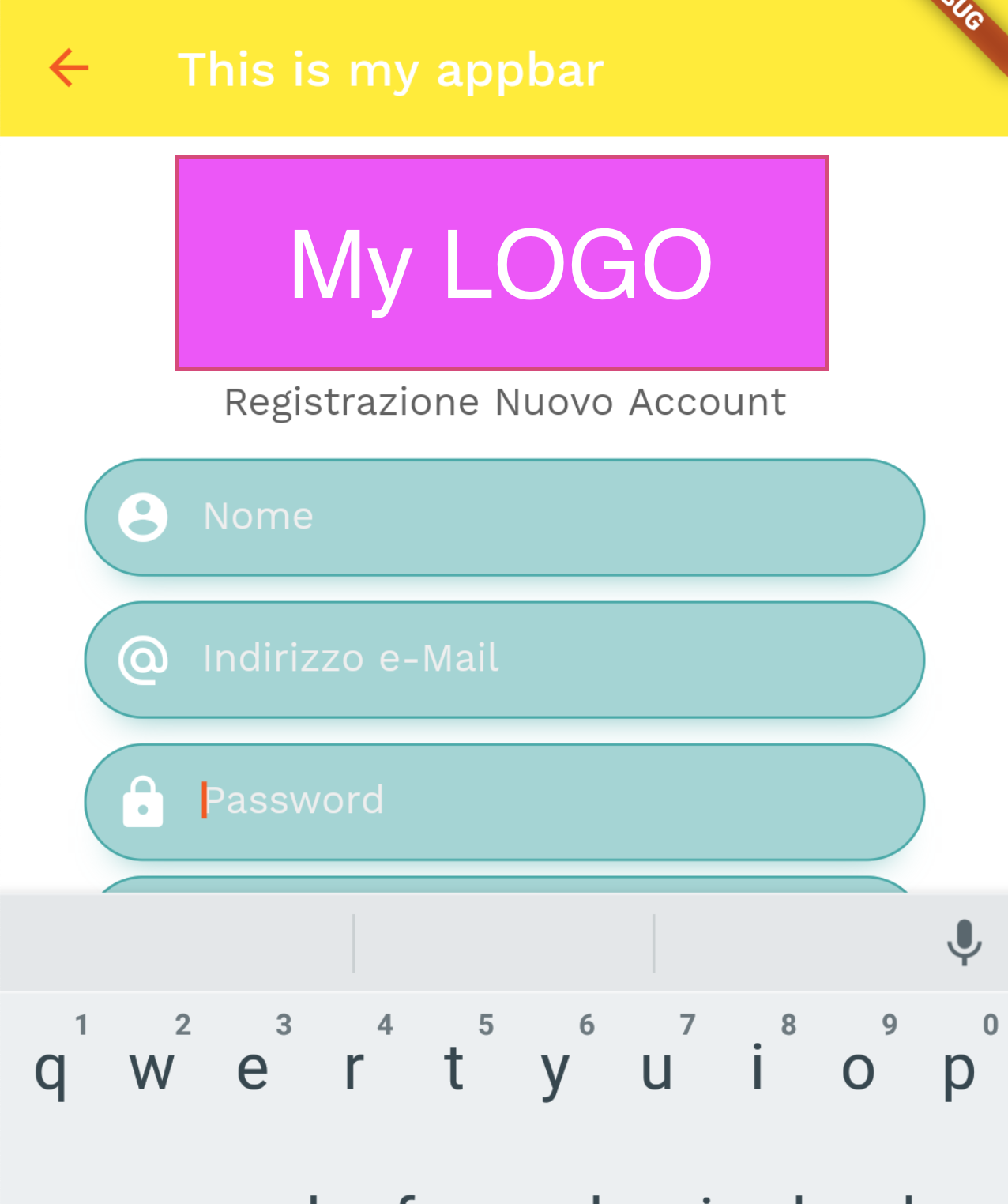
问题是我需要把我的标志堆在“这是我的应用程序”下面。
https://stackoverflow.com/questions/59772271
复制相似问题
腾讯云开发者

Copyright © 2013 - 2026 Tencent Cloud. All Rights Reserved. 腾讯云 版权所有
深圳市腾讯计算机系统有限公司 ICP备案/许可证号:粤B2-20090059  粤公网安备44030502008569号
腾讯云计算(北京)有限责任公司 京ICP证150476号 | 京ICP备11018762号