
MATLAB图像处理:我的直方图的最后一页
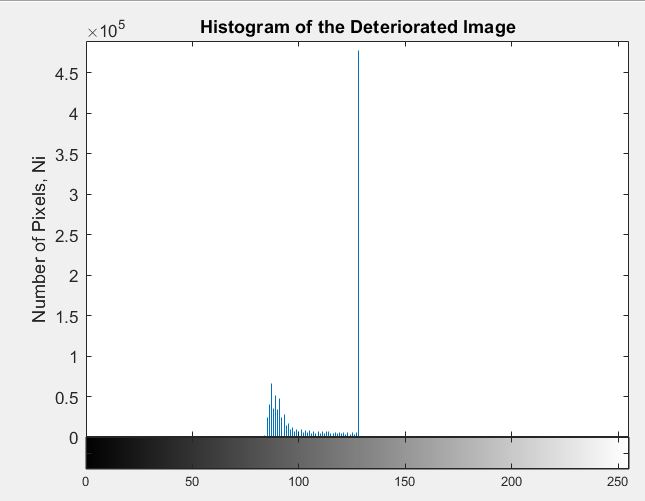
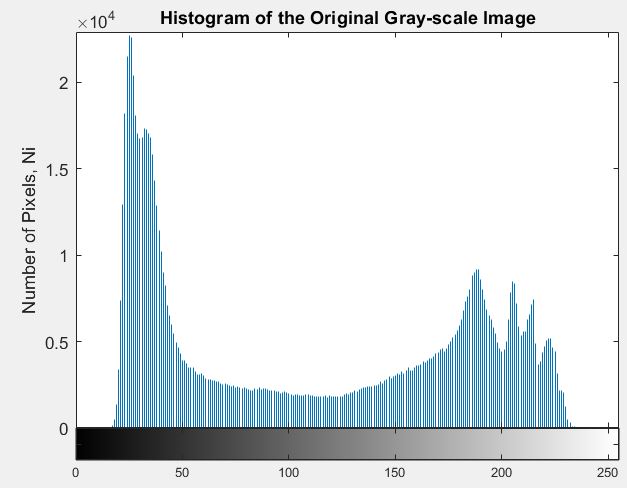
我使用了不调整功能来降低我原来图像的对比度。然而,当我生成这张低对比度图像的直方图时,我注意到最后一个垃圾桶会上升,而不会反映原始图像的直方图。我很肯定,当你降低对比度,垃圾箱高度相对相同,但直方图作为一个整体变得更窄。但在这种情况下,虽然它变得更窄,最后一个垃圾箱看起来比它应该要高得多。我已经附上了我的代码和其他相关的图片。
im = imread('elephant.jpg');

%converts image to grayscale and displays it
im_gray = rgb2gray(im);
figure;
imshow(im_gray)
title ('Original Gray-scale Image');

%displays the histogram of the grayscale image
figure;
imhist(im_gray);
axis([0 255 0 22920])
title ('Histogram of the Original Gray-scale Image')
xlabel ('Pixel Value (Gray-level), ai')
ylabel ('Number of Pixels, Ni')

%lowers the contrast of original image --> deteriorated image
J = imadjust(im_gray,[0 0.5], [0.3 0.5]);
figure;
imshow(J);
title ('Deteriorated Image')

%displays histogram of the deteriorated image
figure;
imhist(J);
axis([0 255 0 489000])
title ('Histogram of the Deteriorated Image')
xlabel ('Pixel Value (Gray-level), ai')
ylabel ('Number of Pixels, Ni')
回答 1
Stack Overflow用户
发布于 2020-01-19 23:35:07
因为imadjust正在夹紧象素的范围,所以最后一次“腾飞”。
命令:J = imadjust(im_gray,[0 0.5], [0.3 0.5]);
获取0.5 (高于128)的所有im_gray值,并将其替换为0.5 ( uint8范围内的128值)。
不调整文档有点不清楚:
J=不调整(I,low_in high_in,low_out high_out)将I中的强度值映射到J中的新值,从而使low_in和high_in之间的值映射到low_out和high_out之间的值。
它没有说明在范围[low_in high_in]之外的值发生了什么变化。
你可以从前一句理解它:
J=不调整(i,low_in high_in)将I中的强度值映射到J中的新值,从而使low_in和high_in之间的值映射为0到1之间的值。
low_in下面的所有值都映射到low_out。high_in上的所有值都映射到high_out。
在im_gray中,所有高于0.5 (高于128个)的值都映射为0.5。
由于im_gray在128个以上有许多像素,所以J有许多像素等于 128。
直方图的中心框数大约占总像素的一半。
您可以使用sum(J(:) == 128)进行检查。
https://stackoverflow.com/questions/59814932
复制相似问题
腾讯云开发者

Copyright © 2013 - 2026 Tencent Cloud. All Rights Reserved. 腾讯云 版权所有
深圳市腾讯计算机系统有限公司 ICP备案/许可证号:粤B2-20090059  粤公网安备44030502008569号
腾讯云计算(北京)有限责任公司 京ICP证150476号 | 京ICP备11018762号