
使用NodeJS从GCP的存储下载对象
使用NodeJS从GCP的存储下载对象
提问于 2020-01-22 17:56:48
我正在使用@google-云/存储从节点应用程序访问Google桶中的对象,但是我无法使它工作。
我已经在GCP的控制台上创建了一个服务帐户,并将存储管理角色分配给它,但是当我试图获取一个文件时,我得到了以下消息:
service-account-user@my-project-5411148.iam.gserviceaccount.com没有对我的桶-45826813215/某个对象的storage.objects.get访问权。
查看桶的权限选项卡,我可以看到服务帐户在那里列出了继承的注释,并且我没有为对象设置任何特定的权限。
我的代码如下所示:
const { Storage } = require('@google-cloud/storage');
const config = require('./config');
const storage = new Storage({ 'keyFilename': config.configFullPath('gcloud') });

const privateBucket = storage.bucket('my-bucket-45826813215');

let objectDownload = async (filename) => {
    let file = privateBucket.file(filename);
    let result = await file.download();
    return result;
}

objectDownload('some-object')
    .then(() => {
        console.log('Done');
    })
    .catch((err) => {
        console.log(err.message);
    });
对我做错了什么有什么想法吗?
回答 1
Stack Overflow用户
回答已采纳
发布于 2020-01-23 18:20:08
我可以用Storage Admin Role下载这个文件。下面是我所遵循的过程
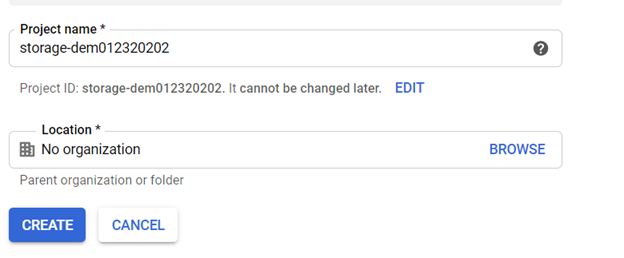
1.创建项目
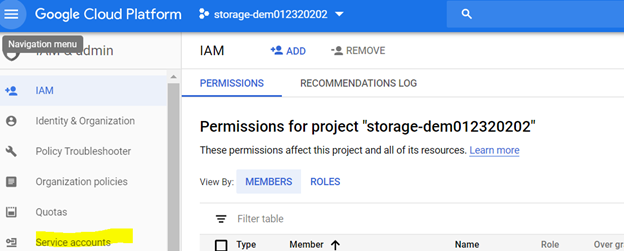
2.转到IAM并选择服务帐户
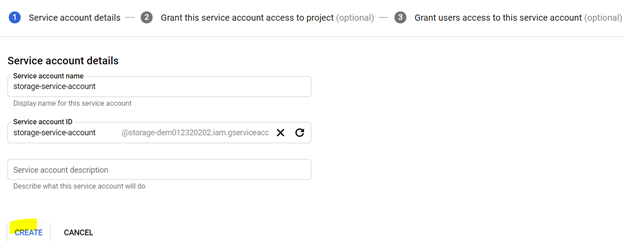
3.选择创建服务帐户
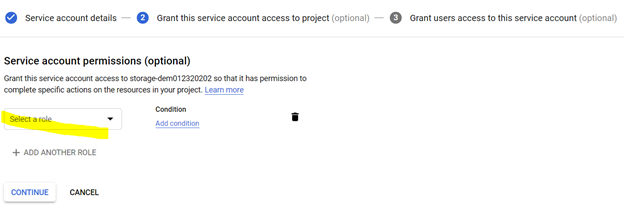
4.为服务帐户选择角色
5.创建密钥
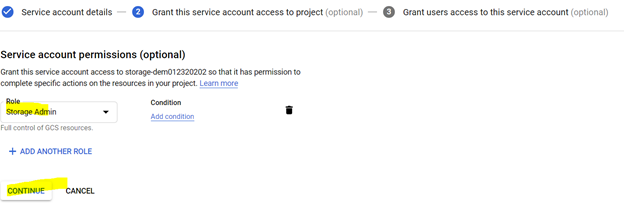
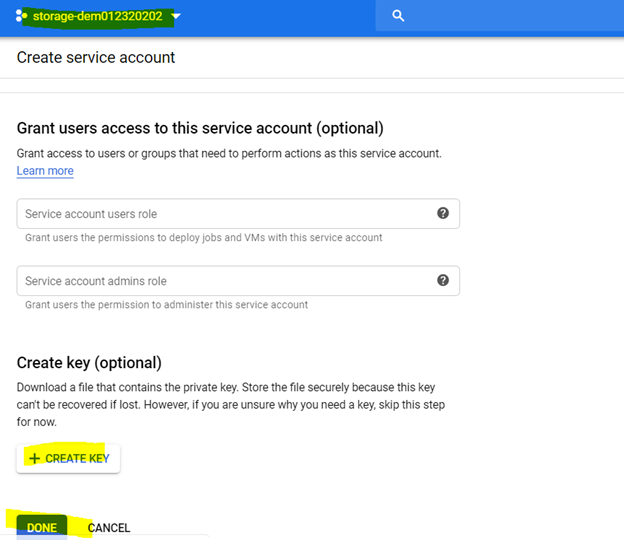
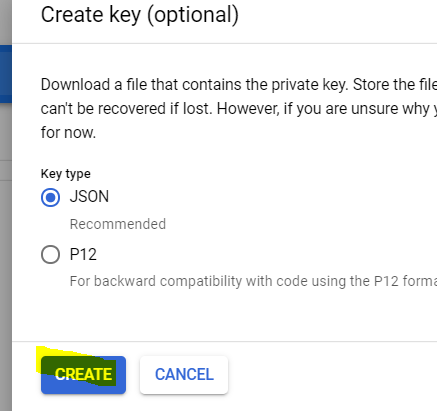
下面是工作代码:
const path = require('path');
const {Storage} = require('@google-cloud/storage');


async function test() {

const serviceKey = path.join(__dirname, './keys.json')


const storageConf = {keyFilename:serviceKey}

const storage = new Storage(storageConf)

const downlaodOptions = {
      destination: __dirname+'/test.jpg'
    };

    try {
    let res =await storage
      .bucket('storage1232020')
      .file('test.jpg')
      .download(downlaodOptions);
   }
   catch(err){
    console.log(err)
   }

}

test()注意事项:确保
- 服务帐户和桶是在项目下创建的。例如,我为项目storage-dem01232020创建了一个桶和服务帐户。
- 您正在正确地将密钥传递给代码。
下载文件的方法
const {Storage} = require('@google-cloud/storage');
const storage = new Storage();
const myBucket = storage.bucket('my-bucket');

const file = myBucket.file('my-file');

//-
// Download a file into memory. The contents will be available as the
second
// argument in the demonstration below, `contents`.
//-
file.download(function(err, contents) {});

//-
// Download a file to a local destination.
//-
file.download({
  destination: '/Users/me/Desktop/file-backup.txt'
}, function(err) {});

//-
// If the callback is omitted, we'll return a Promise.
//-
file.download().then(function(data) {
  const contents = data[0];
});有关更多detials,请参阅以下链接:https://googleapis.dev/nodejs/storage/latest/File.html#download
页面原文内容由Stack Overflow提供。腾讯云小微IT领域专用引擎提供翻译支持
原文链接:
https://stackoverflow.com/questions/59865677
复制相关文章
相似问题
腾讯云开发者

Copyright © 2013 - 2026 Tencent Cloud. All Rights Reserved. 腾讯云 版权所有
深圳市腾讯计算机系统有限公司 ICP备案/许可证号:粤B2-20090059  粤公网安备44030502008569号
腾讯云计算(北京)有限责任公司 京ICP证150476号 | 京ICP备11018762号