
不使用gouraud阴影处理输出
对不起,我是一个全新的opengl es和处理下面的处理和着色输出仅背景。
PShader Gouraud,Phong;
rocket = loadShape("rocket.obj");
rocket.setFill(color(800, 0, 0));
Gouraud= loadShader("gouraudfragment.glsl","gouraudvertex.glsl");
Phong= loadShader("phongfragment.glsl","phongvertex.glsl");background(0);
pushMatrix();
shader(Gouraud);
translate(130,height/2.0);
rotateY(rc);
rotateX(0.4);
noStroke();
fill(#800080);
box(100);
rc+=(0.02+speedCube);
rc*=dirCube;
popMatrix();
pushMatrix();
shader(Gouraud);
translate(width/2, height/2 + 100, -200);
rotateZ(PI);
rotateY(rr);
shape(rocket,100,100);
rr +=( 0.02+speedRocket);
rr*=dirRocket;
popMatrix();顶点着色机
varying vec3 N;
varying vec3 v;
varying vec4 diffuse;
varying vec4 spec;
attribute vec4 position;
attribute vec3 normal;
uniform mat4 modelview;
uniform mat4 projectionMatrix;
uniform mat3 normalMatrix;
uniform vec4 lightPosition;
uniform vec3 lightAmbient;
uniform vec3 lightDiffuse;
uniform vec3 lightSpecular;
uniform float SpecularPower;

void main()
{
   vec4 diffuse;
   vec4 spec;
   vec4 ambient;

   v = vec3(modelview * position);
   N = normalize(normalMatrix * normal);
   gl_Position = projectionMatrix * position;

   vec3 L = normalize(lightPosition.xyz - v);
   vec3 E = normalize(-v);
   vec3 R = normalize(reflect(-L,N));

   ambient = vec4(lightAmbient,100.0);
   diffuse = vec4(clamp( lightDiffuse * max(dot(N,L), 0.0)  , 0.0, 1.0 ) ,100.0);
   spec = vec4(clamp (lightSpecular * pow(max(dot(R,E),0.0),0.3*SpecularPower) , 0.0, 1.0 ),100.0);

   color = ambient + diffuse + spec;
}
破片着色机
void main()
{
    gl_FragColor = color;
}
请帮帮忙!涂布前的遮阳
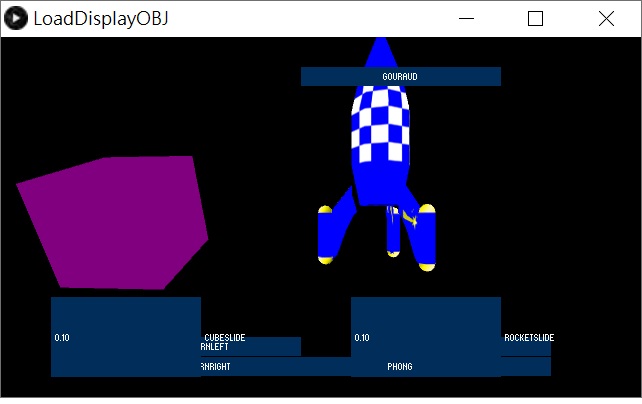
涂布后遮阳
处理加载obj和绘制一个立方体并应用gouraud着色器,但之后只显示背景,加载obj和多维数据集就消失了。什么都没显示!
回答 1
Stack Overflow用户
发布于 2020-01-23 17:40:47
着色器甚至不编译和链接。顶点着色器有1 varying输出(color),因此框架着色器需要输入varying vec4 color;。
varying vec4 color;设置剪辑空间位置时,顶点坐标必须通过模型视图和投影矩阵进行转换:
gl_Position = projectionMatrix * modelview * position; 缺少v和N的类型规范,ambient、diffuse和spec的类型是vec4而不是vec3。
顶点着色器:
attribute vec4 position;
attribute vec3 normal;

varying vec4 color;

uniform mat4 modelview;
uniform mat4 projectionMatrix;
uniform mat3 normalMatrix;
uniform vec4 lightPosition;
uniform vec3 lightAmbient;
uniform vec3 lightDiffuse;
uniform vec3 lightSpecular;
uniform float SpecularPower;

void main()
{
   vec3 v      = vec3(modelview * position);
   vec3 N      = normalize(normalMatrix * normal);
   gl_Position = projectionMatrix * modelview * position;

   vec3 L = normalize(lightPosition.xyz - v);
   vec3 E = normalize(-v);
   vec3 R = normalize(reflect(-L,N));

   vec4 ambient = vec4(lightAmbient,100.0);
   vec4 diffuse = vec4(clamp( lightDiffuse * max(dot(N,L), 0.0)  , 0.0, 1.0 ) ,100.0);
   vec4 spec = vec4(clamp (lightSpecular * pow(max(dot(R,E),0.0),0.3*SpecularPower) , 0.0, 1.0 ),100.0);

   color = ambient + diffuse + spec;
}
碎片着色器:
varying vec4 color;

void main()
{
    gl_FragColor = color;
}当然,你必须设置至少一个环境光源ambientLight()。您也可以使用directionalLight()、pointLight()或spotLight()。
但是请注意,你的着色器只能处理一个光源。更多的1光源将获得
OpenGL在endDraw()顶部的错误1282 :无效操作
如果您想使用一个以上的光源,那么您必须在lightPosition、lightAmbient、lightDiffuse和lightSpecular的顶点着色器中使用统一的阵列。见处理中的着色器类型(https://processing.org/tutorials/pshader/)
https://stackoverflow.com/questions/59877382
复制相似问题
腾讯云开发者

Copyright © 2013 - 2026 Tencent Cloud. All Rights Reserved. 腾讯云 版权所有
深圳市腾讯计算机系统有限公司 ICP备案/许可证号:粤B2-20090059  粤公网安备44030502008569号
腾讯云计算(北京)有限责任公司 京ICP证150476号 | 京ICP备11018762号