
添加Get设置DatagridViewTextBoxCell
添加Get设置DatagridViewTextBoxCell
提问于 2020-01-24 22:51:03
我尝试将一个get; set;属性添加到我的DataGridViewTextBoxCell中,但它不起作用
为此,我创建了我的公共类:
public class MyData : DataGridViewTextBoxCell
    {
        public string Url { get; set; }
    }
在我的主要代码中
dataGridView1.Rows.Add();
MyData CustomCell = (MyData)dataGridView1.Rows[0].Cells[0];
CustomCell.Url = "";在代码执行过程中,MyData CustomCell = (MyData)dataGridView1.Rows[0].Cells[0];行出现了错误
System.InvalidCastException :“无法将对象类型System.Windows.Forms.DataGridViewTextBoxCell转换为..MyData”。
您有线索可以在datagridview单元格中添加我的自定义属性吗?
非常感谢
回答 1
Stack Overflow用户
回答已采纳
发布于 2020-01-25 00:25:19
您还需要创建一个Column类并将CellTemplate属性设置为Cell类的一个新实例:
public class MyDataGridViewTextBoxColumn : DataGridViewTextBoxColumn
{
    public MyDataGridViewTextBoxColumn() =>
        CellTemplate = new MyDataGridViewTextBoxCell();
}您的Cell类应该如下所示:
public class MyDataGridViewTextBoxCell : DataGridViewTextBoxCell
{
    public MyDataGridViewTextBoxCell() { }

    public string Url { get; set; }

    //Don't forget to clone your new properties.
    public override object Clone()
    {
        var c = base.Clone();
        ((MyDataGridViewTextBoxCell)c).Url = Url;
        return c;
    }
}现在,您可以通过设计器添加新的Column类型:
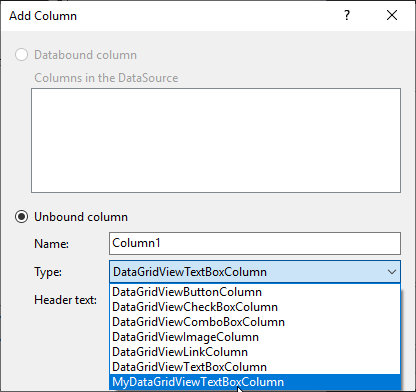
或通过守则:
var myNewTBC = new MyDataGridViewTextBoxColumn
{
    HeaderText = "My Custom TB",
};
dataGridView1.Columns.Add(myNewTBC);假设自定义文本框列是DGV中的第一列,那么您可以得到如下所示的Cell:
var myTB = (MyDataGridViewTextBoxCell)dataGridView1.Rows[0].Cells[0];
myTB.Url = "...";页面原文内容由Stack Overflow提供。腾讯云小微IT领域专用引擎提供翻译支持
原文链接:
https://stackoverflow.com/questions/59904669
复制相关文章
相似问题
腾讯云开发者

Copyright © 2013 - 2026 Tencent Cloud. All Rights Reserved. 腾讯云 版权所有
深圳市腾讯计算机系统有限公司 ICP备案/许可证号:粤B2-20090059  粤公网安备44030502008569号
腾讯云计算(北京)有限责任公司 京ICP证150476号 | 京ICP备11018762号