
角度变化img src在超时
在我的html中有:
<img src="{{activeImage}}" class="img-fluid img-file img-center-style">在.ts中,activeImage定义为默认值:
  promotions: any = [];
  activeImage: string = 'assets/Promo_1.jpg';
现在,在ngOnInit方法中,我调用一个服务,它返回以下内容并在促销中设置它:
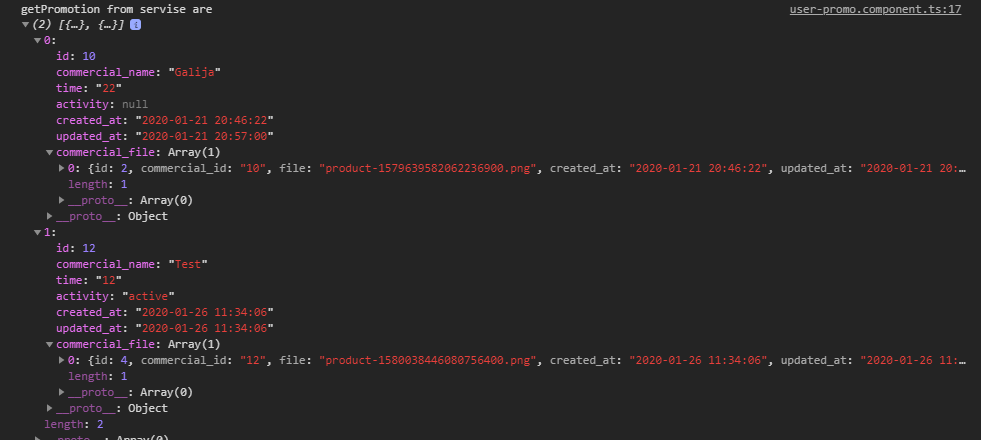
我的目标是什么:
若要将activeImage更改为commercial_file数组中文件的值,请执行以下操作。(它总是有一个元素- 0)。然后,在一段时间后,它将值更改为数组中的第二个文件。
以下是我尝试过的:
  ngOnInit() {
    this.mainService.getPromotion().subscribe(promotions => {
      console.log("getPromotion from servise are ", promotions);
      this.promotions = promotions;

      //If there is something, call method setActiveImage and send array
      if (this.promotions.length > 0) {
        this.setActiveImage(this.promotions);
      }

    });

  }

  setActiveImage(promotions) {
    for (let i = 0; i <= promotions.length - 1; i++) {
      console.log("one promotion is: ", promotions[i]);
      setTimeout(function () {
      //SET SRC TO FILE FROM PROMOTIONS
        this.activeImage = 'http://myurl.com/public/Commercials/' + promotions[i].commercial_file[0].file;
      }, 3000);

    }
}img应该有3s的文件值,然后更改为第二个映像值。(但没有发生),它只是显示了在开头定义的默认值(assets/Promo_1.jpg)。
现在,如果我在ngOnInit中设置它而没有任何setTimeout或任何东西,那么它工作得很好,并且很好地设置了图片:
this.activeImage = 'http://myurl/public/Commercials/' + this.promotions[0].commercial_file[0].file;StackBlitz:https://stackblitz.com/edit/angular-5fteig?file=src%2Fapp%2Fapp.component.ts
TLDR:使用从服务器收集的数据在3s上更改img。
回答 1
Stack Overflow用户
发布于 2020-01-26 14:09:31
对函数使用箭头函数或绑定 this,如果需要访问this
setTimeout(()=> {
    //SET SRC TO FILE FROM PROMOTIONS
    this.activeImage = 'http://myurl.com/public/Commercials/' + promotions[i].commercial_file[0].file;
}, 3000);同样在您的示例中,在使用它之前,您需要在构造函数中获取服务实例,如果编辑器没有自动导入它,也需要导入它。
constructor(private mainService : mainService){}编辑:
若要每3秒用增量值设置定时器更改图像,请执行以下操作:
setActiveImage(promotions) {
    for (let i = 0; i <= promotions.length - 1; i++) {
      console.log("one promotion is: ", promotions[i]);
      setTimeout( ()=> {
      //SET SRC TO FILE FROM PROMOTIONS
        this.activeImage = 'http://myurl.com/public/Commercials/' + promotions[i].commercial_file[0].file;
      }, 3000*(i+1)); //Change i+1 to i if you don't want delay for 1st image.
    }
}https://stackoverflow.com/questions/59919084
复制相似问题
腾讯云开发者

Copyright © 2013 - 2026 Tencent Cloud. All Rights Reserved. 腾讯云 版权所有
深圳市腾讯计算机系统有限公司 ICP备案/许可证号:粤B2-20090059  粤公网安备44030502008569号
腾讯云计算(北京)有限责任公司 京ICP证150476号 | 京ICP备11018762号