
如何使用UIPreviewParameters将文本范围指定为UIContextMenuInteraction突出显示的预览,而不隐藏视图的其余部分?
iOS 13.4更新(2020年3月):
当UIPointerInteraction悬停在链接上时,也会发生这种情况。
我有一个显示富文本的视图,并在用户长时间按下链接时显示iOS 13上下文菜单。当用户开始长按压时,我希望能够突出显示链接而不是整个视图。
为此,我提供了一个UITargetedPreview对象,该对象包含UIPreviewParameters,并将每一行的CGRects突出显示给视图的UIContextMenuInteractionDelegate。这正确地突出了链接,但是也隐藏了视图的其余部分,这带来了不必要的副作用。
这张图片说明了这个问题:
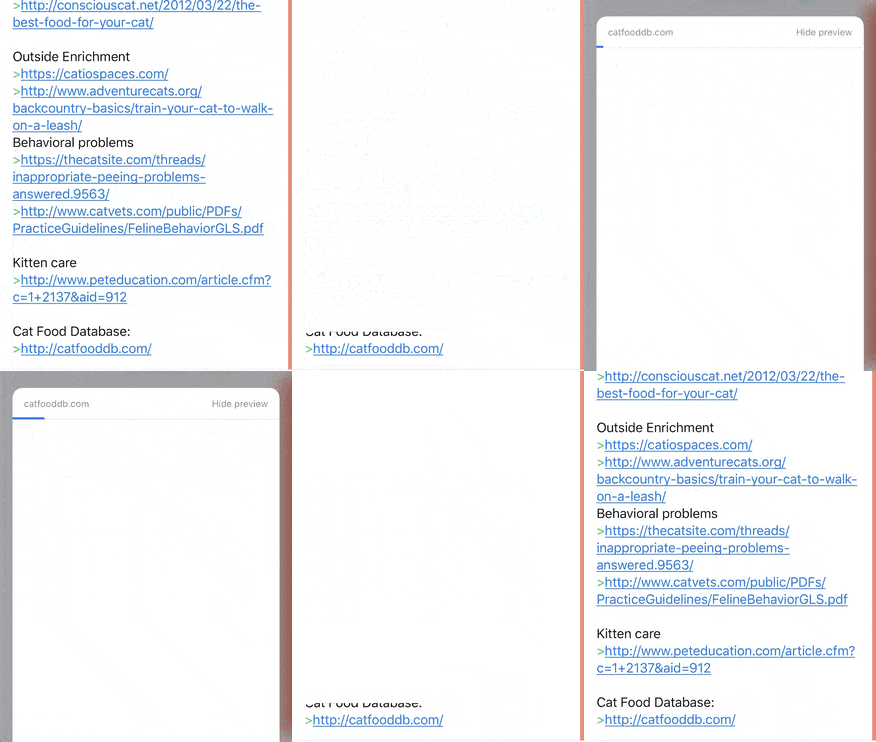
注意,虽然链接被正确地突出显示,但是视图的其余部分在链接被长期按下后释放时会闪烁。
将此与苹果自己的Notes.app中的行为进行比较:
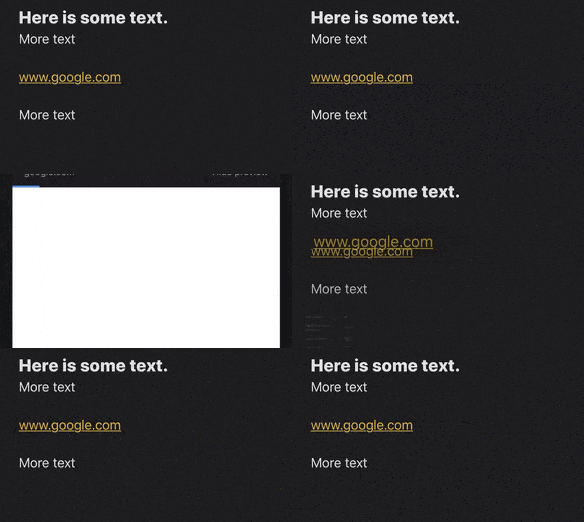
注意,当链接被长期按下时,视图的其余部分不会消失。这在苹果的其他应用程序(如Safari)中也能像预期的那样工作。
我以以下方式向交互委托提供UITargetedPreview:
func contextMenuInteraction(_ interaction: UIContextMenuInteraction, previewForHighlightingMenuWithConfiguration configuration: UIContextMenuConfiguration) -> UITargetedPreview? {
    guard let range = configuration.identifier as? NSRange else { return nil }
    let lineRects: [NSValue] = // calculate appropriate rects for the range of text
    let parameters = UIPreviewParameters(textLineRects: lineRects)
    return UITargetedPreview(view: /* the rich text view */, parameters: parameters)
}

func contextMenuInteraction(_ interaction: UIContextMenuInteraction, previewForDismissingMenuWithConfiguration configuration: UIContextMenuConfiguration) -> UITargetedPreview? {
    guard let range = configuration.identifier as? NSRange else { return nil }
    let lineRects: [NSValue] = // calculate appropriate rects for the range of text
    let parameters = UIPreviewParameters(textLineRects: lineRects)
    return UITargetedPreview(view: /* the rich text view */, parameters: parameters)
}我在UITargetedPreview和UIPreviewParameters的文档中找不到任何东西,所以有人知道如何做到这一点吗?
回答 2
Stack Overflow用户
发布于 2020-04-03 08:36:53
好吧,多亏了一个在WebKit中的实现,我终于找到了该怎么做。我做错的不是提供有针对性的预览UIPreviewTarget。
若要仅突出显示视图的一部分,需要:
- 提供UIPreviewParameters,说明要在预览中显示的视图部分,并将背景颜色设置为与要预览的视图相同的颜色。
- 提供建立以下内容的UIPreviewTarget:
- the whole view as the container of the animation
- the centre of the portion being shown as the centre of the animation
- 要显示的视图部分的创建快照,并将其指定为UITargetedPreview视图。
在代码中,如下所示:
let view: UIView = // the view with the context menu interaction
let highlightedRect: CGRect = // the rect of the highlighted portion to show

// 1
let previewParameters = UIPreviewParameters()
previewParameters.visiblePath = // path of highlighted portion of view to show, remember you can use UIPreviewParameters.init(textLineRects:) for text
previewParameters.backgroundColor = view.backgroundColor

// 2: Notice that we're passing the whole view in here
let previewTarget = UIPreviewTarget(container: view, center: CGPoint(x: highlightedRect.midX, y: highlightedRect.midY))

// 3: Notice that we're passing the snapshot view in here - not the whole view
let snapshot = view.resizableSnapshotView(from: highlightedRect, afterScreenUpdates: true, withCapInsets: .zero)!
return UITargetedPreview(view: snapshot, parameters: previewParameters, target: previewTarget)Stack Overflow用户
发布于 2020-11-04 12:57:43
你的解决方案非常有用。我使用hitTest来检测高度视图,我对结果很高兴,所以只想分享。
- (UITargetedPreview *)contextMenuInteraction:(UIContextMenuInteraction *)interaction previewForHighlightingMenuWithConfiguration:(UIContextMenuConfiguration *)configuration {
    UIView *view = interaction.view;
    CGPoint location = [interaction locationInView:view];
    // Detecting the hittable subview at the given location
    UIView *subView = [view hitTest:location withEvent:nil];
    if (subView) {
        CGRect highlightedRect = subView.frame;
        UIPreviewParameters *previewParameters = [UIPreviewParameters new];
        previewParameters.backgroundColor = subView.backgroundColor;
        previewParameters.visiblePath = [UIBezierPath bezierPathWithRect:CGRectMake(0, 0, highlightedRect.size.width, highlightedRect.size.height)];

        return [[UITargetedPreview alloc] initWithView:subView parameters:previewParameters];
    }
    return nil;
}
https://stackoverflow.com/questions/59916934
复制相似问题
腾讯云开发者

Copyright © 2013 - 2026 Tencent Cloud. All Rights Reserved. 腾讯云 版权所有
深圳市腾讯计算机系统有限公司 ICP备案/许可证号:粤B2-20090059  粤公网安备44030502008569号
腾讯云计算(北京)有限责任公司 京ICP证150476号 | 京ICP备11018762号