
如何调整DataGrid列的序号WPF?
我有这样的DataGrid
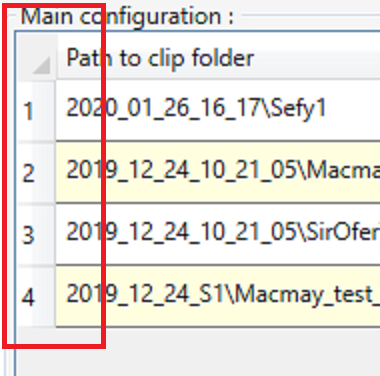
为了自动获得订单号,我这样添加了DataGrid方法LoadingRow。
.xalm
...
<DataGrid ItemsSource="{Binding Path=GridItems}"
            HorizontalGridLinesBrush="Gray"
            RowHeaderWidth="20"
            LoadingRow="Dg_main_configuration_LoadingRow"
            CanUserReorderColumns="False"
            CanUserDeleteRows="False"
            CanUserResizeRows="False"
            CanUserSortColumns="False"
            VerticalGridLinesBrush="LightGray"
            x:Name="Dg_main_configuration"
            CanUserResizeColumns="False"
            PreviewMouseLeftButtonUp="Dg_main_configuration_PreviewMouseLeftButtonUp"
            AlternatingRowBackground="LightYellow"
            CanUserAddRows="False"
            MinHeight="350"
            MaxHeight="350"
            Grid.Column="0"
            AutoGenerateColumns="False">
...
在代码中
private void Dg_main_configuration_LoadingRow(object sender, DataGridRowEventArgs e)
{
    e.Row.Header = (e.Row.GetIndex() + 1).ToString();
}
一切都很好,但无论如何,我想调整这一行列。
问题是:
- 您可以在
Path to clip folder旁边的屏幕截图中看到(左边),在右下角有一个矩形的单元格,它实际上是一种按钮(因为我可以点击它,但是没有什么变化),如何禁用它,或者设置像#这样的符号 - 数字
1, 2, 3, 4水平不在中间,如何修复? - 最后,你可以看到,有一条横线
DarkGray分隔行,但我不知道为什么数字不包括这条单独的行?我的意思是在数字列之后开始行。如何在序号中包括单独的行?
回答 2
Stack Overflow用户
发布于 2020-01-27 14:52:15
您可以在列中显示行号,例如使用上述这里方法。
然后,您可以使用ElementStyle对TextBlock进行中心设置。
<DataGridTextColumn Binding="{Binding RelativeSource={RelativeSource AncestorType=DataGridRow},
                        Converter={local:RowToIndexConverter}}">
    <DataGridTextColumn.ElementStyle>
        <Style TargetType="TextBlock">
            <Setter Property="HorizontalAlignment" Value="Center" />
            <Setter Property="VerticalAlignment" Value="Center" />
        </Style>
    </DataGridTextColumn.ElementStyle>
</DataGridTextColumn>Stack Overflow用户
发布于 2020-01-27 13:46:14
对于第2点(也可能让您更多地了解第3点)。DataGrid可以有一个RowHeaderTemplate (或者更一般的RowHeaderStyle),它将应用于每个行标题值(在代码中设置)。这是一个相关问题。
对于第1点(以及默认行头模板的第2点和第3点),我建议您查看一下微软的默认DataGrid样式和模板。您可能需要设置整个DataGrid模板以更改左上角部分(或尝试拥有一个具有键{ComponentResourceKey ResourceId=DataGridSelectAllButtonStyle,TypeInTargetAssembly={x:Type DataGrid}}的资源)--即DataGridSelectAllButtonStyle,它应该是一个按钮,如果可以在数据网格中选择行,该按钮将选择所有行。
对于第3点,要将水平网格线设置为不同的颜色(例如,匹配行标题的分隔符),请使用HorizontalGridLinesBrush属性。
https://stackoverflow.com/questions/59931191
复制相似问题
腾讯云开发者

Copyright © 2013 - 2026 Tencent Cloud. All Rights Reserved. 腾讯云 版权所有
深圳市腾讯计算机系统有限公司 ICP备案/许可证号:粤B2-20090059  粤公网安备44030502008569号
腾讯云计算(北京)有限责任公司 京ICP证150476号 | 京ICP备11018762号