
ngFor循环在body div中创建溢出。
ngFor循环在body div中创建溢出。
提问于 2020-01-30 14:10:50
我使用一个ngFor循环来呈现数据,问题是它会导致正文添加一个与数据大小相同的溢出,例如:我希望在页面的50%内呈现数据,并查看在 data div中使用溢出滚动所需的其他数据。
P.S :我已经尝试过在CSS中使用vh,而overflow-y: hidden并没有解决我的问题
如果有人有解决办法,我会很高兴听到它,谢谢提前!如果事情不清楚,请告诉我
页面图片:
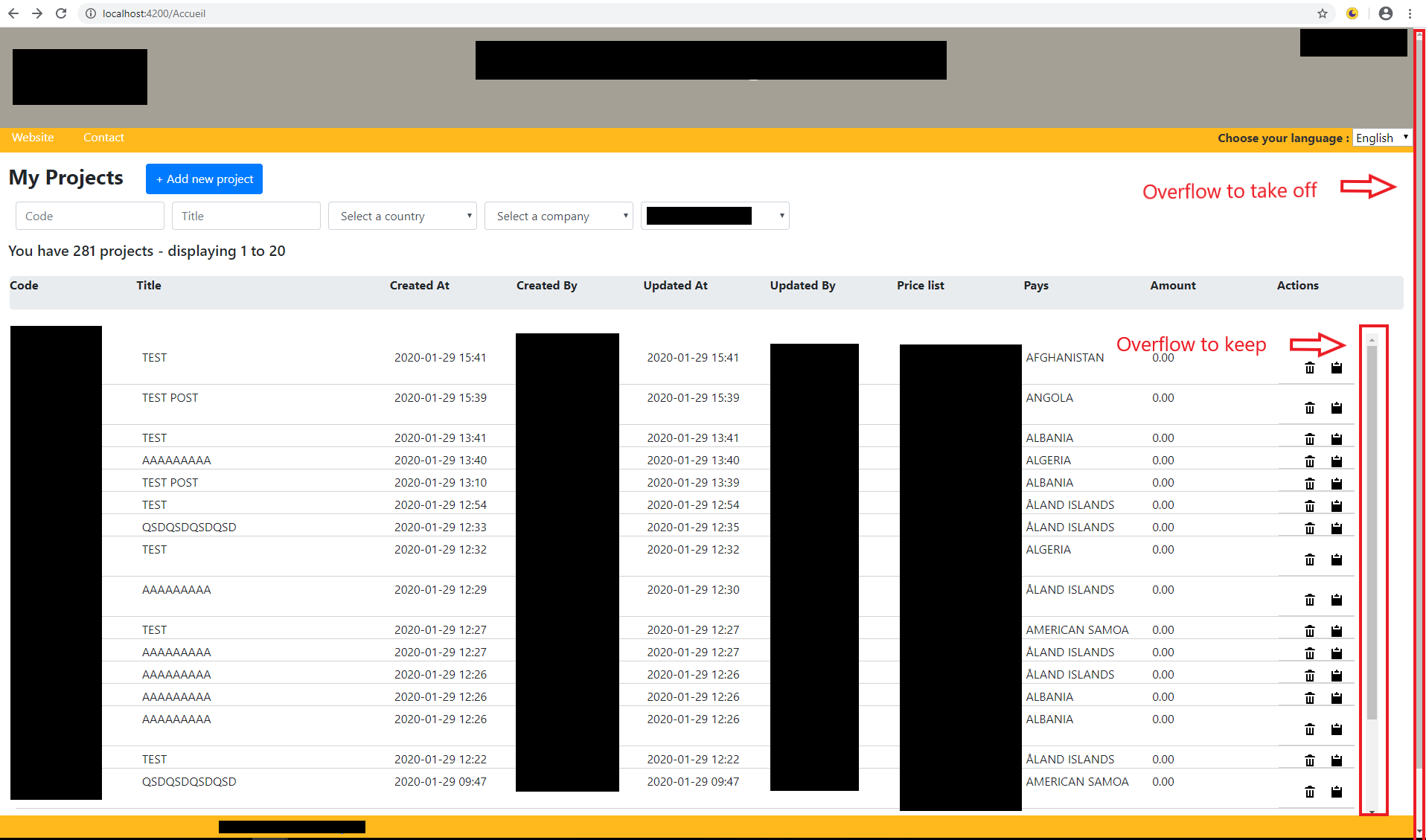
HTML示例
<div  class="projectsContainer container hauteur" id="hauteur" >
<li   class="flex-row bb pt5 pb5 flex-noshrink mh20" *ngFor="let p of Projects.data | paginate: {itemsPerPage: itemsPerPage,currentPage: currentPage,totalItems: totalItems};" value="{{p.id}}"  >
  <a  class="flex2 pointeur" [routerLink]=" (['/Project',p.id])" (change)="currentIndex = $event.target.value" >{{p.code}}</a>
  <a class="flex4"  >{{p.title}}</a>
  <span class="flex2">{{p.created_at}}</span>
  <span class="flex2">{{p.createdby_name}}</span>
  <span class="flex2">{{p.updated_at}}</span>
  <span class="flex2">{{p.updatedby_name}}</span>
  <span class="flex2">{{p.pricelist_label}}</span>
  <span class="flex2 pl10">{{p.country_label}}</span>
  <span class="flex2 text-align-right mb5">{{p.total_fourniture}}</span>
  <a (click)="openModal(template)" class="flex-row bb pt5 pointeur pb5 flex-noshrink mh20"><img src="{{this.trash}}" class="trash"></a>
  <a class="flex-row bb pt5 pointeur pb5 flex-noshrink mh20" (click)="openModal(template2)"><img src="{{this.clip}}" class="clip"></a>
 </li>
</div>
CSS
.container {
 padding-top: 15px;
 width: 100%;
 margin-right: unset;
 margin-left: unset;
 max-width: unset;
}

.projectsContainer{
  padding-top: 15px;
  width: 97%;
  margin-left: 10px;
  max-width: unset;
  overflow-y: auto;
 }

.hauteur{
 height: 60vh !important;
}

.flex-row{
 display: flex;
 flex-direction: row;
}

.pr5{
 padding-bottom: 5px;
 }

.pt5{
 padding-top: 5px;
 }

.flex2{
 flex: 2;
 }
编辑
当我在身体中使用overflow-y: hidden时会发生什么
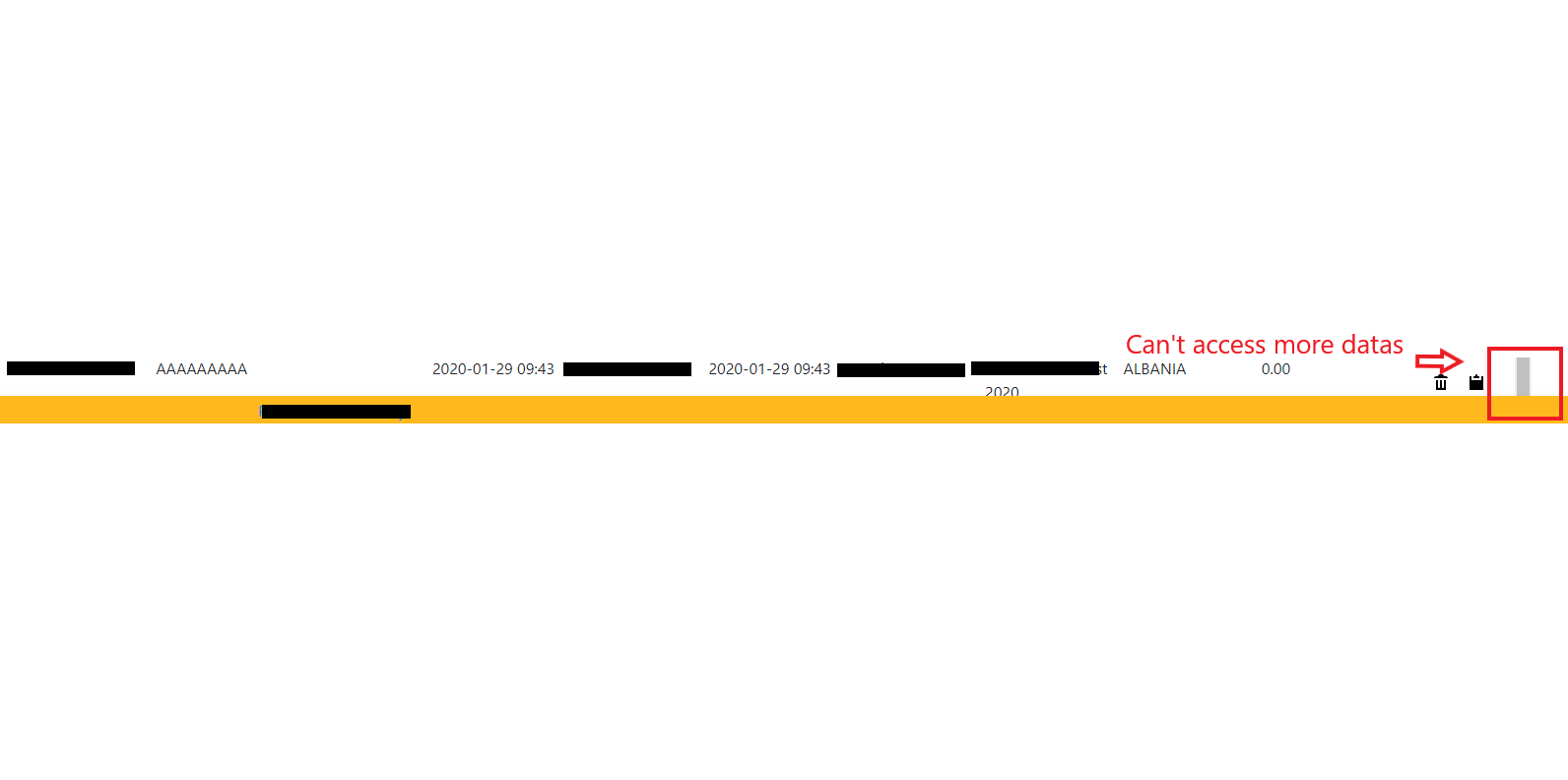
回答 2
Stack Overflow用户
回答已采纳
发布于 2020-01-30 14:17:49
看起来你想脱下的是html或body的过头。
试试这个:
html, body {
 overflow-y: hidden;
}如果问题是要保留滚动的元素(我假设是flex-row )退出页面,将其设置为一个高度,以便适合页面:
.flex-row {
 display: flex;
 flex-direction: row;
 height: calc(100vh - 200px)
}
更改200 of表示上述元素的高度+底部的高度。
Stack Overflow用户
发布于 2020-01-30 14:25:24
尝试添加以下内容:
@media (min-width: 769px) {
    body {
     overflow: hidden;
    }
}
这应该能解决这个问题。
页面原文内容由Stack Overflow提供。腾讯云小微IT领域专用引擎提供翻译支持
原文链接:
https://stackoverflow.com/questions/59987904
复制相关文章
相似问题
腾讯云开发者

Copyright © 2013 - 2026 Tencent Cloud. All Rights Reserved. 腾讯云 版权所有
深圳市腾讯计算机系统有限公司 ICP备案/许可证号:粤B2-20090059  粤公网安备44030502008569号
腾讯云计算(北京)有限责任公司 京ICP证150476号 | 京ICP备11018762号