
SwiftUI ActionSheet Picker
SwiftUI ActionSheet Picker
提问于 2020-02-02 18:07:57
回答 1
Stack Overflow用户
回答已采纳
发布于 2020-03-13 09:27:02
struct ContentView: View {
  init() {
    UITableView.appearance().separatorColor = .clear
   }
var inputArray = ["100","101","102"]
@State var slectedSegmant = "ActionSheet"
@State var slectedObj = "101"
@State var enableSheet = false
var test = false
var body: some View {
    ZStack {
        VStack(spacing: 10) {
            Picker(selection: $slectedSegmant, label: Text("Segment")) {
                Text("Alert").tag("Alert")
                Text("ActionSheet").tag("ActionSheet")
            }.pickerStyle(SegmentedPickerStyle())
                .labelsHidden()
                .padding(EdgeInsets.init(top: 50, leading: 10, bottom: 0, trailing: 10))

            Text("Alert & Pickers")
                .font(Font.system(size: 35, design: .rounded))
                .fontWeight(.bold)
                .frame(maxWidth: .infinity, alignment: .leading)
                .padding(.horizontal)

            List((0...50),id: \.self) { input in
                ZStack {
                    HStack(spacing: 10) {
                        Image(systemName: "book")
                            .font(.title)
                            .padding(.leading, 10)
                        VStack(alignment: .leading, spacing: 5, content: {
                            Text("Simple")
                            Text("3 different buttons")
                        })
                        Spacer()
                    }.padding(.vertical)
                        .frame(maxWidth:.infinity)
                        .background(RoundedRectangle(cornerRadius: 10).foregroundColor(Color.white).shadow(radius: 1.5)
                        )

                    Button(action: {
                        self.enableSheet = true
                    }) {
                        Text("")
                    }
                }
            }.padding()
        }.blur(radius: $enableSheet.wrappedValue ? 1 : 0)
            .overlay(
                $enableSheet.wrappedValue ? Color.black.opacity(0.6) : nil
            )
       if $enableSheet.wrappedValue {
            GeometryReader { gr in
                VStack {
                    VStack {
                        Text("PickerView")
                            .font(.headline)
                            .foregroundColor(.gray)
                            .padding(.top, 10)
                        Text("Prefered ContentHeight")
                            .padding(.top, 5)
                        Picker("test", selection: self.$slectedObj) {
                            Text("100").id("100")
                            Text("101").id("101")
                            Text("101").id("102")
                        }.labelsHidden()
                    }.background(RoundedRectangle(cornerRadius: 10)
                        .foregroundColor(Color.white).shadow(radius: 1))
                    VStack {
                        Button(action: {
                            debugPrint("Done Selected")
                            self.enableSheet = false
                        }) {
                            Text("Done").fontWeight(Font.Weight.bold)
                        }.padding()
                            .frame(maxWidth: gr.size.width  - 90)
                            .background(RoundedRectangle(cornerRadius: 10)
                            .foregroundColor(Color.white).shadow(radius: 1))

                    }
                }.position(x: gr.size.width / 2 ,y: gr.size.height - 200)
            }
        }
    }.edgesIgnoringSafeArea(.all)
  }
 }
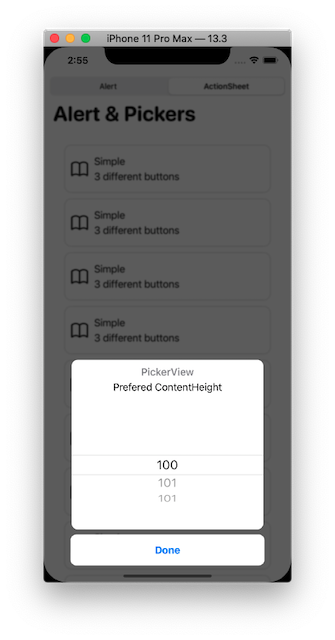
输出
页面原文内容由Stack Overflow提供。腾讯云小微IT领域专用引擎提供翻译支持
原文链接:
https://stackoverflow.com/questions/60029060
复制相关文章
相似问题
腾讯云开发者

Copyright © 2013 - 2026 Tencent Cloud. All Rights Reserved. 腾讯云 版权所有
深圳市腾讯计算机系统有限公司 ICP备案/许可证号:粤B2-20090059  粤公网安备44030502008569号
腾讯云计算(北京)有限责任公司 京ICP证150476号 | 京ICP备11018762号