
单击“保存”按钮时更新R闪亮DT中的值
单击“保存”按钮时更新R闪亮DT中的值
提问于 2020-02-03 21:22:21
因此,我试图制作一个闪亮的应用程序,作为一个计算器。因此,基本思想是建立在DT编辑函数上,我找到了这里。当用户单击“保存”按钮时,您可以看到下面的屏幕截图,我希望更新列TotalReach的值,它只不过是impressions/frequency。我正试图在input$Updated_trich下做这件事。但是当我这样做的时候,我得到了这个错误Warning: Error in function_list[[k]]: attempt to apply non-function。
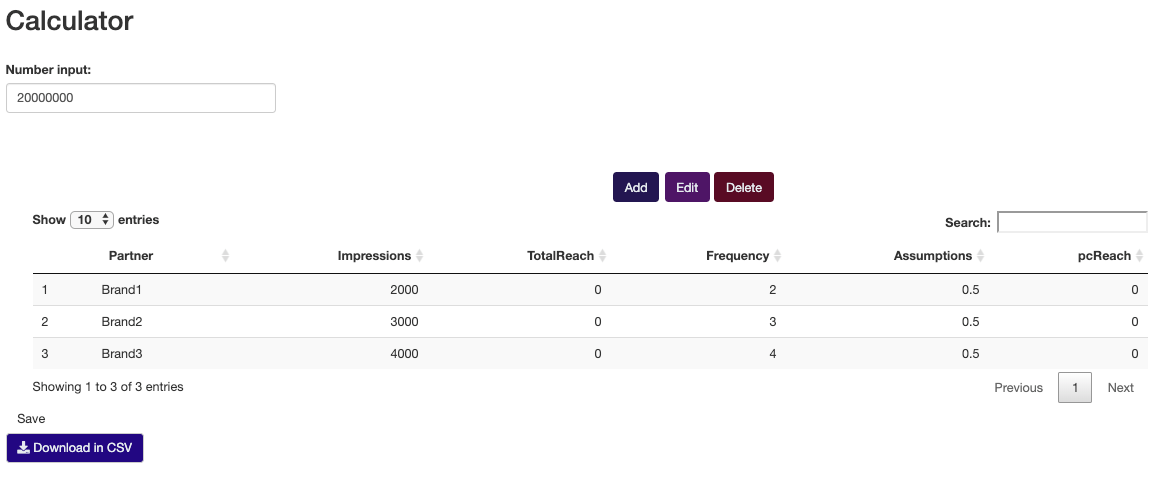
我能做些什么来解决这个问题。下面是代码服务器
library(shiny)
library(shinyjs)
## shinysky is to customize buttons
library(shinysky)
library(DT)
library(data.table)
library(lubridate)
library(shinyalert)

rm(list = ls())
useShinyalert()
shinyServer(function(input, output, session){

  ### interactive dataset
  vals_trich<-reactiveValues()
  vals_trich$Data<-data.frame(Partner = c("Brand1", "Brand2","Brand3"),
                              Impressions = c(2000, 3000, 4000),
                              TotalReach = c (0, 0, .0),
                              Frequency = c(2, 3, 4),
                              Assumptions = c (.5, .5, .5),
                              pcReach = c (0, 0, 0),
                              #gg = c (.5, .5, .5),
                              stringsAsFactors = FALSE)
  #vals_trich$Data<-readRDS("note.rds")

  #### MainBody_trich is the id of DT table
  output$MainBody_trich<-renderUI({
    fluidPage(
      hr(),
      column(6,offset = 6,
             HTML('<div class="btn-group" role="group" aria-label="Basic example" style = "padding:10px">'),
             ### tags$head() This is to change the color of "Add a new row" button
             tags$head(tags$style(".butt2{background-color:#231651;} .butt2{color: #e6ebef;}")),
             div(style="display:inline-block;width:30%;text-align: center;",actionButton(inputId = "Add_row_head",label = "Add", class="butt2") ),
             tags$head(tags$style(".butt4{background-color:#4d1566;} .butt4{color: #e6ebef;}")),
             div(style="display:inline-block;width:30%;text-align: center;",actionButton(inputId = "mod_row_head",label = "Edit", class="butt4") ),
             tags$head(tags$style(".butt3{background-color:#590b25;} .butt3{color: #e6ebef;}")),
             div(style="display:inline-block;width:30%;text-align: center;",actionButton(inputId = "Del_row_head",label = "Delete", class="butt3") ),
             ### Optional: a html button
             # HTML('<input type="submit" name="Add_row_head" value="Add">'),
             HTML('</div>') ),

      column(12,dataTableOutput("Main_table_trich")),
      tags$script("$(document).on('click', '#Main_table_trich button', function () {
                   Shiny.onInputChange('lastClickId',this.id);
                   Shiny.onInputChange('lastClick', Math.random()) });")

    )
  })

  #### render DataTable part ####
  output$Main_table_trich<-renderDataTable({
    DT=vals_trich$Data
    datatable(DT,selection = 'single',
              escape=F) })


  observeEvent(input$Add_row_head, {
    ### This is the pop up board for input a new row
    showModal(modalDialog(title = "Add a new row",
                          textInput(paste0("partner", input$Add_row_head), "Partner"),
                          numericInput(paste0("impressions", input$Add_row_head), "Impressions",0),
                          numericInput(paste0("reach", input$Add_row_head), "TotalReach:",0),
                          numericInput(paste0("frequency", input$Add_row_head), "Frequency:",0),
                          numericInput(paste0("assumption", input$Add_row_head), "Assumptions:",0),
                          numericInput(paste0("reach_pc", input$Add_row_head), "pcReach:",0),
                          actionButton("go", "Add item"),
                          easyClose = TRUE, footer = NULL ))

  })
  ### Add a new row to DT
  observeEvent(input$go, {
    new_row=data.frame(
      Partner=input[[paste0("partner", input$Add_row_head)]],
      Impressions=input[[paste0("impressions", input$Add_row_head)]],
      TotalReach=input[[paste0("reach", input$Add_row_head)]],
      Frequency=input[[paste0("frequency", input$Add_row_head)]],
      Assumptions=input[[paste0("assumption", input$Add_row_head)]],
      pcReach=input[[paste0("reach_pc", input$Add_row_head)]]
    )
    vals_trich$Data<-rbind(vals_trich$Data,new_row )
    removeModal()
  })


  observe({
    # We'll use these multiple times, so use short var names for
    # convenience.
    c_num <- input$control_num

    # Change the value
    updateNumericInput(session, "inNumber", value = c_num)
  })

  ### save to RDS part
  observeEvent(input$Updated_trich,{
    print(vals_trich$Data)
   calc<- vals_trich$Data
   print(calc)
   calc <-calc %>% (calc$TotalReach = calc$Impressions/calc$Frequency)
   print(calc)
    vals_trich$Data <-calc
    DT=vals_trich$Data
    datatable(DT,selection = 'single',
              escape=F)

    saveRDS(vals_trich$Data, "op.rds")
    shinyalert(title = "Saved!", type = "success")
  })


  ### delete selected rows part
  ### this is warning messge for deleting
  observeEvent(input$Del_row_head,{
    showModal(
      if(length(input$Main_table_trich_rows_selected)>=1 ){
        modalDialog(
          title = "Warning",
          paste("Are you sure delete",length(input$Main_table_trich_rows_selected),"rows?" ),
          footer = tagList(
            modalButton("Cancel"),
            actionButton("ok", "Yes")
          ), easyClose = TRUE)
      }else{
        modalDialog(
          title = "Warning",
          paste("Please select row(s) that you want to delect!" ),easyClose = TRUE
        )
      }

    )
  })

  ### If user say OK, then delete the selected rows
  observeEvent(input$ok, {
    vals_trich$Data=vals_trich$Data[-input$Main_table_trich_rows_selected]
    removeModal()
  })

  ### edit button
  observeEvent(input$mod_row_head,{
    showModal(
      if(length(input$Main_table_trich_rows_selected)>=1 ){
        modalDialog(
          fluidPage(
            h3(strong("Modification"),align="center"),
            hr(),
            dataTableOutput('row_modif'),
            actionButton("save_changes","Save changes"),
            tags$script(HTML("$(document).on('click', '#save_changes', function () {
                             var list_value=[]
                             for (i = 0; i < $( '.new_input' ).length; i++)
                             {
                             list_value.push($( '.new_input' )[i].value)
                             }
                             Shiny.onInputChange('newValue', list_value) });")) ), size="l" )
      }else{
        modalDialog(
          title = "Warning",
          paste("Please select the row that you want to edit!" ),easyClose = TRUE
        )
      }

    )
  })


  #### modify part
  output$row_modif<-renderDataTable({
    selected_row=input$Main_table_trich_rows_selected
    old_row=vals_trich$Data[selected_row]
    row_change=list()
    for (i in colnames(old_row))
    {
      if (is.numeric(vals_trich$Data[[i]]))
      {
        row_change[[i]]<-paste0('<input class="new_input" value= ','"',old_row[[i]],'"','  type="number" id=new_',i,' ><br>')
      }
      else if( is.Date(vals_trich$Data[[i]])){
        row_change[[i]]<-paste0('<input class="new_input" value= ','"',old_row[[i]],'"',' type="date" id=new_  ',i,'  ><br>')
      }
      else
        row_change[[i]]<-paste0('<input class="new_input" value= ','"',old_row[[i]],'"',' type="textarea"  id=new_',i,'><br>')
    }
    row_change=as.data.table(row_change)
    setnames(row_change,colnames(old_row))
    DT=row_change
    DT
  },escape=F,options=list(dom='t',ordering=F,scrollX = TRUE),selection="none" )


  ### This is to replace the modified row to existing row
  observeEvent(input$newValue,
               {
                 newValue=lapply(input$newValue, function(col) {
                   if (suppressWarnings(all(!is.na(as.numeric(as.character(col)))))) {
                     as.numeric(as.character(col))
                   } else {
                     col
                   }
                 })
                 DF=data.frame(lapply(newValue, function(x) t(data.frame(x))))
                 colnames(DF)=colnames(vals_trich$Data)
                 vals_trich$Data[input$Main_table_trich_rows_selected]<-DF

               }
  )
  ### This is nothing related to DT Editor but I think it is nice to have a download function in the Shiny so user
  ### can download the table in csv
  output$Trich_csv<- downloadHandler(
    filename = function() {
      paste("Trich Project-Progress", Sys.Date(), ".csv", sep="")
    },
    content = function(file) {
      write.csv(data.frame(vals_trich$Data), file, row.names = F)
    }
  )

})
ui
#
# This is the user-interface definition of a Shiny web application. You can
# run the application by clicking 'Run App' above.
#
# Find out more about building applications with Shiny here:
#
#    http://shiny.rstudio.com/
#

library(shiny)
library(shinyjs)
library(shinysky)
library(DT)
library(data.table)
library(lubridate)
library(shinyalert)
useShinyalert()
# Define UI for application that draws a histogram
shinyUI(fluidPage(

  # Application title
  titlePanel("Calculator"),
  ### This is to adjust the width of pop up "showmodal()" for DT modify table
  tags$head(tags$style(HTML('
                            .modal-lg {
                            width: 1200px;
                            }
                            '))),
 # helpText("Note: Remember to save any updates!"),
  br(),
  ### tags$head() is to customize the download button
 numericInput("inNumber", "Number input:",
              min = 1, max = 330000000, value = 20000000, step = 1000000),
  useShinyalert(), # Set up shinyalert
  uiOutput("MainBody_trich"),actionButton(inputId = "Updated_trich",label = "Save"),
 tags$head(tags$style(".butt{background-color:#230682;} .butt{color: #e6ebef;}")),br(),
 downloadButton("Trich_csv", "Download in CSV", class="butt"),
))回答 1
Stack Overflow用户
回答已采纳
发布于 2020-02-03 21:35:53
这一错误似乎是由于在这一行中使用管道造成的:
calc <-calc %>% (calc$TotalReach = calc$Impressions/calc$Frequency)将library(dplyr)添加到附加库中,并将行更改为
calc <-calc %>%
      mutate(TotalReach = Impressions/Frequency)
允许进行适当的保存。
页面原文内容由Stack Overflow提供。腾讯云小微IT领域专用引擎提供翻译支持
原文链接:
https://stackoverflow.com/questions/60047351
复制相关文章
相似问题
腾讯云开发者

Copyright © 2013 - 2026 Tencent Cloud. All Rights Reserved. 腾讯云 版权所有
深圳市腾讯计算机系统有限公司 ICP备案/许可证号:粤B2-20090059  粤公网安备44030502008569号
腾讯云计算(北京)有限责任公司 京ICP证150476号 | 京ICP备11018762号