
如何禁用aws放大vue认证器的注册链接?
如何禁用aws放大vue认证器的注册链接?
提问于 2020-02-03 19:31:52
我正在使用来自amplify-authenticator库的aws-amplify-vue组件来为我的应用程序启用身份验证。我试图找出如何禁用前端的“创建帐户”链接,我似乎在文档或在线上找不到任何东西。我见过一些地方的用户通过使用css隐藏它来禁用它,还有一些地方用户能够使用react库禁用它,但是我没有找到任何特定于vue库的地方。可能我只是错过了文档,但是有人知道如何从vue放大认证器中删除注册功能吗?
组件
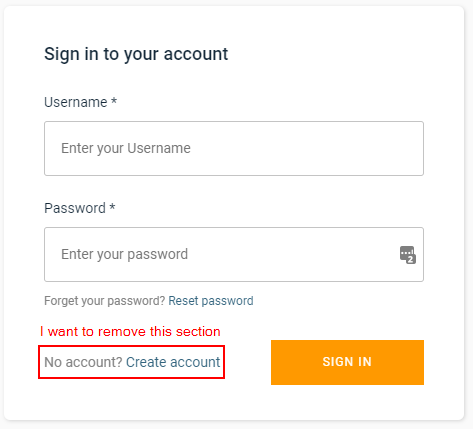
<template>
  <v-container>
    <amplify-authenticator></amplify-authenticator>
  </v-container>
</template>

<script lang="ts">
import { Vue, Component } from "vue-property-decorator";
import { Auth } from "aws-amplify";
import logger from "../logging";
import { components } from "aws-amplify-vue";
import { AmplifyEventBus } from "aws-amplify-vue";

@Component({
  components: {
    ...components
  }
})
export default class Login extends Vue {
  async created() {
    try {
      // This function throws an error if no user is logged in
      await Auth.currentAuthenticatedUser({ bypassCache: true });
      this.$router.push("/instruments");
    } catch (e) {
      logger.silly("No user currently logged in");

      AmplifyEventBus.$on("authState", async info => {
        logger.silly("signedIn");
        logger.silly(info);
        if (info === "signedIn") {
          const user = await Auth.currentAuthenticatedUser({
            bypassCache: true
          });
          this.$router.push("/instruments");
        } else {
          logger.error(`Failed to login`);
          alert("Failed to login");
        }
      });
    }
  }
}
</script>

<style scoped></style>
更新1
基于@asimpledevice的回答,我尝试了以下内容,但没有成功:
<template>
  <v-container class="d-flex justify-center align-center">
    <amplify-authenticator
      :authConfig="authConfiguration"
    ></amplify-authenticator>
  </v-container>
</template>

<script lang="ts">
import { Vue, Component } from "vue-property-decorator";
import { Auth } from "aws-amplify";
import StoreTypes from "../store-types";
import logger from "../logging";
import { components } from "aws-amplify-vue";
import { AmplifyEventBus } from "aws-amplify-vue";

@Component({
  components: {
    ...components
  }
})
export default class Login extends Vue {
  async mounted() {
    try {
      // This function throws an error if no user is logged in
      await Auth.currentAuthenticatedUser({ bypassCache: true });
      this.$router.push("/instruments");
    } catch (e) {
      const self = this;
      AmplifyEventBus.$on("authState", async info => {
        if (info === "signedIn") {
          this.$store.dispatch(StoreTypes.types.LOAD_CURRENT_USER);
          const nextLocation =
            self.$route.query.redirect !== null &&
            self.$route.query.redirect !== undefined
              ? (self.$route.query.redirect as string)
              : "/instruments";
          this.$router.push(nextLocation).catch(err => {});
        }
      });
    }
  }

  authConfiguration() {
    return {
      signInConfig: {
        isSignUpDisplayed: false
      }
    };
  }
}
</script>回答 5
Stack Overflow用户
回答已采纳
发布于 2020-02-17 17:42:34
您可以通过"signInConfig“对象隐藏”注册“部分。
  configurationOptions: any = {
    signInConfig: {
      isSignUpDisplayed: false
    }
  };
然后,您可以将这个对象作为支柱传递给组件:
    <amplify-authenticator
      :authConfig="configurationOptions"
></amplify-authenticator>注意:必须使配置对象成为本地属性。如果配置是函数或计算属性,则配置将无法工作。您的完整解决方案如下:
<template>
  <v-container class="d-flex justify-center align-center">
    <amplify-authenticator
      :authConfig="configurationOptions"
    ></amplify-authenticator>
  </v-container>
</template>

<script lang="ts">
import { Vue, Component } from "vue-property-decorator";
import { Auth } from "aws-amplify";
import StoreTypes from "../store-types";
import logger from "../logging";
import { components } from "aws-amplify-vue";
import { AmplifyEventBus } from "aws-amplify-vue";

@Component({
  components: {
    ...components
  }
})
export default class Login extends Vue {
  configurationOptions: any = {
    signInConfig: {
      isSignUpDisplayed: false
    }
  };

  async mounted() {
    try {
      // This function throws an error if no user is logged in
      await Auth.currentAuthenticatedUser({ bypassCache: true });
      this.$router.push("/instruments");
    } catch (e) {
      const self = this;
      AmplifyEventBus.$on("authState", async info => {
        if (info === "signedIn") {
          this.$store.dispatch(StoreTypes.types.LOAD_CURRENT_USER);
          const nextLocation =
            self.$route.query.redirect !== null &&
            self.$route.query.redirect !== undefined
              ? (self.$route.query.redirect as string)
              : "/instruments";
          this.$router.push(nextLocation).catch(err => {});
        }
      });
    }
  }
}
</script>

<style></style>Stack Overflow用户
发布于 2020-09-24 18:28:23
与@aws-amplify/auth ^3.2.6和@aws-amplify/ui-vue ^0.2.20一起工作,如登录文档中所记录的那样。
<template>
  <div>
    <amplify-authenticator username-alias="email">
      <amplify-sign-in slot="sign-in" :hide-sign-up="true"
        username-alias="email">
      </amplify-sign-in>
    </amplify-authenticator>
  </div>
</template>Stack Overflow用户
发布于 2020-05-27 13:31:18
我让它与一个简化的内联表达式一起工作:
<amplify-authenticator :authConfig="{ signInConfig: { isSignUpDisplayed: false } }" />页面原文内容由Stack Overflow提供。腾讯云小微IT领域专用引擎提供翻译支持
原文链接:
https://stackoverflow.com/questions/60045960
复制相关文章
相似问题
腾讯云开发者

Copyright © 2013 - 2026 Tencent Cloud. All Rights Reserved. 腾讯云 版权所有
深圳市腾讯计算机系统有限公司 ICP备案/许可证号:粤B2-20090059  粤公网安备44030502008569号
腾讯云计算(北京)有限责任公司 京ICP证150476号 | 京ICP备11018762号