
在我的iOS应用程序中我没有收到推送通知Firebase
在我的iOS应用程序中我没有收到推送通知Firebase
提问于 2020-02-06 19:32:07
我的AppDelegate中有以下设置
import UIKit
import CoreData
import Firebase
import GoogleSignIn
import FirebaseFirestore
import GoogleMaps
import GooglePlaces
import UserNotificationsUI

@UIApplicationMain
class AppDelegate: UIResponder, UIApplicationDelegate, GIDSignInDelegate, UNUserNotificationCenterDelegate, MessagingDelegate {

    var window: UIWindow?
    let gcmMessageIDKey = "gcm.message_id"

    func application(_ application: UIApplication, didFinishLaunchingWithOptions launchOptions: [UIApplication.LaunchOptionsKey: Any]?) -> Bool {
        //Api Google masps
        GMSServices.provideAPIKey("AIzaSyDz1yCQldDsfUAhkV0nRcfxqYknTlD1nlMQWEQe")
        GMSPlacesClient.provideAPIKey("AIzaSyDz1yCQldDsfUAhkV0nRcfxqYknTlD1nlQWQEDM")

        //Inicio del projecto en firebase
        FirebaseApp.configure()


        window = UIWindow(frame: UIScreen.main.bounds)
        window?.makeKeyAndVisible()

        //Decimos cual es la pantalla principal con la que iniciara la aplicacion
        let mainViewController = ContainerController()
        window?.rootViewController = mainViewController

        //Configuracion del inicio de sesion google
        GIDSignIn.sharedInstance().clientID = FirebaseApp.app()?.options.clientID
        GIDSignIn.sharedInstance().delegate = self


        //Configuracion de las push Notificatios
        //Delegate UserNotifications
        UNUserNotificationCenter.current().delegate = self
        Messaging.messaging().delegate = self

        let authOptions: UNAuthorizationOptions = [.alert, .badge, .sound]

        UNUserNotificationCenter.current().requestAuthorization(options: authOptions) { (_, error) in
            guard error == nil else{
                print(error!.localizedDescription)
                return
            }
        }

        //Solicit permission from the user to receive notifications
        UNUserNotificationCenter.current().requestAuthorization(options: authOptions) { (_, error) in
            guard error == nil else{
                print(error!.localizedDescription)
                return
            }
        }

        //get application instance ID
        InstanceID.instanceID().instanceID { (result, error) in
            if let error = error {
                print("Error fetching remote instance ID: \(error)")
            } else if let result = result {
                print("Remote instance ID token: \(result.token)")
            }
        }
        application.registerForRemoteNotifications()


        return true
    }

    func application(_ application: UIApplication, didReceiveRemoteNotification userInfo: [AnyHashable: Any]) {
        if let messageID = userInfo[gcmMessageIDKey] {
            print("Message ID: \(messageID)")
        }

        // Print full message.
        print(userInfo)
    }

    func application(_ application: UIApplication, didFailToRegisterForRemoteNotificationsWithError error: Error) {
        print("Unable to register for remote notifications: \(error.localizedDescription)")
    }

    func messaging(_ messaging: Messaging, didReceiveRegistrationToken fcmToken: String) {
        print("Firebase registration token: \(fcmToken)")

        let dataDict:[String: String] = ["token": fcmToken]
        NotificationCenter.default.post(name: Notification.Name("FCMToken"), object: nil, userInfo: dataDict)
        // TODO: If necessary send token to application server.
        // Note: This callback is fired at each app startup and whenever a new token is generated.
    }

    func messaging(_ messaging: Messaging, didReceive remoteMessage: MessagingRemoteMessage) {
        print("Received data message: \(remoteMessage.appData)")
    }


    @available(iOS 9.0, *)
    func application(_ application: UIApplication, open url: URL, options: [UIApplication.OpenURLOptionsKey : Any])
        -> Bool {
            return GIDSignIn.sharedInstance().handle(url)
    }

    func sign(_ signIn: GIDSignIn!, didSignInFor user: GIDGoogleUser!, withError error: Error!) {
        if let error = error {
            // ...
            return
        }

        guard let authentication = user.authentication else { return }
        let credential = GoogleAuthProvider.credential(withIDToken: authentication.idToken, accessToken: authentication.accessToken)

        Auth.auth().signIn(with: credential) { (authResult, error) in
            if let error = error {
                return
            }
            print("Entro al AUTH")
            guard let email = authResult?.user.email else {return}
            guard let name = authResult?.user.displayName else {return}
            guard let image = authResult?.user.photoURL else {return}
            guard let uid = authResult?.user.uid else {return}
            let profileImageUrl = image.absoluteString

            let values = ["name": name, "email": email, "image": profileImageUrl] as [String : Any]
            let db = Firestore.firestore()

            db.collection("users").document(uid).setData(values){ (err) in
                if let err = err {
                    print("Error al agregar documento: \(err.localizedDescription)")
                }else{
                    print("Se agrego el documento con el ID: \(uid)")
                    self.window = UIWindow(frame: UIScreen.main.bounds)
                    self.window?.makeKeyAndVisible()

                    //Decimos cual es la pantalla principal con la que iniciara la aplicacion
                    let mainViewController = MainViewController()
                    self.window?.rootViewController = mainViewController
                }
            }
        }
    }

    func sign(_ signIn: GIDSignIn!, didDisconnectWith user: GIDGoogleUser!, withError error: Error!) {
        // Perform any operations when the user disconnects from app here.
        // ...
        return
    }

    func applicationWillResignActive(_ application: UIApplication) {
        // Sent when the application is about to move from active to inactive state. This can occur for certain types of temporary interruptions (such as an incoming phone call or SMS message) or when the user quits the application and it begins the transition to the background state.
        // Use this method to pause ongoing tasks, disable timers, and invalidate graphics rendering callbacks. Games should use this method to pause the game.
    }

    func applicationDidEnterBackground(_ application: UIApplication) {
        // Use this method to release shared resources, save user data, invalidate timers, and store enough application state information to restore your application to its current state in case it is terminated later.
        // If your application supports background execution, this method is called instead of applicationWillTerminate: when the user quits.
    }

    func applicationWillEnterForeground(_ application: UIApplication) {
        // Called as part of the transition from the background to the active state; here you can undo many of the changes made on entering the background.
    }

    func applicationDidBecomeActive(_ application: UIApplication) {
        // Restart any tasks that were paused (or not yet started) while the application was inactive. If the application was previously in the background, optionally refresh the user interface.
    }

    func applicationWillTerminate(_ application: UIApplication) {
        // Called when the application is about to terminate. Save data if appropriate. See also applicationDidEnterBackground:.
        // Saves changes in the application's managed object context before the application terminates.
        self.saveContext()
    }

    // MARK: - Core Data stack

    lazy var persistentContainer: NSPersistentContainer = {
        /*
         The persistent container for the application. This implementation
         creates and returns a container, having loaded the store for the
         application to it. This property is optional since there are legitimate
         error conditions that could cause the creation of the store to fail.
        */
        let container = NSPersistentContainer(name: "IoTaxiConcesionario")
        container.loadPersistentStores(completionHandler: { (storeDescription, error) in
            if let error = error as NSError? {
                // Replace this implementation with code to handle the error appropriately.
                // fatalError() causes the application to generate a crash log and terminate. You should not use this function in a shipping application, although it may be useful during development.

                /*
                 Typical reasons for an error here include:
                 * The parent directory does not exist, cannot be created, or disallows writing.
                 * The persistent store is not accessible, due to permissions or data protection when the device is locked.
                 * The device is out of space.
                 * The store could not be migrated to the current model version.
                 Check the error message to determine what the actual problem was.
                 */
                fatalError("Unresolved error \(error), \(error.userInfo)")
            }
        })
        return container
    }()

    // MARK: - Core Data Saving support

    func saveContext () {
        let context = persistentContainer.viewContext
        if context.hasChanges {
            do {
                try context.save()
            } catch {
                // Replace this implementation with code to handle the error appropriately.
                // fatalError() causes the application to generate a crash log and terminate. You should not use this function in a shipping application, although it may be useful during development.
                let nserror = error as NSError
                fatalError("Unresolved error \(nserror), \(nserror.userInfo)")
            }
        }
    }
}
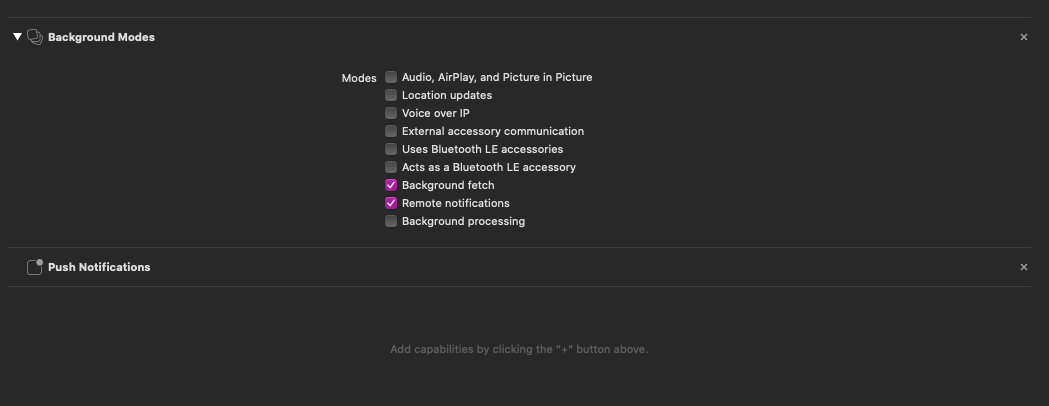
我在应用程序中启用了推送通知。
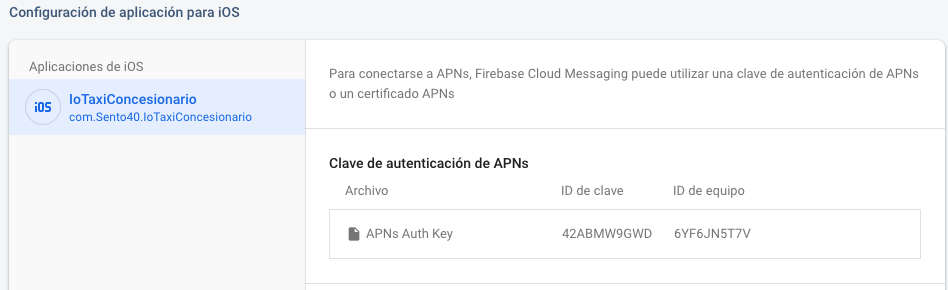
在Firebase,我注册了我的Auth密钥
运行我的应用程序在设备上运行,我收到一个防火墙令牌。

但是当我从Firebase运行一条测试消息时,我不会在电话或控制台上收到通知。
回答 1
Stack Overflow用户
发布于 2020-05-19 13:24:18
我也有同样的问题,只是通过禁用方法swizzling来解决它。下面是关于如何做到这一点的链接:https://firebase.google.com/docs/cloud-messaging/ios/client
基本上你需要这样做:
不喜欢使用swizzling的
开发人员可以通过在应用程序的Info.plist文件中添加标志FirebaseAppDelegateProxyEnabled并将其设置为NO (布尔值)来禁用它。
然后:
func application(application: UIApplication,
             didRegisterForRemoteNotificationsWithDeviceToken deviceToken: NSData) {
             Messaging.messaging().apnsToken = deviceToken
}页面原文内容由Stack Overflow提供。腾讯云小微IT领域专用引擎提供翻译支持
原文链接:
https://stackoverflow.com/questions/60102277
复制相关文章
相似问题
腾讯云开发者

Copyright © 2013 - 2026 Tencent Cloud. All Rights Reserved. 腾讯云 版权所有
深圳市腾讯计算机系统有限公司 ICP备案/许可证号:粤B2-20090059  粤公网安备44030502008569号
腾讯云计算(北京)有限责任公司 京ICP证150476号 | 京ICP备11018762号