
Azure Devops + Coverlet + SonarQube显示0%
早上好,
很抱歉打扰你,我有个问题,我没有任何线索。
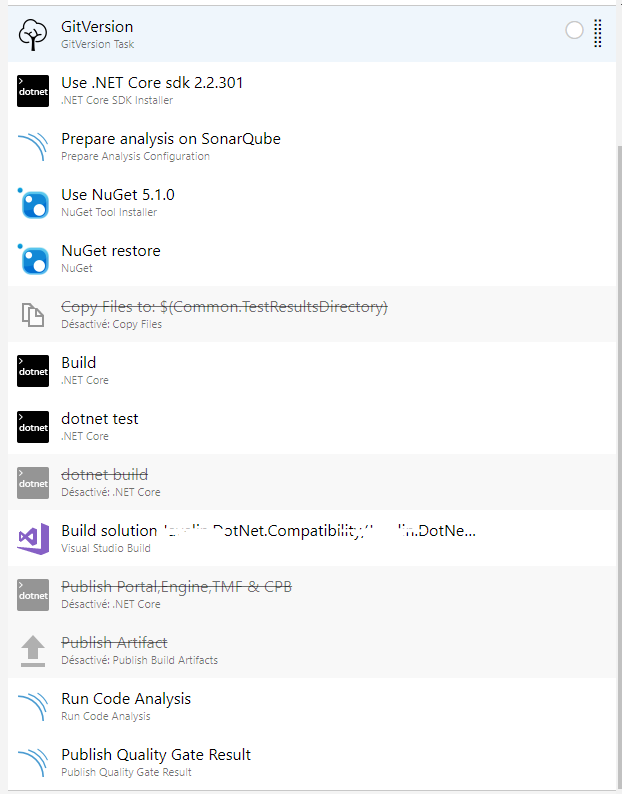
我在Azure DevOps上有一条管道,当我使用命令"dotnet“时,我使用掩护来生成代码覆盖报告。
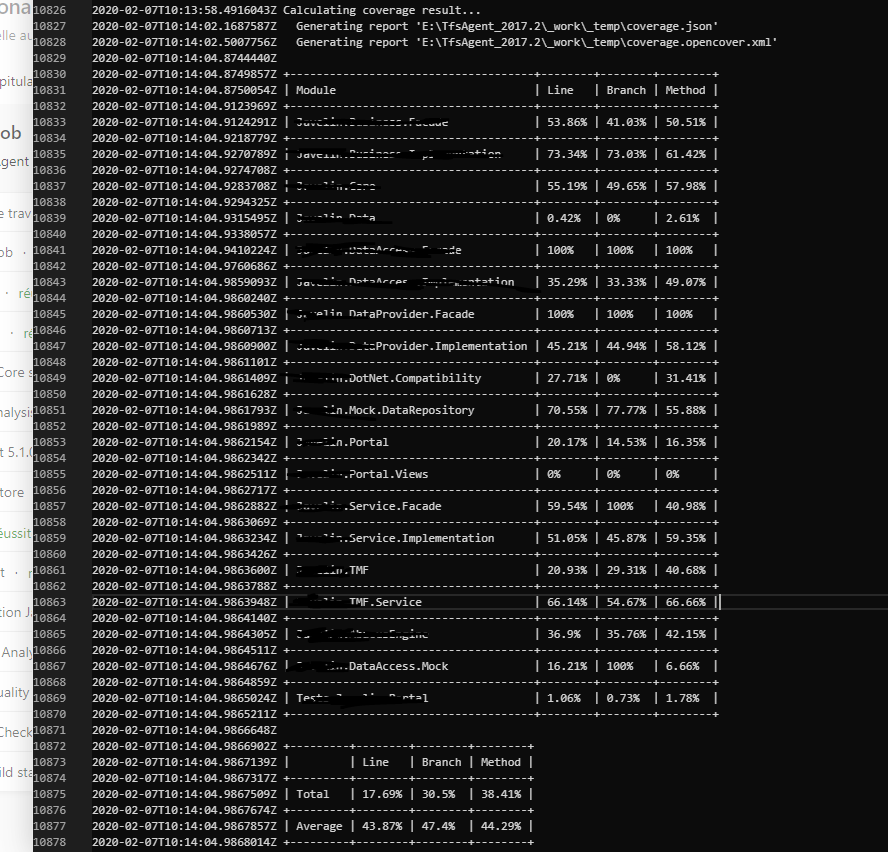
的确,这份报告编写得很好。
首先,在“准备对"sonar.cs.opencover.reportsPaths="$(Agent.TempDirectory)/coverage.opencover.xml".的分析”步骤中,设置变量SonarQube。

但是在我的SonarQube中,有0%的代码覆盖率.我不知道该怎么做或者有什么线索..。

谢谢
回答 2
Stack Overflow用户
发布于 2020-02-14 10:29:17
我做了很多事情来最终成功地实现了覆盖,但我认为问题在于我的解决方案的每个.csproj中缺少了“.csproj”,使得SonarQube扫描器忽略了这些项目。
同时,我也从SonarQube 6.2升级到8.1,这可能解决了这个问题。
为了完成这项工作,我的步调保持不变。
Stack Overflow用户
发布于 2020-02-10 15:15:44
我无法复制上述问题。而且,由于您没有共享、dotnet测试任务或sonarqube准备任务的配置,所以很难排除故障。
我创建了一个测试项目,并成功地将覆盖率发布到我的sonarqube服务器。你可以参考我下面的步骤。
1,创建sonarqube服务器并配置我的projectName和projectKey (我使用azure容器实例,查看这里获取详细信息)。
2、在蔚蓝开发中配置声纳服务连接。
3、创建构建管道。我用yaml管道。
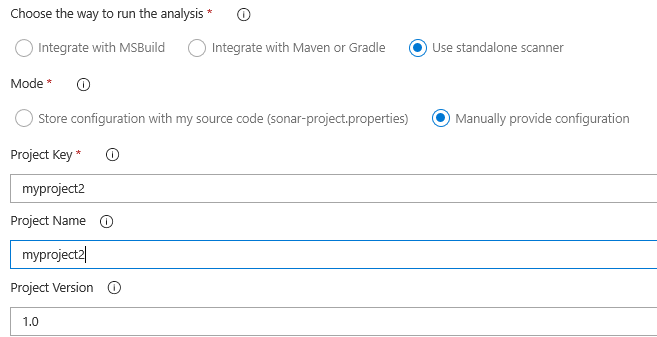
在准备分析配置任务中,我选择使用独立扫描程序,而模式是手动提供配置。我设置了变量sonar.cs.opencover.reportsPaths="$(Agent.TempDirectory)/coverage.opencover.xml"。
下面的屏幕截图是任务在经典ui视图中的设置。
在我的dotnet测试任务中,我将参数设置为下面的参数,并特别将覆盖率结果输出到$(Agent.TempDirectory)/文件夹。
arguments: '--configuration $(buildConfiguration) /p:CollectCoverage=true /p:CoverletOutput=$(Agent.TempDirectory)/ /p:CoverletOutputFormat=opencover'
下面是我的azure-管线. file文件的全部内容。
trigger: none

jobs:
- job: 'Tests'
  pool:
    vmImage: windows-latest

  variables:
    buildConfiguration: 'Release'
  continueOnError: true

  steps:
  - task: SonarQubePrepare@4
    displayName: 'Prepare analysis on SonarQube'
    inputs:
       SonarQube: sonarlevi
       scannerMode: CLI
       configMode: manual
       cliProjectKey: myproject2
       cliProjectName: myproject2
       extraProperties: |
          sonar.cs.opencover.reportsPaths="$(Agent.TempDirectory)/coverage.opencover.xml"


  - task: DotNetCoreCLI@2
    inputs:
      command: restore
      projects: '**\*.csproj'

  - task: DotNetCoreCLI@2
    inputs:
      command: custom
      custom: tool
      arguments: install --tool-path . dotnet-reportgenerator-globaltool
    displayName: Install ReportGenerator tool

  - task: DotNetCoreCLI@2
    displayName: Test .NET
    inputs:
      command: test
      projects: '**\*Test*.csproj'
      publishTestResults: false
      arguments: '--configuration $(buildConfiguration) /p:CollectCoverage=true /p:CoverletOutput=$(Agent.TempDirectory)/ /p:CoverletOutputFormat=opencover'
    condition: succeededOrFailed()


  - task: SonarQubeAnalyze@4

    displayName: 'Run Code Analysis'

  - task: SonarQubePublish@4

displayName: 'Publish Quality Gate Result' https://stackoverflow.com/questions/60111864
复制相似问题
腾讯云开发者

Copyright © 2013 - 2026 Tencent Cloud. All Rights Reserved. 腾讯云 版权所有
深圳市腾讯计算机系统有限公司 ICP备案/许可证号:粤B2-20090059  粤公网安备44030502008569号
腾讯云计算(北京)有限责任公司 京ICP证150476号 | 京ICP备11018762号