
基于列展开行
基于列展开行
提问于 2020-02-09 17:58:31
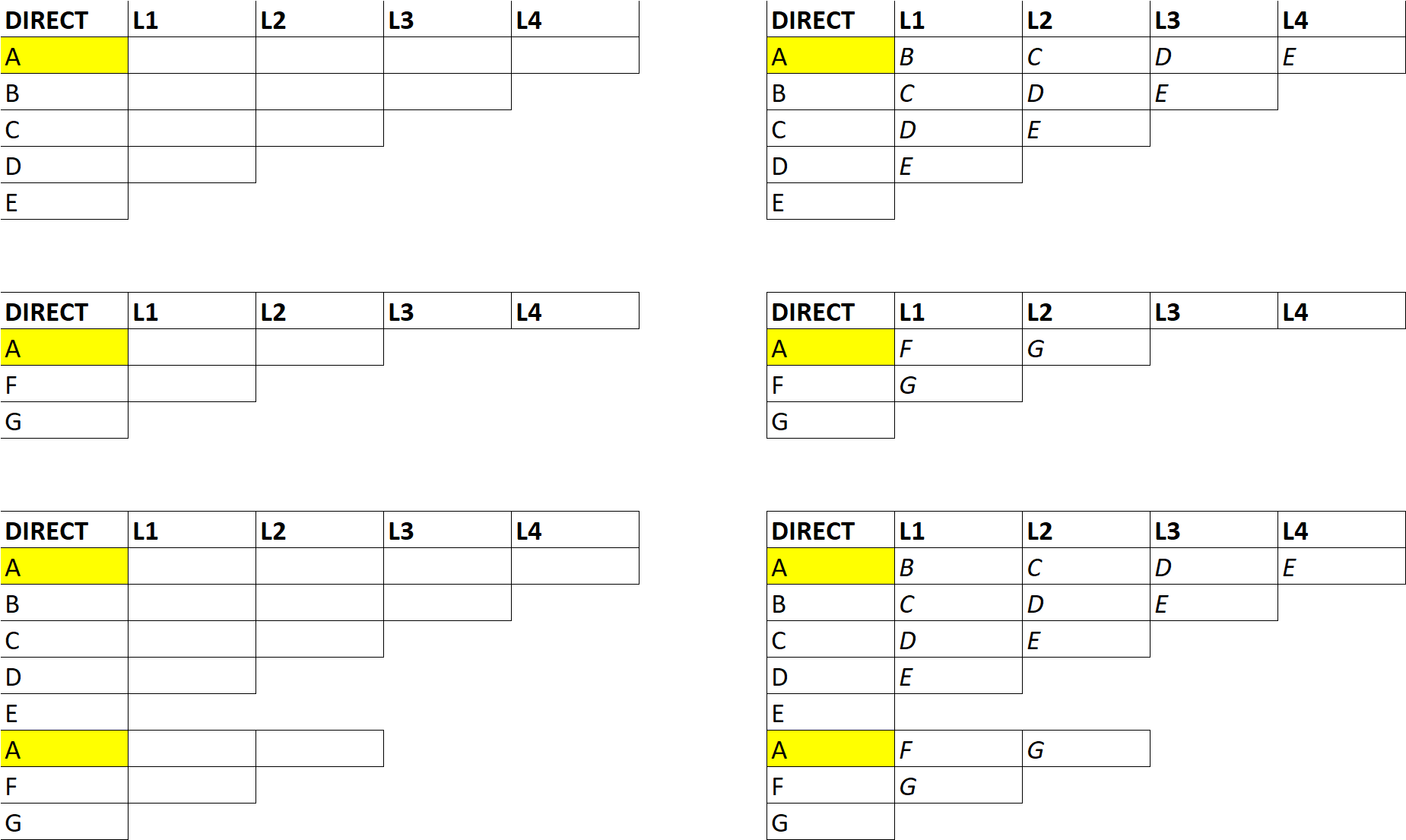
我正在创建层次结构,并需要在右侧以格式描述它们。如果我能够简单地在一列中勾勒出层次结构并使其自动展开(在示例中向左->右),就会容易得多。几点考虑:
在第一列中,新层次结构的开始始终是'A'
- Hierarchies可以从长度为2-10个子级
的值。
有什么想法吗?
回答 2
Stack Overflow用户
发布于 2020-02-09 20:21:36
你不回答我的问题我不能再等了..。
请测试下一段代码,它基于以下假设:您在讨论中的层次结构一直都有一种标题( A:A列中的Direct和B:B中的L1 )。这或空行设置层次结构的底部部分。
下面是代码:
Sub HierarchyArrangeMultipleR()
  Dim sh As Worksheet, i As Long, j As Long, lastR As Long, lastH As Long
  Dim arrI As Variant, arrTr As Variant, colN As Long, k As Long, h As Long

  Set sh = ActiveSheet 'please, use here your worksheet
  lastR = sh.Range("A" & sh.Rows.count).End(xlUp).Row

  For k = 1 To lastR
    If lastH > 0 Then k = lastH + 1
    If k >= lastR Then Exit For
Start:
    If sh.Range("A" & k).Value = "Direct" And sh.Range("B" & k).Value = "L1" Then
        For i = 1 To 10
            If sh.Range("A" & k + i).Value = "Direct" Or _
                  sh.Range("A" & k + i).Value = Empty Then
                lastH = k + i - 1: Exit For
            End If
        Next i
        For h = 3 To lastH - k
            sh.Cells(k, h) = "L" & h - 1
        Next h
    Else
        k = k + 1: GoTo Start
    End If
      arrI = sh.Range("A" & k + 1 & ":A" & lastH).Value
      ReDim arrTr(1 To UBound(arrI) - 1)
      colN = 1
      For i = k To lastH - 2
        For j = 1 To UBound(arrTr) 'lastH - i + k - 2
            arrTr(j) = arrI(j, 1)
        Next j

        colN = colN + 1
        sh.Range(sh.Cells(k + 1, colN), sh.Cells(lastH + 1 - colN, colN)).Value = WorksheetFunction.Transpose(arrTr)
      Next i
      Erase arrTr
  Next k
End SubStack Overflow用户
发布于 2020-02-09 21:07:37
只在A列中键入字母,以单词标题开始每个新序列。然后运行宏并创建扩展。
Sub expand()

    Dim ws As Worksheet
    Set ws = ActiveSheet
    Dim cell As Range, cellHeader As Range
    Dim irow As Integer, i As Integer
    Dim iCount As Integer, iLast As Long

    ' find last row in col A
    iLast = ws.Range("A" & Rows.Count).End(xlUp).Row

    'scan down the sheet
    For Each cell In ws.Range("A1:A" & iLast)

        If UCase(cell) = "DIRECT" Then

            ' remember the header line
            Set cellHeader = cell
            With cellHeader
                .BorderAround xlContinuous
                .Font.Bold = True
            End With

        ElseIf Len(cell) > 0 Then

            cell.BorderAround xlContinuous

            ' start of sequence
            If cell = "A" Then
                irow = 1
                iCount = 0
            End If

            ' add header value
            With cellHeader.Offset(0, irow)
                .Value = "L" & irow
                .Font.Bold = True
                .BorderAround xlContinuous
            End With

            ' copy cell diagonally upwards
            If irow > 1 Then
                For i = 1 To irow - 1
                    cell.Offset(-i, i) = cell.Value
                    cell.Offset(-i, i).BorderAround xlContinuous
                Next
            End If

            ' check max children
            iCount = iCount + 1
            If iCount > 10 Then
                MsgBox "Children count > 10", vbCritical, "Error"
                Exit Sub
            End If
            irow = irow + 1
        End If
    Next
    MsgBox "Expansion Complete", vbInformation
End Sub页面原文内容由Stack Overflow提供。腾讯云小微IT领域专用引擎提供翻译支持
原文链接:
https://stackoverflow.com/questions/60139610
复制相关文章
相似问题
腾讯云开发者

Copyright © 2013 - 2026 Tencent Cloud. All Rights Reserved. 腾讯云 版权所有
深圳市腾讯计算机系统有限公司 ICP备案/许可证号:粤B2-20090059  粤公网安备44030502008569号
腾讯云计算(北京)有限责任公司 京ICP证150476号 | 京ICP备11018762号