
如何提高PDF生成的图像质量?
我们使用TYPO3 9.5.13,GraphicsMagick 1.3.29,Ghostscript 9.27,BK2K\\BootstrapPackage 11.0.1
使用PDF作为正常图像是没有问题的。
但现在我想要一个‘预览’的PDF全栏宽度(~1000 of )。虽然PDF的分辨率很高,但是生成的图像只有595 is的宽度,任何文本都几乎无法读取。
这个问题发生在上传CE中的Image-CEs中,我想增强它:
每次我想要图像使用完整的列宽度,它呈现在一个糟糕的分辨率和图像似乎扭曲。
在这里,从生成的图像中得到一小部分:

与PDF阅读器中显示的PDF区域相同:
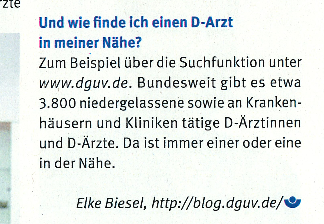
流体部分:
<img loading="lazy"
     src="{f:uri.image(image: file, cropVariant: 'default', maxWidth: 1100)}"
     width="{bk2k:lastImageInfo(property: 'width')}"
     height="{bk2k:lastImageInfo(property: 'height')}"
     intrinsicsize="{bk2k:lastImageInfo(property: 'width')}x{bk2k:lastImageInfo(property: 'height')}"
     title="{file.properties.title}"
     alt="{file.properties.alternative}">
其结果如下:
<img loading="lazy"
     src="/fileadmin/_processed_/3/2/csm_Warum_D-Arzt_6afd8ad8d4.png"
     intrinsicsize="595x842"
     title=""
     alt=""
     width="595"
     height="842">
编辑:
如果使用这种液体:
<img loading="lazy"
     src="{f:uri.image(image: file, cropVariant: 'default', width: 1100)}"
     width="{bk2k:lastImageInfo(property: 'width')}"
     height="{bk2k:lastImageInfo(property: 'height')}"
     intrinsicsize="{bk2k:lastImageInfo(property: 'width')}x{bk2k:lastImageInfo(property: 'height')}"
     title="{file.properties.title}"
     alt="{file.properties.alternative}">
我得到:
<img loading="lazy"
     src="/fileadmin/_processed_/3/2/csm_Warum_D-Arzt_2ffb63b15f.png"
     intrinsicsize="1100x1557"
     title=""
     alt=""
     width="1100"
     height="1557">
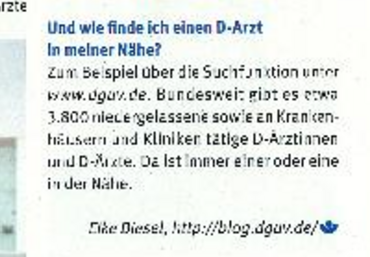
图像更大(并且溢出容器),但是质量也很差,请注意较大的像素:
回答 1
Stack Overflow用户
发布于 2020-02-12 08:29:42
实际上,PDF是而不是图像。它是一种容器格式,可以包含具有不同颜色空间和尺寸的向量和图像。位图图像有固定的尺寸宽度,高度,密度,PDF没有。最初,它是为打印机而不是为屏幕而创建和优化的。
TYPO3反映了后端有一条消息:

IMHO,没有完美的方式来处理PDF来表现像图像,因为你知道输出格式,但没有输入格式(正确)。获得可接受结果的两种方法:
- 扩展内容元素或创建新元素,并为PDF预览图像添加第二个图像槽。用图形化的程序自己创建预览图像。
- 编写自己的viewhelper,并创建自己的缩略图
。
解决方案1将为编辑器带来更多的工作。对我来说不是最好的练习。
我会带着自己的毒蛇去。
为PDF添加自己的呈现类型:
<f:switch expression="{file.type}">
  <f:case value="5">
    <f:render partial="Media/Type/Pdf" arguments="{file: file, dimensions: dimensions, data: data, settings: settings}" />
  </f:case>
  <f:defaultCase>
    <f:render partial="Media/Type/Image" arguments="{file: file, dimensions: dimensions, data: data, settings: settings}" />
  </f:defaultCase>
</f:switch>
部分媒体/类型/Pdf
{namespace cv=Conversion\HelperUtils\ViewHelpers}
<html xmlns:f="http://typo3.org/ns/TYPO3/CMS/Fluid/ViewHelpers" xmlns:ce="http://typo3.org/ns/TYPO3/CMS/FluidStyledContent/ViewHelpers" data-namespace-typo3-fluid="true">
  <cv:forEachPdfThumbnail document="{file}" pages="1" as="pdfPreviewPage">
    <f:image src="{pdfPreviewPage}" alt="" />
  </cv:forEachPdfThumbnail>
</html>
ViewHelper:
这个viewhelper使用命令实用程序::imageMagickCommand从一个PDF转换多个页面。您可以将密度提高到更高的值,以提高质量。正如前面提到的,这个viewhelper是几年前开发的,可以改进(例如保存到文件管理/处理,而不是typo3temp )。可以随意克隆和改进:https://github.com/conversion1/t3-pdfthumbnailviewhelper/blob/master/ForEachPdfThumbnailViewHelper.php
public static function renderStatic(array $arguments, \Closure $renderChildrenClosure, RenderingContextInterface $renderingContext)
{

    $templateVariableContainer = $renderingContext->getVariableProvider();

    /** @var \TYPO3\CMS\Core\Resource\FileReference $document */
    $document = $arguments['document'];
    $pages = explode(',', str_replace(' ', '', $arguments['pages']));

    $colorspace = TRUE === isset($GLOBALS['TYPO3_CONF_VARS']['GFX']['colorspace']) ? $GLOBALS['TYPO3_CONF_VARS']['GFX']['colorspace'] : 'RGB';
    $absFilePath = GeneralUtility::getFileAbsFileName($document->getOriginalFile()->getPublicUrl());
    $destinationPath = 'typo3temp/';
    $destinationFilePrefix = 'pdf-prev_' . $document->getOriginalFile()->getNameWithoutExtension();
    $destinationFileExtension = 'png';

    $output = '';

    foreach ($pages as $pageNumber) {

        if($pageNumber > 0) {
            $pageNumber = intval($pageNumber);
        } else {
            $pageNumber = 1;
        }

        $destinationFileSuffix =  '_page-' . $pageNumber;
        $absDestinationFilePath = GeneralUtility::getFileAbsFileName($destinationPath . $destinationFilePrefix . $destinationFileSuffix . '.' . $destinationFileExtension);

        $imgArguments = '-colorspace ' . $colorspace;
        $imgArguments .= ' -density 300';
        $imgArguments .= ' -sharpen 0x.6';
        $imgArguments .= ' "' . $absFilePath . '"';
        $imgArguments .= '['. intval($pageNumber - 1) .']';
        $imgArguments .= ' "' . $absDestinationFilePath . '"';

        if(!file_exists($absDestinationFilePath)) {
            $command = CommandUtility::imageMagickCommand('convert', $imgArguments);
            CommandUtility::exec($command);
        }

        $thumbnail = substr($absDestinationFilePath, strlen(Environment::getPublicPath()));
        $templateVariableContainer->add($arguments['as'], $thumbnail);
        $output .= $renderChildrenClosure();
        $templateVariableContainer->remove($arguments['as']);

    }

    return $output;
}
编辑:
第三种方法:您可以使用JavaScript库动态生成缩略图。例如https://github.com/mozilla/pdf.js
https://stackoverflow.com/questions/60168339
复制相似问题
腾讯云开发者

Copyright © 2013 - 2026 Tencent Cloud. All Rights Reserved. 腾讯云 版权所有
深圳市腾讯计算机系统有限公司 ICP备案/许可证号:粤B2-20090059  粤公网安备44030502008569号
腾讯云计算(北京)有限责任公司 京ICP证150476号 | 京ICP备11018762号