
JavaFX:为什么文字是模糊的?
JavaFX:为什么文字是模糊的?
提问于 2020-02-14 20:52:36
我从JavaFX开始,但马上注意到标签是模糊的(你看到这些粉红色的边沿字母了吗?)
我试过改变字体,尺寸,重量,但还是一样.
它冒犯了眼睛,看上去笨重,有没有办法使它看起来不模糊的效果?
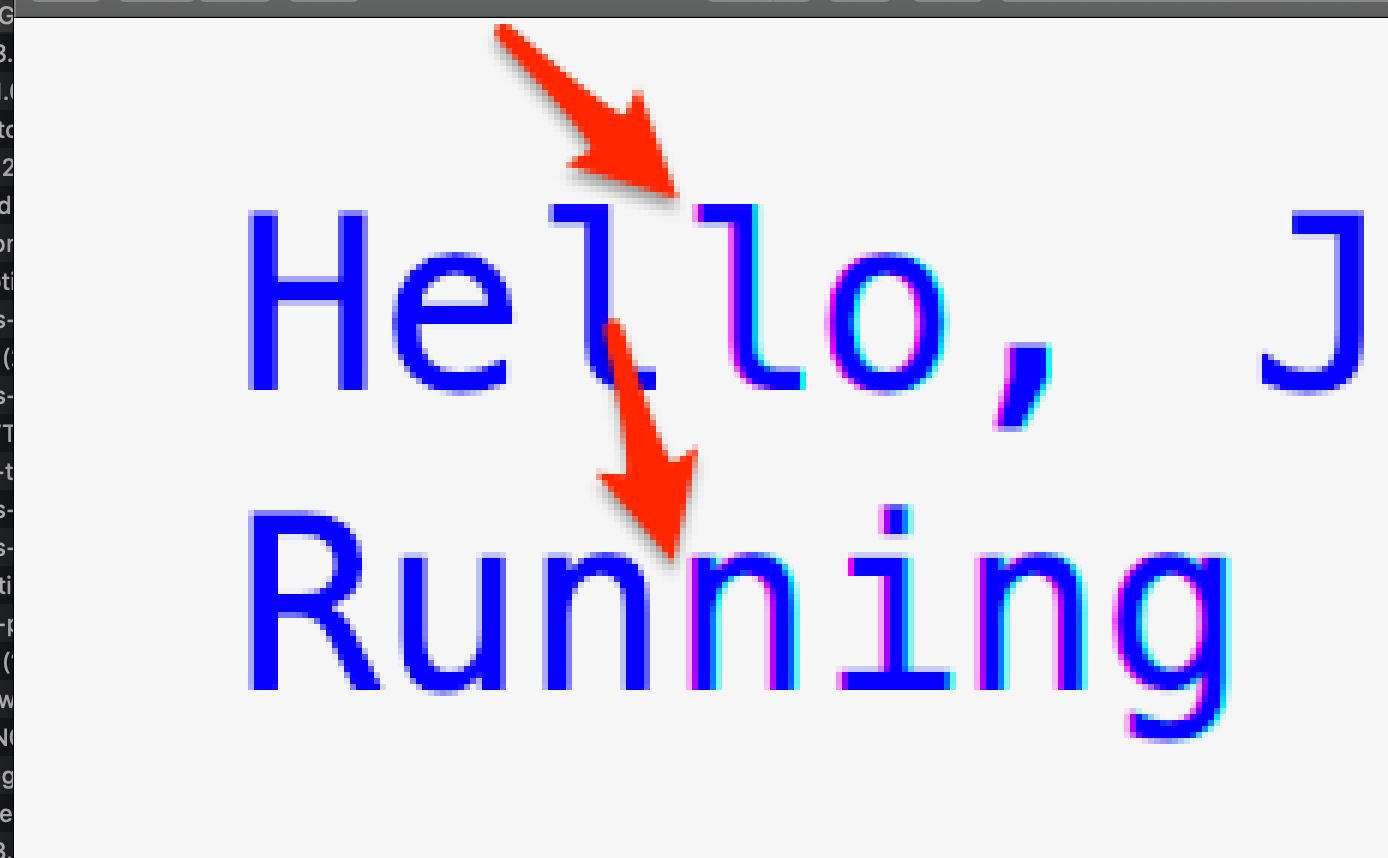
我使用的是OpenFx 13,在以前的JavaFx版本中尝试过。
scene.fxml
<?xml version="1.0" encoding="UTF-8"?>

<?import javafx.scene.control.Label?>
<?import javafx.scene.layout.StackPane?>


<StackPane maxHeight="-Infinity" maxWidth="-Infinity" minHeight="-Infinity" minWidth="-Infinity" prefHeight="400.0" prefWidth="600.0" xmlns="http://javafx.com/javafx/8.0.171" xmlns:fx="http://javafx.com/fxml/1" fx:controller="org.openjfx.FXMLController">
   <children>
      <Label fx:id="label" text="Label" />
   </children>
</StackPane>
FXMLController
package org.openjfx;

import javafx.fxml.FXML;
import javafx.scene.control.Label;
import javafx.scene.text.Font;
import javafx.scene.text.FontWeight;

public class FXMLController {

    @FXML
    private Label label;

    public void initialize() {
        String javaVersion = System.getProperty("java.version");
        String javafxVersion = System.getProperty("javafx.version");
        label.setFont(Font.font("Menlo", FontWeight.BOLD, 20));
        label.setText("Hello, JavaFX " + javafxVersion + "\nRunning on Java " + javaVersion + ".");
    }
}
MainApp
package org.openjfx;

import javafx.application.Application;
import javafx.fxml.FXMLLoader;
import javafx.scene.Parent;
import javafx.scene.Scene;
import javafx.stage.Stage;


public class MainApp extends Application {

    @Override
    public void start(Stage stage) throws Exception {
        Parent root = FXMLLoader.load(getClass().getResource("scene.fxml"));

        Scene scene = new Scene(root);
        scene.getStylesheets().add(getClass().getResource("styles.css").toExternalForm());

        stage.setTitle("JavaFX and Gradle");
        stage.setScene(scene);
        stage.show();
    }

    public static void main(String[] args) {
        launch(args);
    }

}回答 1
Stack Overflow用户
回答已采纳
发布于 2020-02-14 21:12:41
尝试在MainApp上使用LCD抗混叠:
public class MainApp extends Application {
    System.setProperty("prism.lcdtext", "false");
    ... The rest of your code ...
}页面原文内容由Stack Overflow提供。腾讯云小微IT领域专用引擎提供翻译支持
原文链接:
https://stackoverflow.com/questions/60233363
复制相关文章
相似问题
腾讯云开发者

Copyright © 2013 - 2026 Tencent Cloud. All Rights Reserved. 腾讯云 版权所有
深圳市腾讯计算机系统有限公司 ICP备案/许可证号:粤B2-20090059  粤公网安备44030502008569号
腾讯云计算(北京)有限责任公司 京ICP证150476号 | 京ICP备11018762号