
我可以使用WP_List_Table类在页面上呈现表吗?
我目前正在使用短代码显示从表中获取的项目列表,并将其显示在我的网站的一个页面上,但是由于信息列表非常大,我希望添加一个页面,并在将来为记录添加一个小的筛选菜单。
我在表格文档中找到了这个类,据我所知,它是一个类,允许您使用元素列表创建表,但我也在一些教程(如这或这 one )中阅读了这些类,它们表明该类用于创建元素列表,但用于wordpress管理。
我可以在我的短代码将呈现的函数中正常地使用这个类吗?或者,考虑到我希望在将来添加的功能,还有其他更合适的类吗?
用于呈现信息的函数和短代码如下:
function opt_menu_cactaceas_frontend() {

    global $wpdb;
    $tabla_cactaceas = $wpdb->prefix . 'cactaceas2';
    $aspirantes = $wpdb->get_results("SELECT * FROM $tabla_cactaceas");

    //echo '<table class="wp-list-table widefat fixed striped">';
    echo '<table>';
    echo '<thead><tr><th width="70%">Nombre Cientifico</th><th width="30%">Imagen</th></tr></thead>';
    echo '<tbody id="the-list">';

    foreach ( $aspirantes as $aspirante ) {

        $genero = esc_textarea($aspirante->genero);
        $especie = esc_textarea($aspirante->especie);
        $subespecie = esc_textarea($aspirante->subespecie);
        $autor = esc_textarea($aspirante->autor);

        if ( $subespecie == '' ):

            $nombreCactacea = "<i>$genero $especie</i> $autor";
        else:
            $nombreCactacea = "<i>$genero $especie</i> subsp. <i>$subespecie</i> $autor";

        endif;

        $imagen_cactus = wp_get_attachment_image( 263, 'thumbnail' );

        echo "<tr><td><a href='#' title='$motivacion'>$nombreCactacea</a></td><td>$imagen_cactus</td></tr>";
    }
    echo '</tbody></table>';
}

//funcion - agrega el shortcode en la pagina que se le llame
add_shortcode('srt_code_add_list_cactaceas', 'formulario_registro');
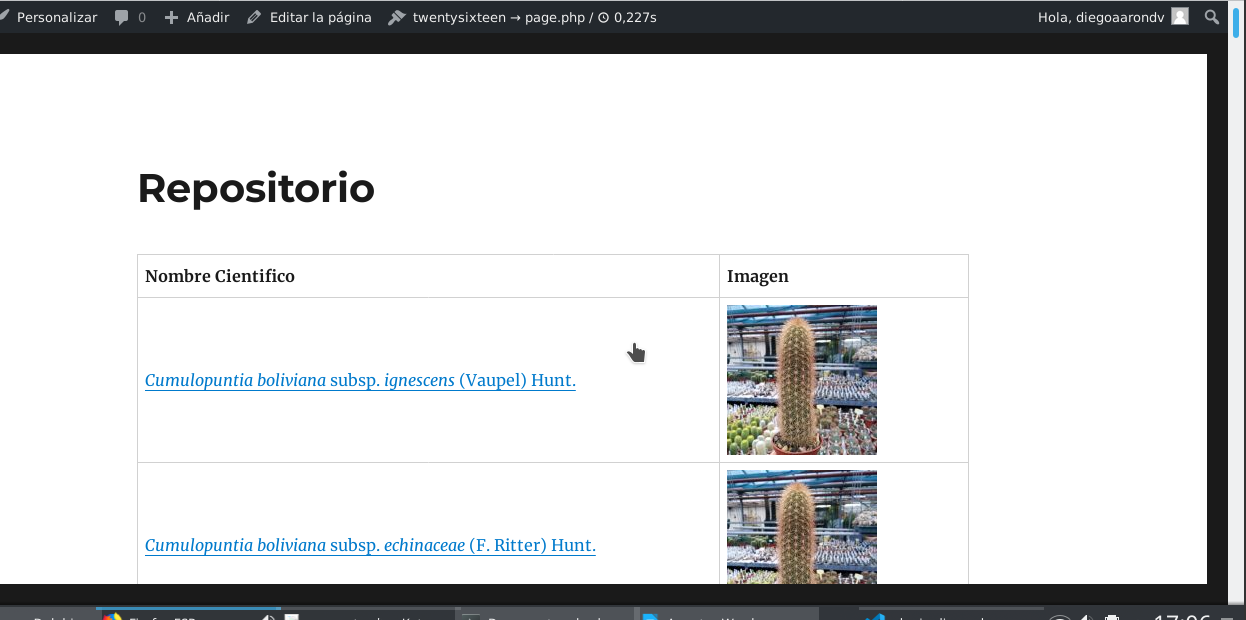
到目前为止,表的呈现方式如下:
回答 2
Stack Overflow用户
发布于 2020-07-15 10:47:17
WP_List_Table类可以在前端使用。然而,用于WP管理的CSS可能与前端使用的CSS冲突。
前端
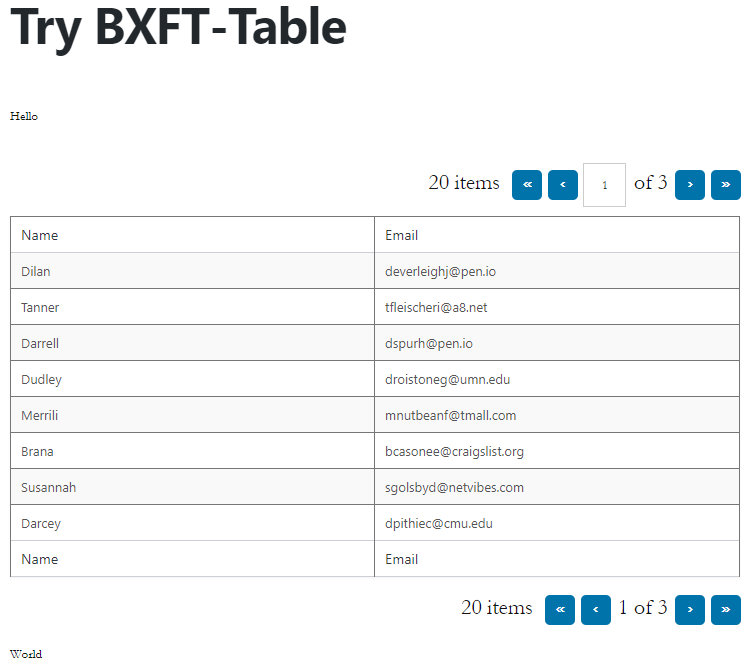
WP插件包含2个PHP文件。
bxft-shortcode.php
<?php
/**
 * BXFT - Shortcode
 *
 * @package     BXFT\Shortcode
 *
 * Plugin Name: BXFT - Shortcode
 * Plugin URI:
 * Description: Creating a shortcode with WP_List_Table.
 * Version:     1.0
 * Author:      Box
 * Author URI:  box@boxoft.net
 * License:     GPLv2
 */

add_shortcode( 'bxft-table', 'bxft_table_shortcode' );

function bxft_table_shortcode( $atts ) {
    ob_start();
    include_once plugin_dir_path( __FILE__ ) . 'class-bxft-table.php';
    $template = ob_get_contents();
    ob_end_clean();
    return $template;
}

add_action( 'wp_enqueue_scripts', 'bxft_queue_stylesheet' );

function bxft_queue_stylesheet() {
    wp_enqueue_style( 'bxft-table-shortcode-style', admin_url( 'css/wp-admin.css' ), array(), '1.0' );
}
class-bxft-table.php
<?php
if ( ! class_exists( 'WP_List_Table' ) ) {
    require_once ABSPATH . 'wp-admin/includes/template.php';
    require_once ABSPATH . 'wp-admin/includes/class-wp-screen.php';
    require_once ABSPATH . 'wp-admin/includes/screen.php';
    require_once ABSPATH . 'wp-admin/includes/class-wp-list-table.php';
}

class BXFT_Table extends WP_List_Table {

    public function prepare_items() {
        $data         = $this->wp_list_table_data();
        $per_page     = 8;
        $current_page = $this->get_pagenum();
        $total_items  = count( $data );
        $this->set_pagination_args(
            array(
                'total_items' => $total_items,
                'per_page'    => $per_page,
            )
        );

        // $this->items           = $data;
        $this->items           = array_slice(
            $data,
            ( ( $current_page - 1 ) * $per_page ),
            $per_page
        );
        $columns               = $this->get_columns();
        $hidden                = $this->get_hidden_columns();
        $this->_column_headers = array( $columns, $hidden );
    }

    public function wp_list_table_data() {
        $data = array(
            array(
                'id'    => 1,
                'name'  => 'Dilan',
                'email' => 'deverleighj@pen.io',
            ),
            array(
                'id'    => 2,
                'name'  => 'Tanner',
                'email' => 'tfleischeri@a8.net',
            ),
            array(
                'id'    => 3,
                'name'  => 'Darrell',
                'email' => 'dspurh@pen.io',
            ),
            array(
                'id'    => 4,
                'name'  => 'Dudley',
                'email' => 'droistoneg@umn.edu',
            ),
            array(
                'id'    => 5,
                'name'  => 'Merrili',
                'email' => 'mnutbeanf@tmall.com',
            ),
            array(
                'id'    => 6,
                'name'  => 'Brana',
                'email' => 'bcasonee@craigslist.org',
            ),
            array(
                'id'    => 7,
                'name'  => 'Susannah',
                'email' => 'sgolsbyd@netvibes.com',
            ),
            array(
                'id'    => 8,
                'name'  => 'Darcey',
                'email' => 'dpithiec@cmu.edu',
            ),
            array(
                'id'    => 9,
                'name'  => 'Sofie',
                'email' => 'sbroskeb@ca.gov',
            ),
            array(
                'id'    => 10,
                'name'  => 'Joscelin',
                'email' => 'jwestripa@php.net',
            ),
            array(
                'id'    => 11,
                'name'  => 'Kalila',
                'email' => 'kmacavaddy9@xing.com',
            ),
            array(
                'id'    => 12,
                'name'  => 'Marie-jeanne',
                'email' => 'mcocci8@1und1.de',
            ),
            array(
                'id'    => 13,
                'name'  => 'Darnell',
                'email' => 'dlamborne7@linkedin.com',
            ),
            array(
                'id'    => 14,
                'name'  => 'Hugibert',
                'email' => 'hhelgass6@icio.us',
            ),
            array(
                'id'    => 15,
                'name'  => 'Anitra',
                'email' => 'alongforth5@cmu.edu',
            ),
            array(
                'id'    => 16,
                'name'  => 'Reinaldos',
                'email' => 'rburchett4@simplemachines.org',
            ),
            array(
                'id'    => 17,
                'name'  => 'Arlan',
                'email' => 'adelph3@homestead.com',
            ),
            array(
                'id'    => 18,
                'name'  => 'Harwell',
                'email' => 'hturbefield2@sciencedaily.com',
            ),
            array(
                'id'    => 19,
                'name'  => 'Mikey',
                'email' => 'mmoakes1@reuters.com',
            ),
            array(
                'id'    => 20,
                'name'  => 'Mira',
                'email' => 'mmaciocia0@newsvine.com',
            ),
        );

        return $data;
    }

    public function get_hidden_columns() {
        return array( 'id' );
    }

    public function get_columns() {
        $columns = array(
            'id'     => 'ID',
            'name'   => 'Name',
            'email'  => 'Email',
        );

        return $columns;
    }

    public function column_default( $item, $column_name ) {
        switch ( $column_name ) {
            case 'id':
            case 'name':
            case 'email':
                return $item[ $column_name ];
            default:
                return 'N/A';
        }
    }
}

function display_bxft_table() {
    $bxft_table = new BXFT_Table();
    $bxft_table->prepare_items();
    ?>
    <div class="wrap">
        <?php $bxft_table->display(); ?>
    </div>
    <?php
}

display_bxft_table();我正在通过观看WP_List_Table来学习https://www.youtube.com/playlist?list=PLT9miexWCpPWD3BOrqHmwaXL2LLVb6kpg。谢谢作者。
Stack Overflow用户
发布于 2020-02-17 07:47:21
表格主要用于WordPress后端。如果您想呈现表,并希望与后端相同,那么请确保您已经包括了适当的资源,就像admin所做的那样(例如。(表)。否则,您也可以使用引导数据表,也可以尝试下面的插件。
https://stackoverflow.com/questions/60243599
复制相似问题
腾讯云开发者

Copyright © 2013 - 2026 Tencent Cloud. All Rights Reserved. 腾讯云 版权所有
深圳市腾讯计算机系统有限公司 ICP备案/许可证号:粤B2-20090059  粤公网安备44030502008569号
腾讯云计算(北京)有限责任公司 京ICP证150476号 | 京ICP备11018762号