
角度拖放..。可滚动div中的自动滚动丢失区域
因此,我在沙箱中工作,以模拟应用程序的环境,我希望实现这个拖放。不好意思,这么多话,但我真的想确保我正确地解释问题,因为我已经看到了几个旧的帖子,在这个问题上,要么没有回答或回答错误的问题。
短版
- cdk dnd不会autoscroll
- made我自己的autoscroll
- cdk dnd不会掉下来一次scrolled
诀窍似乎是,cdk拖放自动滚动功能只对整个窗口大小起作用,或者,如果它是一个固定高度的div,并带有溢出-y:滚动(这就是我要做的),那么它需要在cdkDropList级别。不幸的是,由于我的应用程序的组件体系结构,这是而不是的一个选项。
我编写了自己的自动滚动功能,它根据鼠标的屏幕位置滚动div,当一个元素被拖动时,我得到了这个功能,但最大的问题是,一旦开始滚动,您就失去了在列表中删除项的能力。
下面是我的父组件的HTML (具有固定高度和溢出位置的div )
<div #ScrollDiv style="height: 200px; width: 200px; overflow-y: scroll; padding: 5px;">
  <app-child (itemSelected)="itemSelection($event)"></app-child>
</div>
下面是带有cdk指令的子组件模板
   <div cdkDropList style="border: 2px solid purple;" (cdkDropListDropped)="drop($event)">
    <div cdkDrag [cdkDragData]="draggers" *ngFor="let item of draggers; let i = index"
            style="height: 30px; border: 2px solid blue; margin: 5px"
            (mousedown)="grabDrag()">
            {{item}}</div>
    </div>
此时,我可以在窗口中拖动,但是自动滚动无法工作,因此我将自动滚动添加到父组件的Type脚本文件中,更改了滚动位置(mousemove)。对于要开始向上/向下滚动的职位,这些值是在我正在处理的页面上硬编码的。
import { Component, OnInit, ElementRef, ViewChild, AfterViewInit, ChangeDetectionStrategy } from '@angular/core';
import { Subscription, fromEvent } from 'rxjs';

@Component({
  selector: 'app-root',
  templateUrl: './app.component.html',
  styleUrls: ['./app.component.css']
})
export class AppComponent implements AfterViewInit  {
  title = 'drag-sizing';
  itemSelected = false;
  isScrolling = false;
  smoothScroll;
  scrollSpeed = 2;
  @ViewChild('ScrollDiv', {static: true}) public myScrollContainer: ElementRef;

ngAfterViewInit() {
  fromEvent(this.myScrollContainer.nativeElement, 'mousemove').subscribe((event: MouseEvent) => {
    if (this.itemSelected) {
      if (event.clientY < 150) {
        this.isScrolling = true;
        if (!this.smoothScroll) {
          this.smoothScroll = setInterval(() => {
            this.scrollUp();
          }, 10);
        }
      } else if (event.clientY > 300) {
        this.isScrolling = true;
        if (!this.smoothScroll) {
          this.smoothScroll = setInterval(() => {
            this.scrollDown();
          }, 10);
        }
      } else {
        clearInterval(this.smoothScroll);
        this.smoothScroll = undefined;
        this.isScrolling = false;
      }
    } else {
      clearInterval(this.smoothScroll);
      this.smoothScroll = undefined;
      this.isScrolling = false;
    }
  });
}
  scrollInner() {
    this.myScrollContainer.nativeElement.scrollTop += 2;
  }
  itemSelection(event) {
    this.itemSelected = event;
    if (!this.itemSelected) {
      clearInterval(this.smoothScroll);
      this.smoothScroll = undefined;
    }
  }
  scrollUp() {
    if (this.isScrolling === true) {
      this.myScrollContainer.nativeElement.scrollTop -= this.scrollSpeed;
    }
  }

  scrollDown() {
    if (this.isScrolling === true) {
      this.myScrollContainer.nativeElement.scrollTop += this.scrollSpeed;
    }
  }
}
和子组件TypeScript,它发出正在拖放的项,并具有drop功能。
import { Component, OnInit, Input, ElementRef, ViewChild, AfterViewInit, Output, EventEmitter } from '@angular/core';
import { Subscription, fromEvent, BehaviorSubject, Subject } from 'rxjs';
import { CdkDragDrop, transferArrayItem, moveItemInArray } from '@angular/cdk/drag-drop';

@Component({
  selector: 'app-child',
  templateUrl: './child.component.html',
  styleUrls: ['./child.component.css']
})
export class ChildComponent implements  AfterViewInit {
@Output() itemSelected = new EventEmitter<boolean>();

  itemIsSelected = false;
  draggers = ['item 0', 'item 1', 'item 2'...]

  ngAfterViewInit(): void {
    fromEvent(document, 'mouseup').subscribe(() => {
      this.itemIsSelected = false;
      this.itemSelected.emit(this.itemIsSelected);
  });
  }
  grabDrag() {
    this.itemIsSelected = true;
    this.itemSelected.emit(this.itemIsSelected);
  }
  drop(event: CdkDragDrop<any>) {
    console.log(event);
    moveItemInArray(this.draggers, event.previousIndex, event.currentIndex);
  }
}
(可能有些东西我不使用-一些失败的尝试遗留下来)
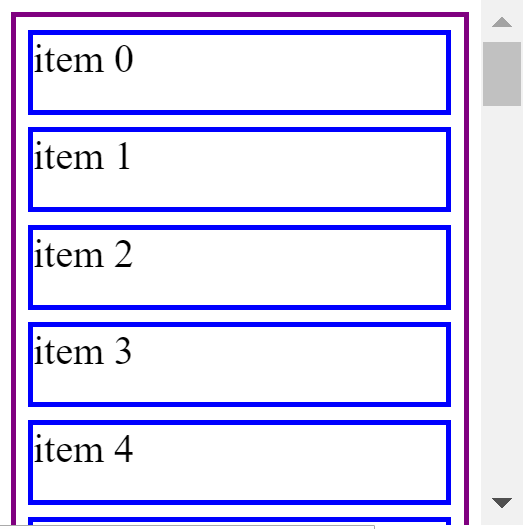
无论如何:我知道这很长,但是我试图克服/找出的主要行为是,当我拖动一个项目并滚动离开数组初始视图端口中的小块时,cdk拖放不再允许我将项目拖放到数组的那个位置.该项目似乎仍在拖放,但这使我相信它不再识别DROP区域。
回答 3
Stack Overflow用户
发布于 2020-06-19 22:56:55
我认为解决方案可能是将cdkScrollable指令放在一个容器中,容器中包含CDK拖放组件。
Stack Overflow用户
发布于 2022-03-21 15:26:30
应该将cdkScrollable指令添加到导致滚动条出现的元素中(导致视图端口或元素高度溢出)。在我的例子中,持有cdkDropList的是元素的直接父级。
这里最重要的是可滚动容器上的cdkScrollable。它可以是远祖(在我们的例子中是这样的),而不是亲生父母。
总之,要启用autoscroll,您需要导入CdkScrollableModule并为可滚动容器设置cdkScrollable,该容器应该在拖动时滚动。
试着做这样的事情:
<div cdkScrollable class="modal-content">
    <div cdkDropList class="data-content" (cdkDropListDropped)="drop($event)">
     <ng-container *ngFor="let column of columnList"
        [ngTemplateOutlet]="datarowcontent"
        [ngTemplateOutletContext]="{column}">
     </ng-container>
     <ng-template  let-column="column" #datarowcontent>
         <div cdkDrag class="data-row">
             <div cdkDragHandle class="edit-mode-icon">
                 <svg myDragIcon size="16"></svg>
             </div>
             <div class="content name">{{ column.name}}</div>
         </div>
     </ng-template>
    </div>
</div>Stack Overflow用户
发布于 2022-07-06 11:08:17
为我工作如下:
<div cdkScrollable cdkDropList>
  <div *ngFor="let item of data" cdkDrag>
    <app-component [item]="item"></app-component>
  </div>
</div>
我用cdkScrollable和cdkDropList。确保在模块文件中导入CdkScrollableModule。
https://stackoverflow.com/questions/60284623
复制相似问题
腾讯云开发者

Copyright © 2013 - 2026 Tencent Cloud. All Rights Reserved. 腾讯云 版权所有
深圳市腾讯计算机系统有限公司 ICP备案/许可证号:粤B2-20090059  粤公网安备44030502008569号
腾讯云计算(北京)有限责任公司 京ICP证150476号 | 京ICP备11018762号