
如何传递shinytree值以在闪亮的情况下删除输入
如何传递shinytree值以在闪亮的情况下删除输入
提问于 2020-02-19 11:18:34
我正在尝试创建显示的下拉输入,它在R中有分层下拉列表,如下所示:
现在,我能够创建一个shinytree,在这里我们可以显示整个列表,但是我希望以下拉方式显示列表,而不是shinytree。
下面是我的代码:
library(shiny)

library(shinyTree)

# Define UI for application:

    ui <- {fluidPage(
            sidebarLayout(
              sidebarPanel(width = 3,
                 div(shinyTree("Tree",checkbox = TRUE)),
                 verbatimTextOutput("selected")
              ),
              mainPanel(width = 9)
           )
    )}

# Define server logic:
    server <- function(input, output, session){

       observe({
          df <- data.frame(
             child= c('a','b','c','d','e','f','g','h'),
             parent = c('f','f','f','g','h','i','i','i'))

          tree <- FromDataFrameNetwork(df)

          filtered_value <- as.list(tree)

          filtered_value <- filtered_value[-1]

          output$Tree <- renderTree({
            filtered_value
          })
       })
    }

# Run the application
shinyApp(ui = ui, server = server)我正在以这样的方式寻找输入:自定义下拉

回答 1
Stack Overflow用户
回答已采纳
发布于 2020-02-20 08:12:42
昨天我为ComboTree库做了一个闪亮的绑定。这很管用,但这并不是什么了不起的事情。
将comboTreeBinding.js文件放入www子文件夹:
var comboTreeBinding = new Shiny.InputBinding();

$.extend(comboTreeBinding, {
  find: function (scope) {
    return $(scope).find(".comboTree");
  },
  getValue: function (el) {
    var value = el.value.split(", ");
    var empty = value.length === 1 && value[0] === "";
    return empty ? null : value;
  },
  setValue: function(el, value) {
    $(el).setSelection(value);
  },
  subscribe: function (el, callback) {
    $(el).on("change.comboTreeBinding", function (e) {
      callback();
    });
  },
  unsubscribe: function (el) {
    $(el).off(".comboTreeBinding");
  },
  initialize: function(el) {
        var $el = $(el);
        $el.comboTree({
      source: $el.data("choices"),
      isMultiple: $el.data("multiple"),
      cascadeSelect: $el.data("cascaded"),
      collapse: true
    });
  }
});

Shiny.inputBindings.register(comboTreeBinding);闪亮的应用程序(将文件、style.css、和放在www子文件夹中):
library(shiny)
library(jsonlite)

comboTreeInput <- function(inputId, width = "30%", height = "100px",
                           choices, multiple = TRUE, cascaded = TRUE){
  tags$div(style = sprintf("width: %s; height: %s;", width, height),
           tags$input(id = inputId, class = "comboTree", type = "text",
                      placeholder = "Select",
                      `data-choices` = as.character(toJSON(choices, auto_unbox = TRUE)),
                      `data-multiple` = ifelse(multiple, "true", "false"),
                      `data-cascaded` = ifelse(cascaded, "true", "false")
           )
  )
}

choices <- list(
  list(id = 1, title = "item1"),
  list(id = 2, title = "item2",
       subs = list(
         list(id = 21, title = "item2-1"),
         list(id = 22, title = "item2-2")
       )
  ),
  list(id = 3, title = "item3",
       subs = list(
         list(id = 31, title = "item3-1", isSelectable = FALSE,
              subs = list(
                list(id = 311, title = "item3-1-1"),
                list(id = 312, title = "item3-1-2")
              )
         ),
         list(id = 32, title = "item3-2")
       )
  )
)

ui <- fluidPage(
  tags$head(
    tags$link(rel = "stylesheet", href = "style.css"),
    tags$script(src = "comboTreePlugin.js"),
    tags$script(src = "comboTreeBinding.js")
  ),
  br(),
  h3("You selected:"),
  verbatimTextOutput("selections"),
  br(),
  comboTreeInput("mycombotree", choices = choices)
)

server <- function(input, output, session){

  output[["selections"]] <- renderPrint({
    input[["mycombotree"]]
  })

}

shinyApp(ui, server)
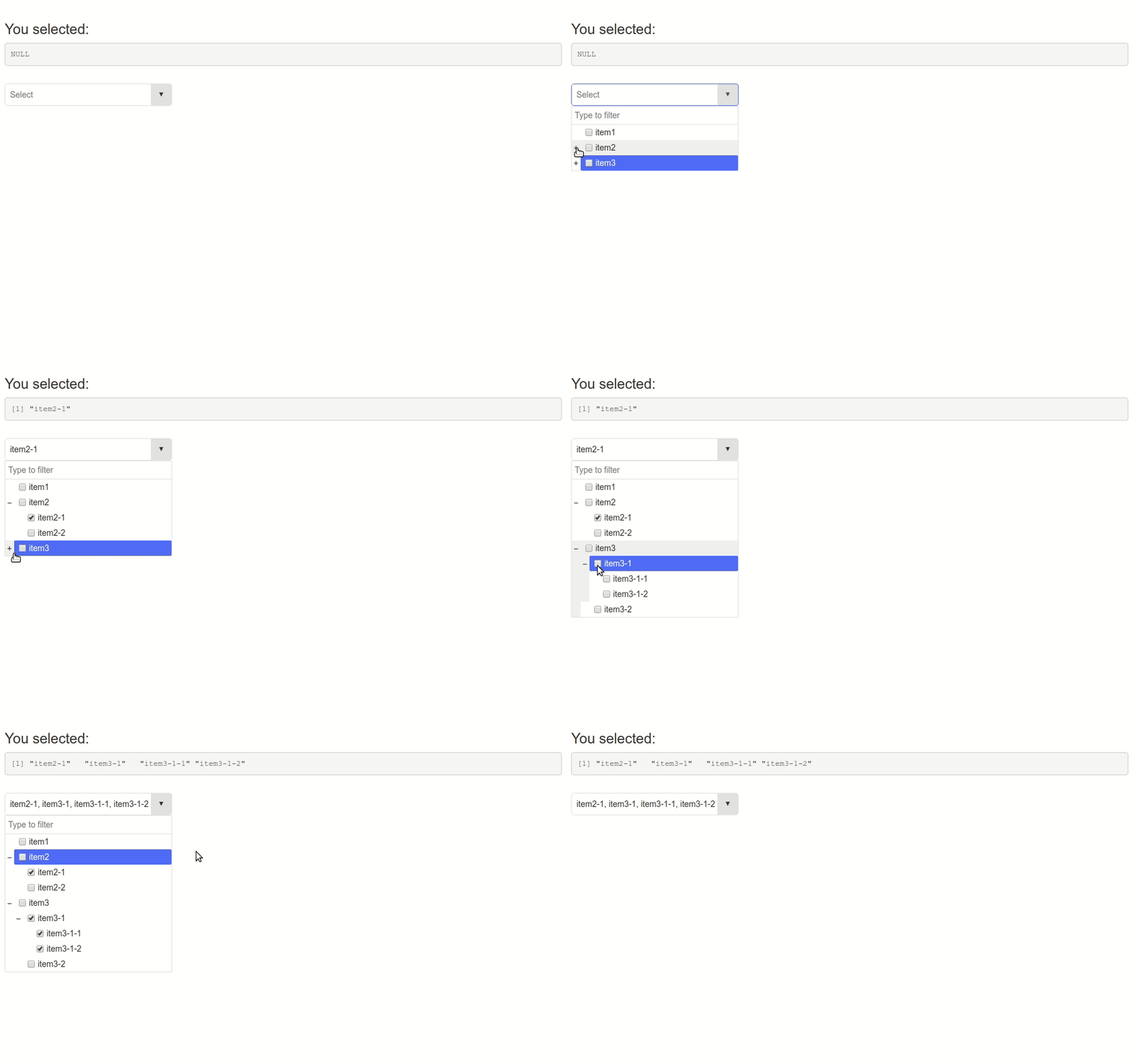
页面原文内容由Stack Overflow提供。腾讯云小微IT领域专用引擎提供翻译支持
原文链接:
https://stackoverflow.com/questions/60299185
复制相关文章
相似问题
腾讯云开发者

Copyright © 2013 - 2026 Tencent Cloud. All Rights Reserved. 腾讯云 版权所有
深圳市腾讯计算机系统有限公司 ICP备案/许可证号:粤B2-20090059  粤公网安备44030502008569号
腾讯云计算(北京)有限责任公司 京ICP证150476号 | 京ICP备11018762号