
“需要NOAUTH身份验证”用于Redis的Azure缓存Gitlab错误
“需要NOAUTH身份验证”用于Redis的Azure缓存Gitlab错误
提问于 2020-02-21 10:44:32
我已经为Redis创建了一个Azure缓存,我正在尝试将它用作Gitlab的外部redis。
我的gitlab.rb是:
#external_url "https://ci.example.com"

nginx['redirect_http_to_https'] = true
nginx['ssl_certificate'] = "/etc/gitlab/ssl/ci.example.com.crt"
nginx['ssl_certificate_key'] = "/etc/gitlab/ssl/ci.example.com.key"

### The duration in seconds to keep backups before they are allowed to be deleted
gitlab_rails['backup_keep_time'] = 604800

### External postgres settings
postgresql['enable'] = false
gitlab_rails['db_adapter'] = "postgresql"
gitlab_rails['db_encoding'] = "unicode"
gitlab_rails['db_database'] = "cisomething"
# username string for AWS
# gitlab_rails['db_username'] = "gitlab"
# username string for Azure
gitlab_rails['db_username'] = "gitlab@ci-something.postgres.database.azure.com"
gitlab_rails['db_password'] = "really long password"
gitlab_rails['db_host'] = "ci-something.postgres.database.azure.com"
gitlab_rails['db_port'] = 5432
gitlab_rails['auto_migrate'] = false

### External redis settings
redis['enable'] = false
gitlab_rails['redis_host'] = "ci.redis.cache.windows.net"
gitlab_rails['redis_port'] = 6379
gitlab_rails['redis_password'] = "azure-redis-primary-access-key"

### Whitelist VPC cidr for access to health checks
gitlab_rails['monitoring_whitelist'] = ['XX.XXX.X.X/24']

### Default Theme
gitlab_rails['gitlab_default_theme'] = 2

### Enable or disable automatic database migrations
gitlab_rails['auto_migrate'] = false

### GitLab email server settings
... other settings here我可以用redis-cli连接到Redis
redis-cli -h ci.redis.cache.windows.net -p 6379 -a azure-redis-primary-access-key
执行命令。
当我执行gitlab-ctl tail时,我会看到以下错误:
==> /var/log/gitlab/gitlab-workhorse/current <==
{"error":"keywatcher: pubsub receive: NOAUTH Authentication required.","level":"error","msg":"unknown error","time":"2020-02-21T10:26:08Z"}
{"address":"ci.redis.cache.windows.net","level":"info","msg":"redis: dialing","scheme":"redis","time":"2020-02-21T10:26:08Z"}
{"error":"keywatcher: pubsub receive: NOAUTH Authentication required.","level":"error","msg":"unknown error","time":"2020-02-21T10:26:08Z"}
{"address":"ci.redis.cache.windows.net","level":"info","msg":"redis: dialing","scheme":"redis","time":"2020-02-21T10:26:08Z"}
{"error":"keywatcher: pubsub receive: NOAUTH Authentication required.","level":"error","msg":"unknown error","time":"2020-02-21T10:26:08Z"}
{"address":"ci.redis.cache.windows.net","level":"info","msg":"redis: dialing","scheme":"redis","time":"2020-02-21T10:26:08Z"}
{"error":"keywatcher: pubsub receive: NOAUTH Authentication required.","level":"error","msg":"unknown error","time":"2020-02-21T10:26:08Z"}
{"address":"ci.redis.cache.windows.net","level":"info","msg":"redis: dialing","scheme":"redis","time":"2020-02-21T10:26:08Z"}
我在网上搜索,但找不到解决这个问题的方法。
System information
System:     Ubuntu 16.04
Current User:   git
Using RVM:  no
Ruby Version:   2.6.5p114
Gem Version:    2.7.10
Bundler Version:1.17.3
Rake Version:   12.3.3
Redis Version:  5.0.7
Git Version:    2.24.1
Sidekiq Version:5.2.7

GitLab information
Version:    12.7.6
Revision:   61654d25b20
Directory:  /opt/gitlab/embedded/service/gitlab-rails
DB Adapter: PostgreSQL
DB Version: 9.5.20,回答 1
Stack Overflow用户
回答已采纳
发布于 2020-02-21 12:52:21
所以我想出来了。
为了将来的参考,这里是。
gitlab.rb
### External redis settings
redis['enable'] = false
gitlab_rails['redis_host'] = "ci.redis.cache.windows.net"
gitlab_rails['redis_port'] = 6380
gitlab_rails['redis_password'] = "azure-primary-access-key"
gitlab_rails['redis_ssl'] = true
Redis配置Azure门户的Azure Cache
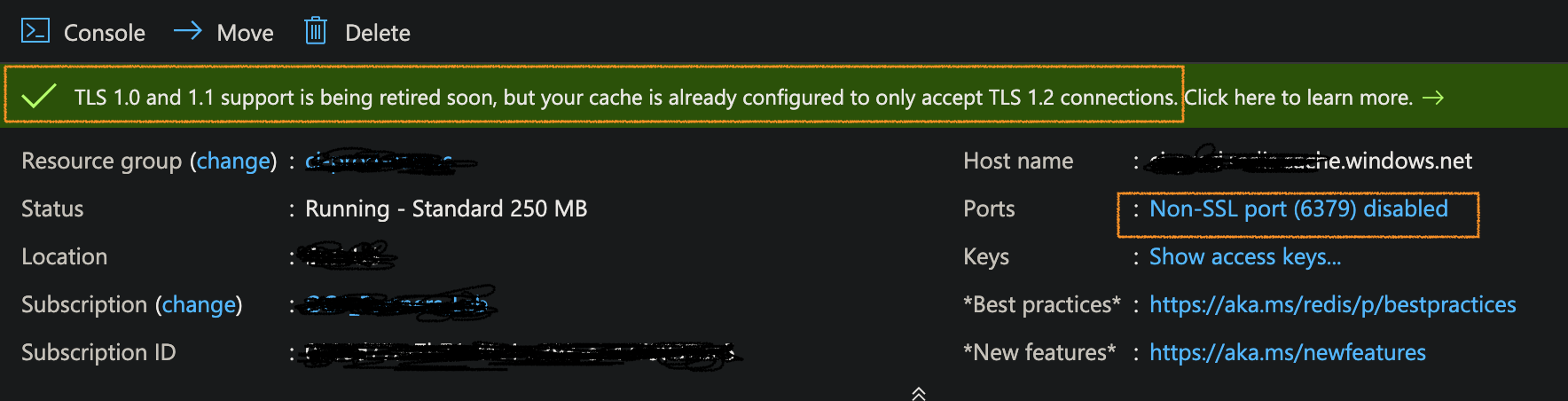
最后说明:
在部署Gitlab时,使用gitlab-ctl tail检查日志。如果您看到redis默认端口为6379,就意味着Sidekiq有旧的配置,正如我所观察到的,这个配置没有用gitlab-ctl reconfigure进行更新。删除VM并重新部署它。
页面原文内容由Stack Overflow提供。腾讯云小微IT领域专用引擎提供翻译支持
原文链接:
https://stackoverflow.com/questions/60336948
复制相关文章
相似问题
腾讯云开发者

Copyright © 2013 - 2026 Tencent Cloud. All Rights Reserved. 腾讯云 版权所有
深圳市腾讯计算机系统有限公司 ICP备案/许可证号:粤B2-20090059  粤公网安备44030502008569号
腾讯云计算(北京)有限责任公司 京ICP证150476号 | 京ICP备11018762号