
基于文件扩展设置图标。角7
基于文件扩展设置图标。角7
提问于 2020-02-24 17:02:56
我使用的是角7,我有一个列表,其中显示了一些带有图标的文档名。在这一刻,我显示相同的图标--不知道文档是什么,但是我有Excel文档、pdf、文档、图像等的图标。我想知道是否有一种基于文档扩展设置图标的方法。
到目前为止,我有这样的想法:
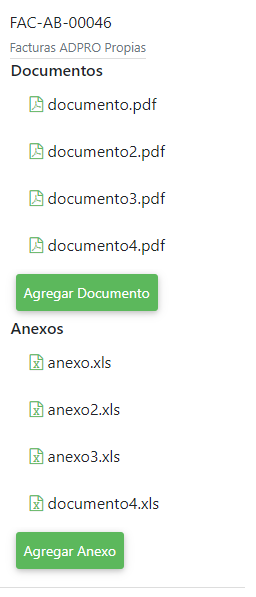
使用这样的html:
<h6 class="list-tittle">
  Documentos
</h6>
<div >
  <ul class="list-group">
    <li *ngFor="let document of documents;" class="list-item"><i class="fa fa-file-pdf-o" style="color:#5cb85c;" aria-hidden="true"></i> {{document}}</li>
  </ul>
</div>
<button type="button" class="btn  tolowercase">Agregar Documento</button>
<h6 class="list-tittle">
  Anexos
</h6>
<div>
  <ul class="list-group">
    <li *ngFor="let anexo of anexos;" class="list-item"><i class="fa fa-file-excel-o" style="color:#5cb85c;" aria-hidden="true"></i> {{anexo}}</li>
  </ul>
</div>
<button type="button" class="btn  tolowercase">Agregar Anexo</button>
预期的行为是,列表显示的图标如下:预期的:
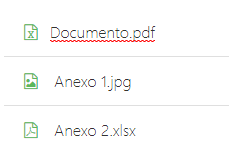
我很感谢你的帮助。
回答 1
Stack Overflow用户
回答已采纳
发布于 2020-02-24 17:47:50
为此,你必须做以下事情
1)抽取每个文档的扩展
2)创建一个数组,其中包含每个类型的图标类名。
使用下面的示例
.ts
export class AppComponent {
  documentList = ["document1.pdf", "document2.xlsx", "document3.jpg"];
  iconList = [ // array of icon class list based on type
    { type: "xlsx", icon: "fa fa-file-excel-o" },
    { type: "pdf", icon: "fa fa-file-pdf-o" },
    { type: "jpg", icon: "fa fa-file-image-o" }
  ];

  getFileExtension(filename) { // this will give you icon class name
    let ext = filename.split(".").pop();
    let obj = this.iconList.filter(row => {
      if (row.type === ext) {
        return true;
      }
    });
    if (obj.length > 0) {
      let icon = obj[0].icon;
      return icon;
    } else {
      return "";
    }
  }
}
.html
<div *ngFor="let filename of documentList">
      <i class="{{getFileExtension(filename)}}" style="color:#5cb85c;" aria-hidden="true"></i>
      {{filename}}
</div>
工作示例链接
https://stackblitz.com/edit/angular-4bexr3?embed=1&file=src/app/app.component.html
页面原文内容由Stack Overflow提供。腾讯云小微IT领域专用引擎提供翻译支持
原文链接:
https://stackoverflow.com/questions/60380718
复制相关文章
相似问题
腾讯云开发者

Copyright © 2013 - 2026 Tencent Cloud. All Rights Reserved. 腾讯云 版权所有
深圳市腾讯计算机系统有限公司 ICP备案/许可证号:粤B2-20090059  粤公网安备44030502008569号
腾讯云计算(北京)有限责任公司 京ICP证150476号 | 京ICP备11018762号