
在远程计算机上处理请求时发生了错误。
在远程计算机上处理请求时发生了错误。
提问于 2020-02-25 12:13:55
我尝试使用Jenkins和msdeploy将.NET Framework4.5应用程序部署到远程windows服务器:
def deployDev(folder, virtualDirectory)
{
bat "\"C:\\Program Files\\IIS\\Microsoft Web Deploy V3\\msdeploy.exe\" -verb:sync -allowUntrusted -source:package=\"${WORKSPACE}\\DIST\\Package\\${virtualDirectory}.zip\" -dest:auto=\"Default%%20Web%%20Site/${virtualDirectory}\",computerName=\"https://XX-XXX-XX:8172/msdeploy.axd?site=Default%%20Web%%20Site\" -enablerule:AppOffline -setParam:name=\"IIS Web Application Name\",value=\"Default Web Site\\${virtualDirectory}\" -verbose -disableLink:AppPoolExtension -disableLink:ContentExtension -disableLink:CertificateExtension"
}
在部署过程中,我得到了以下错误:
14:29:53  Verbose: Source createApp (E:\Jenkins\slaves\AsoModernisation\workspace\ASO2_master\Aso2\obj\Debug\Package\PackageTmp) does not match destination (Default Web Site\Aso2) differing in attributes (isDest['False','True']). Update pending.
14:29:53  Verbose: Update operation on **createApp** (E:\Jenkins\slaves\AsoModernisation\workspace\ASO2_master\Aso2\obj\Debug\Package\PackageTmp) skipped because of rule ApplicationExistsRule.
14:29:53  Verbose: Delete operation on filePath (Default Web Site\Aso2\App_Offline.htm) skipped because of rule AppOffline.
14:29:53  Verbose: Source **setAcl** (E:\Jenkins\slaves\AsoModernisation\workspace\ASO2_master\Aso2\obj\Debug\Package\PackageTmp) does not match destination (Default Web Site\Aso2) differing in attributes (isDest['False','True'],setAclUser,setAclAccess). Update pending.
14:29:53  Info: Adding ACLs for path (Default Web Site\Aso2)
14:29:53  Verbose: Parameter entry 'IIS Web Application Name/1' is applicable to 'iisApp/E:\Jenkins\slaves\AsoModernisation\workspace\ASO2_master\Aso2\obj\Debug\Package\PackageTmp' because of its scope.
14:29:53  Verbose: Parameter entry 'IIS Web Application Name/2' is applicable to 'setAcl/E:\Jenkins\slaves\AsoModernisation\workspace\ASO2_master\Aso2\obj\Debug\Package\PackageTmp' because of its scope.
14:29:53  Verbose: Parameter entry 'IIS Web Application Name/2' is applicable to 'setAcl/E:\Jenkins\slaves\AsoModernisation\workspace\ASO2_master\Aso2\obj\Debug\Package\PackageTmp' because of its scope.
14:29:53  Verbose: Parameter entry 'Add write permission to App_Data Folder/1' is applicable to 'setAcl/E:\Jenkins\slaves\AsoModernisation\workspace\ASO2_master\Aso2\obj\Debug\Package\PackageTmp\App_Data' because of its scope.
14:29:53  Error: (21/02/2020 14:29:53) An error occurred when the request was processed on the remote computer.
14:29:53  Error: The server experienced an issue processing the request. Contact the server administrator for more information.
14:29:53  Error count: 1.
我打开了端口8172,检查了用户权限,尝试重新安装ms部署(v3.6),添加了IIS管理器权限,在默认网站下创建了池和虚拟目录。
有人会对这件事有什么建议吗?createApp或setAcl有什么会引起这个问题的吗?
回答 1
Stack Overflow用户
回答已采纳
发布于 2020-02-26 07:58:25
首先,确保在这两台机器上安装了管理服务。

它正在运行并设置windows和iis凭据。
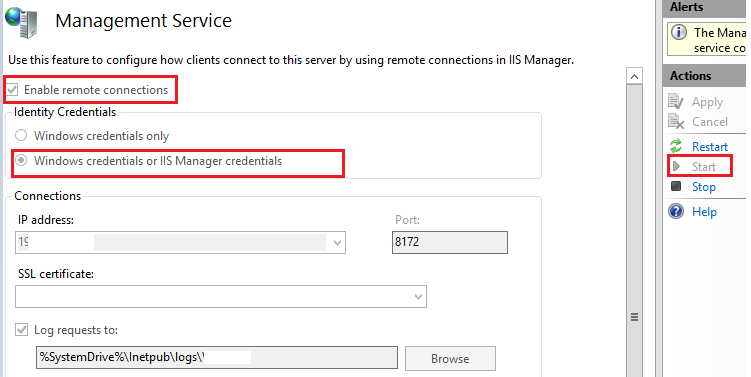
打开港口8172。
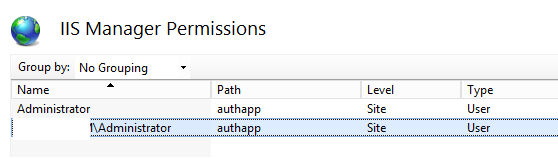
将iis经理用户设置为sit级别。
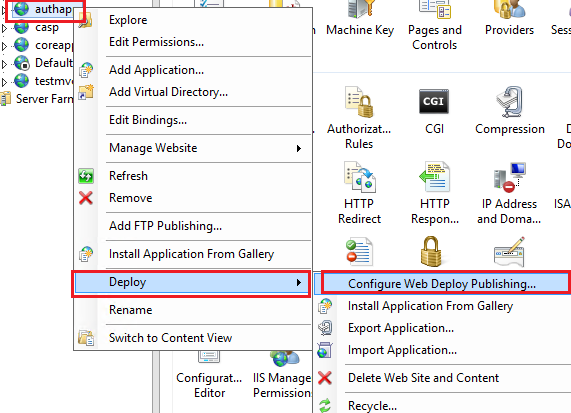
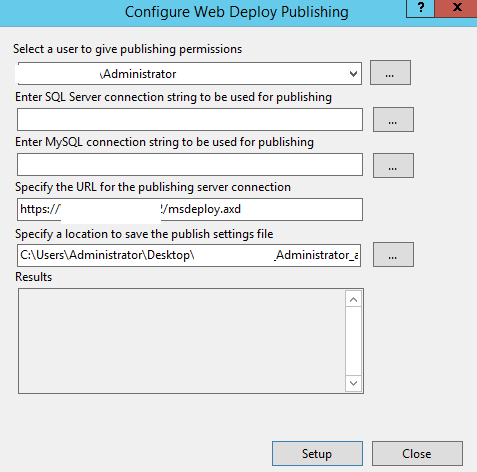
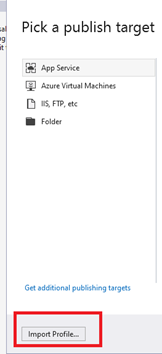
配置“web部署发布”设置。
使用IIS生成的配置文件并复制发布配置文件。
您可以使用配置文件发布应用程序。
以管理员身份运行visual studio。
并在发布网站时使用该配置文件。
页面原文内容由Stack Overflow提供。腾讯云小微IT领域专用引擎提供翻译支持
原文链接:
https://stackoverflow.com/questions/60394408
复制相关文章
相似问题
腾讯云开发者

Copyright © 2013 - 2026 Tencent Cloud. All Rights Reserved. 腾讯云 版权所有
深圳市腾讯计算机系统有限公司 ICP备案/许可证号:粤B2-20090059  粤公网安备44030502008569号
腾讯云计算(北京)有限责任公司 京ICP证150476号 | 京ICP备11018762号