
在NumPy中安装PyCharm包时出错
在NumPy中安装PyCharm包时出错
提问于 2020-03-04 06:15:25
我尝试将NumPy包安装在PyCharm中,并得到了以下错误:
错误:无法初始化编译器实例:您有Visual吗
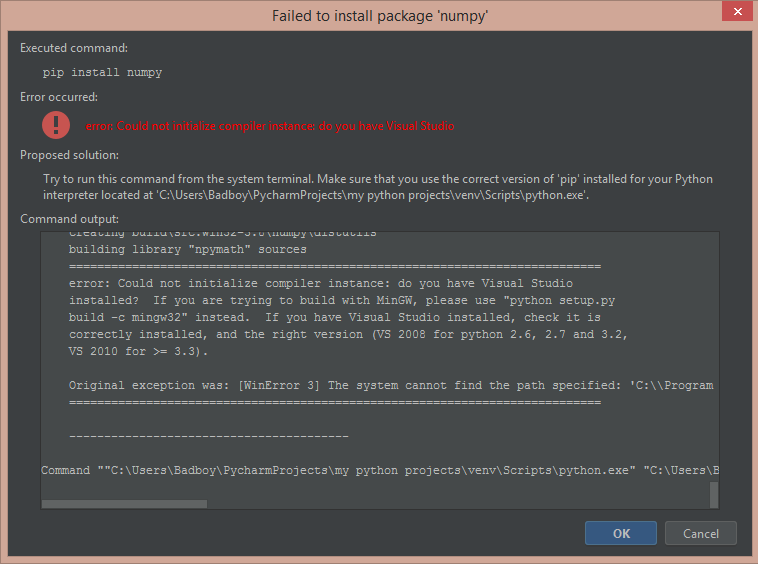
我已经安装了Visual 2015并升级了安装工具。请帮我解决这个问题
Collecting numpy
  Using cached https://files.pythonhosted.org/packages/40/de/0ea5092b8bfd2e3aa6fdbb2e499a9f9adf810992884d414defc1573dca3f/numpy-1.18.1.zip
  Installing build dependencies: started
  Installing build dependencies: finished with status 'done'
  Getting requirements to build wheel: started
  Getting requirements to build wheel: finished with status 'done'
    Preparing wheel metadata: started
    Preparing wheel metadata: still running...
    Preparing wheel metadata: finished with status 'error'
    Complete output from command "C:\Users\Badboy\PycharmProjects\my python projects\venv\Scripts\python.exe" "C:\Users\Badboy\PycharmProjects\my python projects\venv\lib\site-packages\pip-19.0.3-py3.8.egg\pip\_vendor\pep517\_in_process.py" prepare_metadata_for_build_wheel C:\Users\Badboy\AppData\Local\Temp\tmpi7a2_egc:
    Running from numpy source directory.
    setup.py:461: UserWarning: Unrecognized setuptools command, proceeding with generating Cython sources and expanding templates
      run_build = parse_setuppy_commands()
    Cythonizing sources
    Processing numpy/random\_bounded_integers.pxd.in
    Processing numpy/random\mtrand.pyx
    Processing numpy/random\_bit_generator.pyx
    Processing numpy/random\_bounded_integers.pyx.in
    Processing numpy/random\_common.pyx
    Processing numpy/random\_generator.pyx
    Processing numpy/random\_mt19937.pyx
    Processing numpy/random\_pcg64.pyx
    Processing numpy/random\_philox.pyx
    Processing numpy/random\_sfc64.pyx
    blas_opt_info:
    blas_mkl_info:
    No module named 'numpy.distutils._msvccompiler' in numpy.distutils; trying from distutils
    customize MSVCCompiler
      libraries mkl_rt not found in ['C:\\Users\\Badboy\\PycharmProjects\\my python projects\\venv\\lib', 'C:\\']
      NOT AVAILABLE

    blis_info:
      libraries blis not found in ['C:\\Users\\Badboy\\PycharmProjects\\my python projects\\venv\\lib', 'C:\\']
      NOT AVAILABLE

    openblas_info:
      libraries openblas not found in ['C:\\Users\\Badboy\\PycharmProjects\\my python projects\\venv\\lib', 'C:\\']
    get_default_fcompiler: matching types: '['gnu', 'intelv', 'absoft', 'compaqv', 'intelev', 'gnu95', 'g95', 'intelvem', 'intelem', 'flang']'
    customize GnuFCompiler
    Could not locate executable g77
    Could not locate executable f77
    customize IntelVisualFCompiler
    Could not locate executable ifort
    Could not locate executable ifl
    customize AbsoftFCompiler
    Could not locate executable f90
    customize CompaqVisualFCompiler
    Could not locate executable DF
    customize IntelItaniumVisualFCompiler
    Could not locate executable efl
    customize Gnu95FCompiler
    Could not locate executable gfortran
    Could not locate executable f95
    customize G95FCompiler
    Could not locate executable g95
    customize IntelEM64VisualFCompiler
    customize IntelEM64TFCompiler
    Could not locate executable efort
    Could not locate executable efc
    customize PGroupFlangCompiler
    Could not locate executable flang
    don't know how to compile Fortran code on platform 'nt'
      NOT AVAILABLE

    atlas_3_10_blas_threads_info:
    Setting PTATLAS=ATLAS
      libraries tatlas not found in ['C:\\Users\\Badboy\\PycharmProjects\\my python projects\\venv\\lib', 'C:\\']
      NOT AVAILABLE

    atlas_3_10_blas_info:
      libraries satlas not found in ['C:\\Users\\Badboy\\PycharmProjects\\my python projects\\venv\\lib', 'C:\\']
      NOT AVAILABLE

    atlas_blas_threads_info:
    Setting PTATLAS=ATLAS
      libraries ptf77blas,ptcblas,atlas not found in ['C:\\Users\\Badboy\\PycharmProjects\\my python projects\\venv\\lib', 'C:\\']
      NOT AVAILABLE

    atlas_blas_info:
      libraries f77blas,cblas,atlas not found in ['C:\\Users\\Badboy\\PycharmProjects\\my python projects\\venv\\lib', 'C:\\']
      NOT AVAILABLE

    accelerate_info:
      NOT AVAILABLE

    C:\Users\Badboy\AppData\Local\Temp\pycharm-packaging\numpy\numpy\distutils\system_info.py:1896: UserWarning:
        Optimized (vendor) Blas libraries are not found.
        Falls back to netlib Blas library which has worse performance.
        A better performance should be easily gained by switching
        Blas library.
      if self._calc_info(blas):
    blas_info:
      libraries blas not found in ['C:\\Users\\Badboy\\PycharmProjects\\my python projects\\venv\\lib', 'C:\\']
      NOT AVAILABLE

    C:\Users\Badboy\AppData\Local\Temp\pycharm-packaging\numpy\numpy\distutils\system_info.py:1896: UserWarning:
        Blas (http://www.netlib.org/blas/) libraries not found.
        Directories to search for the libraries can be specified in the
        numpy/distutils/site.cfg file (section [blas]) or by setting
        the BLAS environment variable.
      if self._calc_info(blas):
    blas_src_info:
      NOT AVAILABLE

    C:\Users\Badboy\AppData\Local\Temp\pycharm-packaging\numpy\numpy\distutils\system_info.py:1896: UserWarning:
        Blas (http://www.netlib.org/blas/) sources not found.
        Directories to search for the sources can be specified in the
        numpy/distutils/site.cfg file (section [blas_src]) or by setting
        the BLAS_SRC environment variable.
      if self._calc_info(blas):
      NOT AVAILABLE

    'svnversion' is not recognized as an internal or external command,
    operable program or batch file.
    non-existing path in 'numpy\\distutils': 'site.cfg'
    lapack_opt_info:
    lapack_mkl_info:
      libraries mkl_rt not found in ['C:\\Users\\Badboy\\PycharmProjects\\my python projects\\venv\\lib', 'C:\\']
      NOT AVAILABLE

    openblas_lapack_info:
      libraries openblas not found in ['C:\\Users\\Badboy\\PycharmProjects\\my python projects\\venv\\lib', 'C:\\']
      NOT AVAILABLE

    openblas_clapack_info:
      libraries openblas,lapack not found in ['C:\\Users\\Badboy\\PycharmProjects\\my python projects\\venv\\lib', 'C:\\']
      NOT AVAILABLE

    flame_info:
      libraries flame not found in ['C:\\Users\\Badboy\\PycharmProjects\\my python projects\\venv\\lib', 'C:\\']
      NOT AVAILABLE

    atlas_3_10_threads_info:
    Setting PTATLAS=ATLAS
      libraries lapack_atlas not found in C:\Users\Badboy\PycharmProjects\my python projects\venv\lib
      libraries tatlas,tatlas not found in C:\Users\Badboy\PycharmProjects\my python projects\venv\lib
      libraries lapack_atlas not found in C:\
      libraries tatlas,tatlas not found in C:\
    <class 'numpy.distutils.system_info.atlas_3_10_threads_info'>
      NOT AVAILABLE

    atlas_3_10_info:
      libraries lapack_atlas not found in C:\Users\Badboy\PycharmProjects\my python projects\venv\lib
      libraries satlas,satlas not found in C:\Users\Badboy\PycharmProjects\my python projects\venv\lib
      libraries lapack_atlas not found in C:\
      libraries satlas,satlas not found in C:\
    <class 'numpy.distutils.system_info.atlas_3_10_info'>
      NOT AVAILABLE

    atlas_threads_info:
    Setting PTATLAS=ATLAS
      libraries lapack_atlas not found in C:\Users\Badboy\PycharmProjects\my python projects\venv\lib
      libraries ptf77blas,ptcblas,atlas not found in C:\Users\Badboy\PycharmProjects\my python projects\venv\lib
      libraries lapack_atlas not found in C:\
      libraries ptf77blas,ptcblas,atlas not found in C:\
    <class 'numpy.distutils.system_info.atlas_threads_info'>
      NOT AVAILABLE

    atlas_info:
      libraries lapack_atlas not found in C:\Users\Badboy\PycharmProjects\my python projects\venv\lib
      libraries f77blas,cblas,atlas not found in C:\Users\Badboy\PycharmProjects\my python projects\venv\lib
      libraries lapack_atlas not found in C:\
      libraries f77blas,cblas,atlas not found in C:\
    <class 'numpy.distutils.system_info.atlas_info'>
      NOT AVAILABLE

    lapack_info:
      libraries lapack not found in ['C:\\Users\\Badboy\\PycharmProjects\\my python projects\\venv\\lib', 'C:\\']
      NOT AVAILABLE

    C:\Users\Badboy\AppData\Local\Temp\pycharm-packaging\numpy\numpy\distutils\system_info.py:1730: UserWarning:
        Lapack (http://www.netlib.org/lapack/) libraries not found.
        Directories to search for the libraries can be specified in the
        numpy/distutils/site.cfg file (section [lapack]) or by setting
        the LAPACK environment variable.
      return getattr(self, '_calc_info_{}'.format(name))()
    lapack_src_info:
      NOT AVAILABLE

    C:\Users\Badboy\AppData\Local\Temp\pycharm-packaging\numpy\numpy\distutils\system_info.py:1730: UserWarning:
        Lapack (http://www.netlib.org/lapack/) sources not found.
        Directories to search for the sources can be specified in the
        numpy/distutils/site.cfg file (section [lapack_src]) or by setting
        the LAPACK_SRC environment variable.
      return getattr(self, '_calc_info_{}'.format(name))()
      NOT AVAILABLE

    C:\Users\Badboy\AppData\Local\Programs\Python\Python38-32\lib\distutils\dist.py:274: UserWarning: Unknown distribution option: 'define_macros'
      warnings.warn(msg)
    running dist_info
    running build_src
    build_src
    building py_modules sources
    creating build
    creating build\src.win32-3.8
    creating build\src.win32-3.8\numpy
    creating build\src.win32-3.8\numpy\distutils
    building library "npymath" sources
    ============================================================================
    error: Could not initialize compiler instance: do you have Visual Studio
    installed?  If you are trying to build with MinGW, please use "python setup.py
    build -c mingw32" instead.  If you have Visual Studio installed, check it is
    correctly installed, and the right version (VS 2008 for python 2.6, 2.7 and 3.2,
    VS 2010 for >= 3.3).

    Original exception was: [WinError 3] The system cannot find the path specified: 'C:\\Program Files (x86)\\Microsoft SDKs\\Windows\\v8.1\\lib', and the Compiler class was MSVCCompiler
    ============================================================================

    ----------------------------------------

Command ""C:\Users\Badboy\PycharmProjects\my python projects\venv\Scripts\python.exe" "C:\Users\Badboy\PycharmProjects\my python projects\venv\lib\site-packages\pip-19.0.3-py3.8.egg\pip\_vendor\pep517\_in_process.py" prepare_metadata_for_build_wheel C:\Users\Badboy\AppData\Local\Temp\tmpi7a2_egc" failed with error code 1 in C:\Users\Badboy\AppData\Local\Temp\pycharm-packaging\numpy回答 2
Stack Overflow用户
发布于 2020-03-04 08:30:45
我不知道如何由PyCharm安装。尝试通过pip install numpy从cmd安装包。
Stack Overflow用户
发布于 2020-03-04 15:06:27
PyCharm试图安装numpy源代码并编译它们(尽管我不知道为什么),为此您需要一个可工作的编译器。您可以尝试将带有默认pip的numpy (二进制)包安装到venv中。
cd "C:\Users\Badboy\PycharmProjects\my python projects"
- Activate
venv\Scripts\activate.bat
- A新前缀( venv )应该出现在cmd
- 安装NumPy:
pip install numpy
中
页面原文内容由Stack Overflow提供。腾讯云小微IT领域专用引擎提供翻译支持
原文链接:
https://stackoverflow.com/questions/60520072
复制相关文章
相似问题
腾讯云开发者

Copyright © 2013 - 2026 Tencent Cloud. All Rights Reserved. 腾讯云 版权所有
深圳市腾讯计算机系统有限公司 ICP备案/许可证号:粤B2-20090059  粤公网安备44030502008569号
腾讯云计算(北京)有限责任公司 京ICP证150476号 | 京ICP备11018762号