
所有选项卡中的Chrome扩展设置切换开关状态
我正在制作一个简单的Chrome扩展,其中包含一个简单的开关,请参见下面的内容:

每当我启用此开关时,我都希望新的on/off状态在所有其他活动选项卡/新选项卡/chrome实例中反映出来。
目前没有发生这种情况,如果我在一个选项卡中启用它,则它仍然在另一个选项卡中被禁用。
我的做法如下:
chrome.storage
- Send
- 将事件侦听器添加到切换
- 值,并将新值存储在后台脚本中的
chrome.runtime消息中,并更新所有铬实例。
问题:每当我切换开关时,我都会收到以下错误:

此外,由于某些原因,我的background.js从未初始化,可能与上面的错误有关。
这是我的
background.js (监听要发送的消息,以便我可以更新其他选项卡)
console.log('?! loading background js !?') // this never fires :(

// Whenever a message has been passed, such as toggling the enable/disable switch, communicate that with other Chrome tabs/instances.
chrome.runtime.onMessage.addListener(
    function (request, sender, sendResponse) {
        // todo: update all chrome tabs with new switch state
        console.log('reached Background message handler!')
    }
);
popup.js (侦听单击事件,执行切换chrome.storage切换值的脚本)
// when the toggle is updated, run our script
document.getElementById('enable-site-blocking').onclick = executeBlocking;

function executeBlocking() {
    chrome.tabs.executeScript({
        code: "setToggleState()"
    });
}
content-script.js (单击切换按钮、设置存储状态和发送运行时消息时执行)
setToggleState();

function setToggleState() {
    chrome.storage.sync.get(['isExtensionActive'], function (storage) {
        const invertedState = !storage.isExtensionActive;
        chrome.storage.sync.set({
            isExtensionActive: invertedState
        });

        console.log('sending message')

        // send an update to all other Chrome processes
        chrome.runtime.sendMessage({
            greeting: "hello"
        }, function (response) {
            console.log("done sending message");
        });
    });
}
因此,我的问题如下:
- 是我的正确方法,用于维护跨选项卡的切换开关的状态吗?如果没有,我应该更改什么?
- ,可能导致上面显示的错误的原因是什么?
- 为什么不执行?
对不起,如果这是简单的事情,我是新的Chrome扩展!
对于其他上下文,下面是我的manifest.json中的内容_脚本/背景
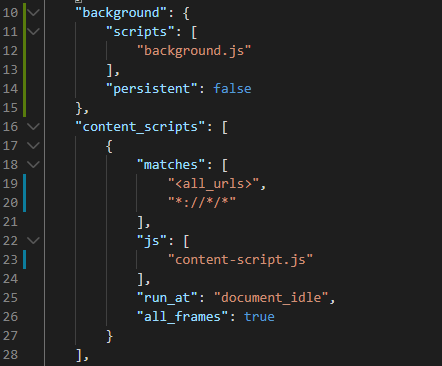
谢谢你的帮助
回答 1
Stack Overflow用户
发布于 2020-03-07 05:59:33
不需要background.js或消息传递,只需在popup.js中设置值并在内容脚本中使用chrome.storage.onChanged侦听器即可。
popup.js:
function setToggleState() {
  chrome.storage.sync.get('isExtensionActive', storage => {
    chrome.storage.sync.set({
      isExtensionActive: !storage.isExtensionActive,
    });
  });
}
background.js:没有必要
content.js:
chrome.storage.sync.get('isExtensionActive', storage => {
  toggleSomething(storage.isExtensionActive);
});

chrome.storage.onChanged.addListener(changes => {
  if (changes.isExtensionActive) {
    toggleSomething(changes.isExtensionActive.newValue);
  }
});

function toggleSomething(state) {
  console.log('new state:', state);
  // ........... do something
}
备注:
后台脚本运行在一个单独的隐藏背景页中,其中有its own devtools.
- The弹出窗口,也是一个单独窗口中的单独页面,因此它有单独的devtools:在弹出窗口内右键单击,然后单击“检查”.
https://stackoverflow.com/questions/60573241
复制相似问题
腾讯云开发者

Copyright © 2013 - 2026 Tencent Cloud. All Rights Reserved. 腾讯云 版权所有
深圳市腾讯计算机系统有限公司 ICP备案/许可证号:粤B2-20090059  粤公网安备44030502008569号
腾讯云计算(北京)有限责任公司 京ICP证150476号 | 京ICP备11018762号