
如何遍历图像绘制边框?
如何遍历图像绘制边框?
提问于 2020-03-09 08:47:47
我想遍历一个图像并在图像中绘制边界框,并使用图像的子矩阵进行一些计算。我正试图使C++中的以下代码在Python (摘自这里的答案)中工作。
for (int y = 0; y<resizedImage.cols - 32; y += 32) {
    for (int x = 0; x<resizedImage.rows - 32; x += 32) {
        // get the average for the whole 32x32 block
        Rect roi(x, y, 32, 32);
        Scalar mean, dev;
        meanStdDev(resizedImage(roi), mean, dev); // mean[0] is the mean of the first channel, gray scale value;
    }
}我想计算平均值并打印ROI。这是我在Python中使用Pillow的代码。我在代码中使用的图像是这里。

image = Image.open(path)
draw = ImageDraw.Draw(image)
step = 64
original_rows, original_cols = image.size
rows = original_rows + step
cols = original_cols + step
image_arr = np.asarray(image)

for row in range(0, rows, step):
    if row <= rows - step:
        for col in range(0, cols, step):
            if col <= cols - step:
                box = (col,row,step,step)
                region = image.crop(box)
                print(np.asarray(region))
                draw.rectangle([col,row,step,step], width = 1, outline="#FFFFFF")
image.show()由于图像是256 x 256,而我的步骤是64,我希望打印16个区域,但它只打印第一个区域,其余区域似乎是空的(看看枕头对象的大小)。我也不明白为什么它会打印24次(<PIL.Image.Image>),而我期望16次。
[[[255   0   0 255]
  [255   0   0 255]
  [255   0   0 255]
  ...
  [255   0   0 255]
  [255   0   0 255]
  [255   0   0 255]]]]

<PIL.Image.Image image mode=RGBA size=0x64 at 0x11937F5F8>
<PIL.Image.Image image mode=RGBA size=0x64 at 0x10E9A4748>
<PIL.Image.Image image mode=RGBA size=0x64 at 0x11937F3C8>
<PIL.Image.Image image mode=RGBA size=0x64 at 0x1193618D0>
<PIL.Image.Image image mode=RGBA size=64x0 at 0x11937F5F8>
<PIL.Image.Image image mode=RGBA size=0x0 at 0x10E9A4748>
<PIL.Image.Image image mode=RGBA size=0x0 at 0x11937F3C8>
<PIL.Image.Image image mode=RGBA size=0x0 at 0x1193618D0>
<PIL.Image.Image image mode=RGBA size=0x0 at 0x11937F5F8>
<PIL.Image.Image image mode=RGBA size=64x0 at 0x10E9A4748>
<PIL.Image.Image image mode=RGBA size=0x0 at 0x11937F3C8>
<PIL.Image.Image image mode=RGBA size=0x0 at 0x1193618D0>
<PIL.Image.Image image mode=RGBA size=0x0 at 0x11937F5F8>
<PIL.Image.Image image mode=RGBA size=0x0 at 0x10E9A4748>
<PIL.Image.Image image mode=RGBA size=64x0 at 0x11937F3C8>
<PIL.Image.Image image mode=RGBA size=0x0 at 0x1193618D0>
<PIL.Image.Image image mode=RGBA size=0x0 at 0x11937F5F8>
<PIL.Image.Image image mode=RGBA size=0x0 at 0x10E9A4748>
<PIL.Image.Image image mode=RGBA size=0x0 at 0x11937F3C8>
<PIL.Image.Image image mode=RGBA size=64x0 at 0x1193618D0>
<PIL.Image.Image image mode=RGBA size=0x0 at 0x11937F5F8>
<PIL.Image.Image image mode=RGBA size=0x0 at 0x10E9A4748>
<PIL.Image.Image image mode=RGBA size=0x0 at 0x11937F3C8>
<PIL.Image.Image image mode=RGBA size=0x0 at 0x1193618D0>在回答这里之后,我了解到在打开图像后,我需要将图像直接转换为NumPy数组,但是,这并没有帮助。
我做错了什么?我很感谢你的帮助。
编辑:--我使用NumPy数组使其工作。我仍然不明白为什么和如何使用枕头的作物不起作用。
image = Image.open(path)
step = 64
rows, cols = image.size
image_arr = np.asarray(image) #Added this

for row in range(0, rows, step):
    for col in range(0, cols, step):
          roi = image_arr[row:row+step, col:col+step] #Added this instead of using Pillow
print(np.mean(roi))回答 1
Stack Overflow用户
回答已采纳
发布于 2020-03-09 09:23:56
我想知道,您为什么要使用PIL,特别是您的代码源代码是基于OpenCV的,您无论如何都需要处理NumPy数组。
这将是我的解决方案:
import cv2
import numpy as np

# Read input image; create additional output image to draw on
image = cv2.imread('ZsyOG.png')
image_out = image.copy()

# Parameters
step = 64
cols, rows = image.shape[:2]

# Actual processing in loop
i_region = 0
for row in np.arange(0, rows, step):
    for col in np.arange(0, cols, step):
        mean = cv2.mean(image[row:row+step, col:col+step])
        image_out = cv2.rectangle(img=image_out,
                                  pt1=(row, col),
                                  pt2=(row + step, col + step),
                                  color=(255, 255, 255),
                                  thickness=1)
        image_out = cv2.putText(img=image_out,
                                text=str(i_region),
                                org=(int(col+1/2*step), int(row+1/2*step)),
                                fontFace=cv2.FONT_HERSHEY_COMPLEX_SMALL,
                                fontScale=1.0,
                                color=(255, 255, 255))
        print('Region: ', i_region, '| Mean: ', mean)
        i_region += 1

cv2.imshow('image_out', image_out)
cv2.waitKey(0)
cv2.destroyAllWindows()
输出图像:
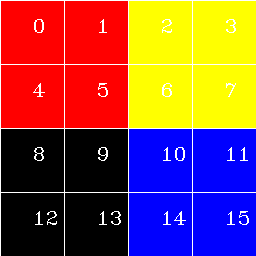
打印输出:
Region:  0 | Mean:  (0.0, 0.0, 255.0, 0.0)
Region:  1 | Mean:  (0.0, 0.0, 255.0, 0.0)
Region:  2 | Mean:  (0.0, 255.0, 255.0, 0.0)
Region:  3 | Mean:  (0.0, 255.0, 255.0, 0.0)
Region:  4 | Mean:  (0.0, 0.0, 255.0, 0.0)
Region:  5 | Mean:  (0.0, 0.0, 255.0, 0.0)
Region:  6 | Mean:  (0.0, 255.0, 255.0, 0.0)
Region:  7 | Mean:  (0.0, 255.0, 255.0, 0.0)
Region:  8 | Mean:  (0.0, 0.0, 0.0, 0.0)
Region:  9 | Mean:  (0.0, 0.0, 0.0, 0.0)
Region:  10 | Mean:  (255.0, 0.0, 0.0, 0.0)
Region:  11 | Mean:  (255.0, 0.0, 0.0, 0.0)
Region:  12 | Mean:  (0.0, 0.0, 0.0, 0.0)
Region:  13 | Mean:  (0.0, 0.0, 0.0, 0.0)
Region:  14 | Mean:  (255.0, 0.0, 0.0, 0.0)
Region:  15 | Mean:  (255.0, 0.0, 0.0, 0.0)
希望这能帮上忙!
----------------------------------------
System information
----------------------------------------
Platform:    Windows-10-10.0.16299-SP0
Python:      3.8.1
NumPy:       1.18.1
OpenCV:      4.2.0
----------------------------------------页面原文内容由Stack Overflow提供。腾讯云小微IT领域专用引擎提供翻译支持
原文链接:
https://stackoverflow.com/questions/60597158
复制相关文章
相似问题
腾讯云开发者

Copyright © 2013 - 2026 Tencent Cloud. All Rights Reserved. 腾讯云 版权所有
深圳市腾讯计算机系统有限公司 ICP备案/许可证号:粤B2-20090059  粤公网安备44030502008569号
腾讯云计算(北京)有限责任公司 京ICP证150476号 | 京ICP备11018762号