
如何使用funtion应用程序更新共享点在线站点集合
我正在使用azure函数开发关于创建站点collections.My步骤的一些特性,如下所示:
- 使用admin创建站点集合(按clientid和客户端机密)
- 获取新的URl客户端上下文来更新一些信息,如组成员、站点所有者等
我现在面临的问题是,首先使用帐户和密码获取新的客户端上下文,然后更新站点属性,但现在不能使用它,导致新的公司策略。如何改进此方法以解决此问题?
public ClientContext GetClientContextByCredential(SharePointOnlineCredentials cred, bool tryNewSite)
        {
            ClientContext ctx = ContextInit;
            try
            {
                ctx.Credentials = cred;
                Web web = ctx.Web;
                ctx.Load(web, w => w.Url);
                ctx.ExecuteQuery();

                return ctx;
            }
            catch (Exception ex)
            {
                ctx = null;
                if (_logHelper != null)
                {
                    if (tryNewSite)
                    {
                        _logHelper.writeLog(ex.Message, TraceLevel.Info, ex);
                    }
                    else
                        _logHelper.writeLog(ex.Message, TraceLevel.Error, ex);
                }
                return ctx;
            }
}这样的错误在使用SharePointOnlineCredentials时会出错。
The remote server returned an error: (401) Unauthorized.回答 1
Stack Overflow用户
发布于 2020-03-11 03:13:39
如果您想使用Azure应用程序连接SharePoint联机,请参考以下步骤
- 创建Azure AD应用程序
Connect-AzureAD

# Create the self signed cert if you have the cert, please skip it
$currentDate = Get-Date
$endDate  = $currentDate.AddYears(1)
$notAfter  = $endDate.AddYears(1)
$pwd  = "<password>"
$thumb = (New-SelfSignedCertificate -CertStoreLocation cert:\localmachine\my -DnsName com.foo.bar -KeyExportPolicy Exportable -Provider "Microsoft Enhanced RSA and AES Cryptographic Provider" -NotAfter $notAfter).Thumbprint
$pwd = ConvertTo-SecureString -String $pwd -Force -AsPlainText
Export-PfxCertificate -cert "cert:\localmachine\my\$thumb" -FilePath c:\temp\examplecert.pfx -Password $pwd

# Load the certificate
$cert  = New-Object System.Security.Cryptography.X509Certificates.X509Certificate("C:\temp\examplecert.pfx", $pwd)
$keyValue = [System.Convert]::ToBase64String($cert.GetRawCertData())


# Create the Azure Active Directory Application
$application = New-AzureADApplication -DisplayName "test123" -IdentifierUris "https://test123"
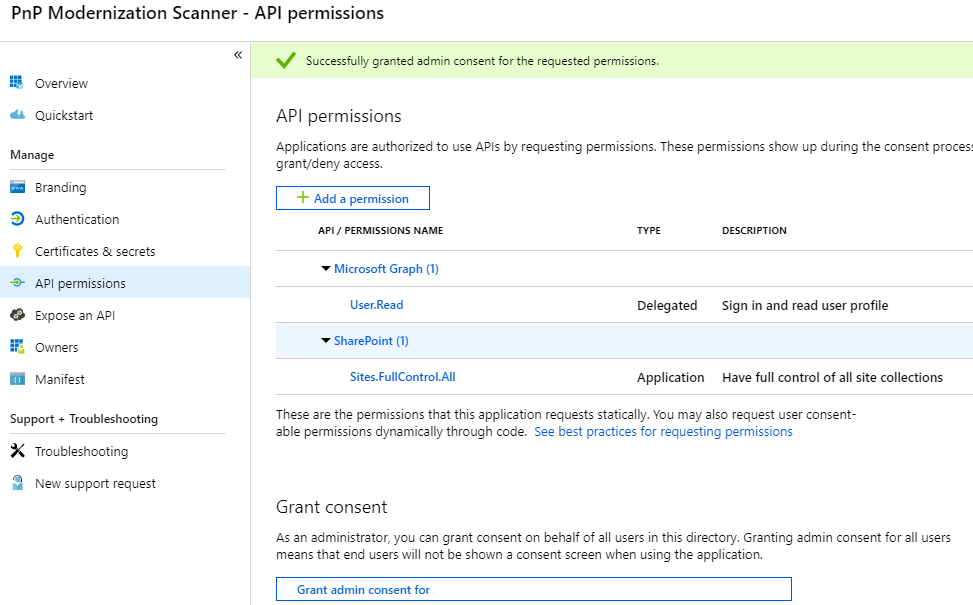
New-AzureADApplicationKeyCredential -ObjectId $application.ObjectId -CustomKeyIdentifier "Test123" -StartDate $currentDate -EndDate $endDate -Type AsymmetricX509Cert -Usage Verify -Value $keyValue- 通过Azure Portal配置权限
- 将证书上传到Azure密钥库
$Password = ConvertTo-SecureString -String "123" -AsPlainText -Force
Import-AzKeyVaultCertificate -VaultName "ContosoKV01" -Name "ImportCert01" -FilePath "C:\temp\examplecert.pfx" -Password $Password- 配置Azure函数 a. 为函数应用程序配置MSI
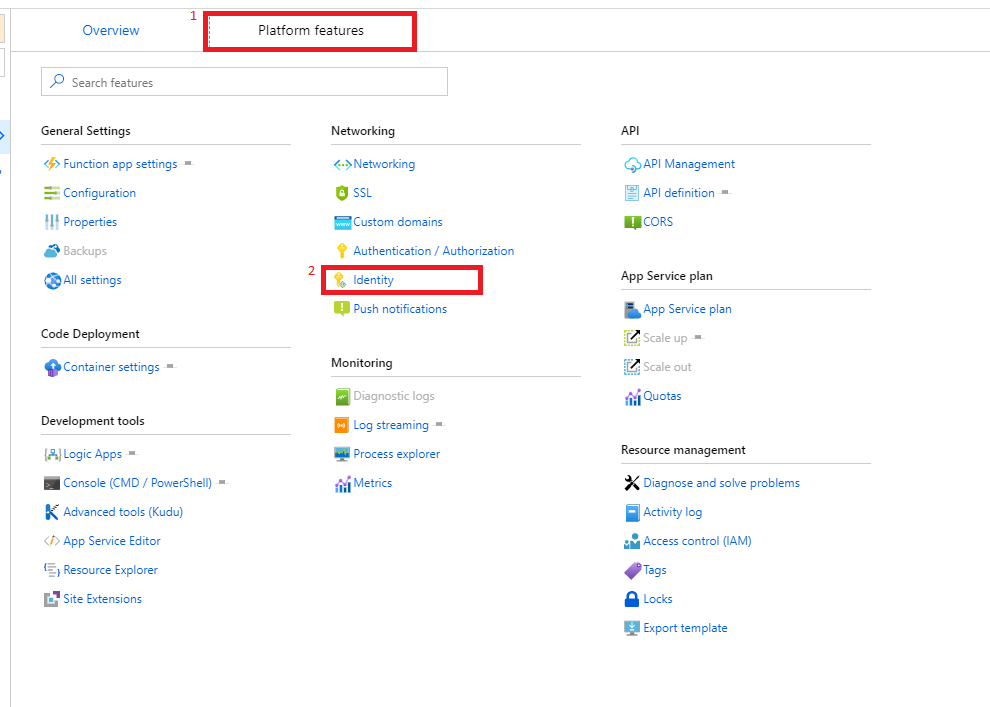
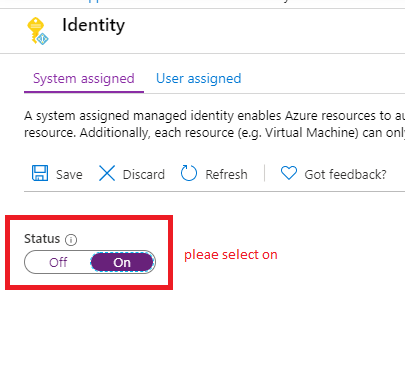
在密钥库中为您先前创建的应用程序标识创建一个访问策略。启用此策略的“获取”秘密权限。
c.代码
公共AuthenticationManager().GetAzureADAppOnlyAuthenticatedContext( GetClientContextByCredential() { ClientContext ctx = ContextInit;尝试{ ctx =新的ctx siteUrl,ApplicationId,房客+ ".onmicrosoft.com",GetKeyVaultCertificate("kv-spo",“AzureAutomationSPOAccess”){ ctx .Load(cc.Web,p => p.Title);ctx .ExecuteQuery();返回ctx;} ctx (异常ex) {ctx=空;if (_logHelper != null) { if (tryNewSite) { _logHelper.writeLog(ex.Message,TraceLevel.Info,ex);} KeyVaultClient.AuthenticationCallback(serviceTokenProvider.KeyVaultTokenCallback));_logHelper.writeLog(ex.Message,TraceLevel.Error,ex);}返回ctx;}内部静态X509Certificate2 GetKeyVaultCertificate(string keyvaultName,string name) { var serviceTokenProvider =新AzureServiceTokenProvider();var keyVaultClient =新KeyVaultClient(新的AzureServiceTokenProvider)//获取证书var X509Certificate2(Convert.FromBase64String(secret.Result.Value));=keyVaultClient.GetSecretAsync(“keyVaultClient.GetSecretAsync+ keyvaultName + ".vault.azure.net/",名称);//返回证书返回新的X509Certificate2(Convert.FromBase64String(secret.Result.Value));}
有关更多详情,请参阅
https://learn.microsoft.com/en-us/sharepoint/dev/solution-guidance/security-apponly-azuread
blog/performing-app-only-operations-on-sharepoint-online-through-azure-ad
https://stackoverflow.com/questions/60596135
复制相似问题
腾讯云开发者

Copyright © 2013 - 2026 Tencent Cloud. All Rights Reserved. 腾讯云 版权所有
深圳市腾讯计算机系统有限公司 ICP备案/许可证号:粤B2-20090059  粤公网安备44030502008569号
腾讯云计算(北京)有限责任公司 京ICP证150476号 | 京ICP备11018762号