
cx_freeze错误:模块未找到tkinter
cx_freeze错误:模块未找到tkinter
提问于 2020-03-10 14:01:58
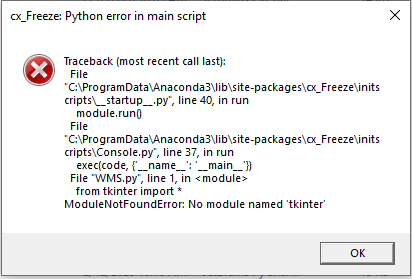
我开始有一些问题的迷你和PyCharm,所以我不得不重新安装他们。然而,现在当我使用cx_freeze创建.exe时,我得到了下面的错误。
这是我的代码:
from tkinter import *
from tkinter import ttk
from ttkthemes import ThemedTk
from ttkthemes import themed_tk as tk
import os
from tkinter import messagebox
import getpass
import pyodbc
import test
import time


class Application(object):
    def __init__(self,master):
        self.master=master

        self.itemIn = ttk.Button(master, text="In", width=35,
                                 command=self.itemIn).grid(row=2, column=0, padx=10,pady=15)
        self.itemOut = ttk.Button(master, text="Out", width=35,
                                       command=self.itemOut).grid(row=3, column=0, padx=10)

    def itemIn(self):
        pass
    def itemOut(self):
        pass

def main():
    global userList
    strForDB = os.getcwd() + '\DBINFO.txt'
    openDBFile = open(strForDB, 'r')
    currentDirForDB = openDBFile.read()
    openDBFile.close()
    dbPath = currentDirForDB
    conToSubmit = pyodbc.connect(dbPath)
    curToSubmit = conToSubmit.cursor()
    userName = getpass.getuser()

    root = tk.ThemedTk()
    root.get_themes()
    root.set_theme("radiance")
    app=Application(root)
    root.title("Main Menu v:5.1")
    root.configure(background="#F4F3F1")
    root.resizable(0, 0)
    # Change Application Icon with below:
    root.wm_iconbitmap(os.getcwd()+'/Z Logo.ico')
    ### To maximize
    # w, h = root.winfo_screenwidth(), root.winfo_screenheight()
    # root.geometry("%dx%d+0+0" % (w, h))
    root.geometry('340x510+300+80')
    root.mainloop()
    #else:
    #    messagebox.showerror("Access Denied", "You are not allowed to access this application.")
    #    return


if __name__=='__main__':
    main()
这是cx_freeze构建脚本,在这里我导入了所有相关模块。
import cx_Freeze
import os
from cx_Freeze import *
import sys
if sys.platform == "win32":
     base = "Win32GUI"

imodules=['tkinter','pyodbc','getpass','pathlib','openpyxl','datetime','os','win32print','win32ui'] #modules to include

emodules=[] ###modules to NOT include
            #(useful if a module is forcefully installed
            #even if you don't want that module)


build_exe_options={"packages":imodules,"excludes":emodules}

setup(
        name= "WMS System",
        options={"build_exe":build_exe_options},description="App to track Inventory",author="VM",
        executables=[
        Executable(
                 "WMS.py", base=base, icon="Z logo.ico"
                )
            ]
        )
我已经使用cx_freeze很长一段时间了,但是我从来没有见过这个错误。
回答 2
Stack Overflow用户
回答已采纳
发布于 2020-04-11 21:59:31
我和你有同样的问题,经过长时间的疑难解答,我发现
- in /lib文件夹我有"Tkinter“文件夹,将其重命名为"tkinter”解决了上述问题
- 类型模块中的任何以下错误都可以通过将它们添加到构建选项的“include”标记中解决,或者自己从python安装文件夹
查找和复制整个模块文件夹。
Stack Overflow用户
发布于 2020-07-13 02:05:26
项目中的文件夹名必须是"lib/tkinter",,但可能是"lib/Tkinter",,然后必须将文件夹从"tkinter“重命名为"Tkinter”。
页面原文内容由Stack Overflow提供。腾讯云小微IT领域专用引擎提供翻译支持
原文链接:
https://stackoverflow.com/questions/60619203
复制相关文章
相似问题
腾讯云开发者

Copyright © 2013 - 2026 Tencent Cloud. All Rights Reserved. 腾讯云 版权所有
深圳市腾讯计算机系统有限公司 ICP备案/许可证号:粤B2-20090059  粤公网安备44030502008569号
腾讯云计算(北京)有限责任公司 京ICP证150476号 | 京ICP备11018762号