
统一使用ShaderLab裁剪椭圆形状区域
统一使用ShaderLab裁剪椭圆形状区域
提问于 2020-03-11 19:18:15
我试图用统一中的着色器绘制一个椭球。
遵循以下步骤
- I在一些互联网教程的帮助下编写了一个自定义着色器,
- 在
- 上添加了着色器,并在对象
上应用了该材料。
Shader "Custom/HoleMaker" {
    Properties{
            _Position("Position", Vector) = (0,0,0,0)
            _Radius("Radius", Range(0,1)) = 0.01
            _Color("Color", Color) = (1,1,1,1)
            _CutawayColor("Cutaway Color", Color) = (1,1,1,1)
    }
            SubShader{
                    Tags { "RenderType" = "Opaque"}
                    LOD 200
                    Cull Front

                    CGPROGRAMtypes
                    #pragma surface surf MonoColor fullforwardshadows vertex:vert

                    // Use shader model 3.0 target, to get nicer looking lighting
                    #pragma target 3.0

                    fixed4 _CutawayColor;

                    float4 _Position;
                    float _Radius;

                    struct Input
                    {
                            float2 uv_MainTex;
                            float3 worldPos;
                    };

                    void vert(inout appdata_full v, out Input o)
                    {
                            UNITY_INITIALIZE_OUTPUT(Input, o);
                            v.normal *= -1;
                    }

                    half4 LightingMonoColor(SurfaceOutput s, half3 lightDir, half atten) {
                            return _CutawayColor;
                    }

                    void surf(Input IN, inout SurfaceOutput o)
                    {

                            //spherical clipping
                            float dist = distance(IN.worldPos.xyz, _Position.xyz);
                            if (dist < _Radius)
                                    clip(-1);


                            o.Albedo = _CutawayColor.rgb;
                    }
                    ENDCG
            }
                    FallBack "Diffuse"
   }
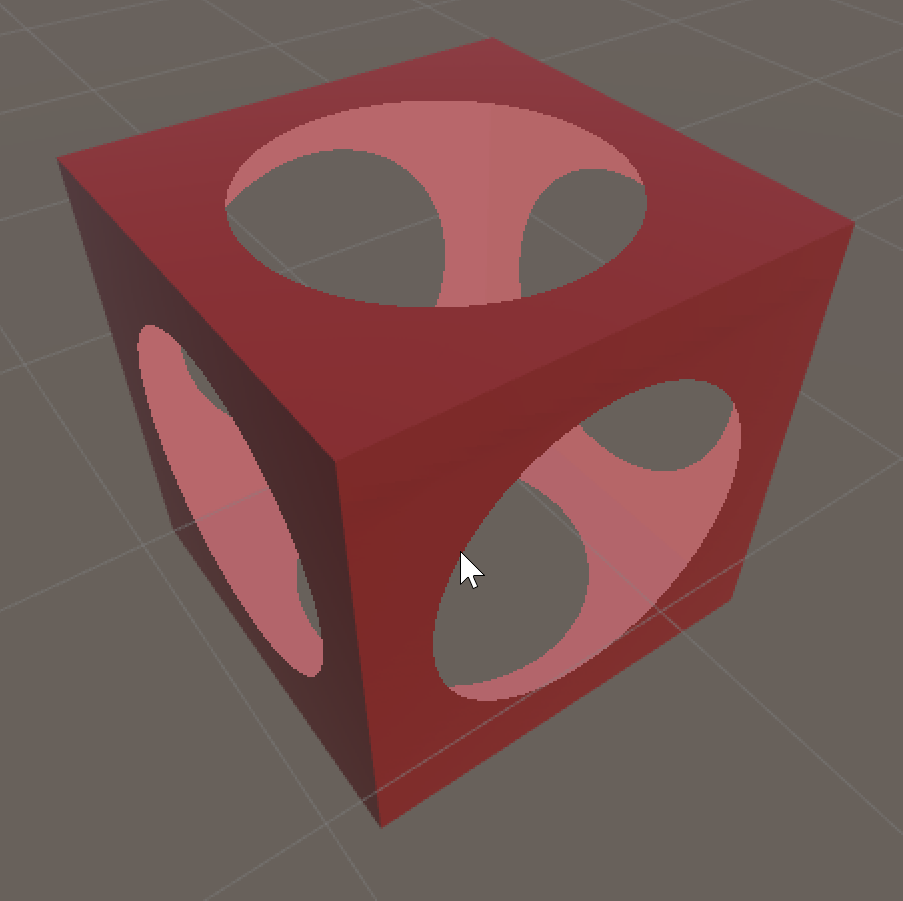
这段代码用于创建一个圆圈,但是当我尝试使用函数片段()来创建一个椭球面时,它不起作用。根据文档,剪辑(Float4 x)也可用于裁剪表面。变量_Radius在World Space中创建了一个完美的球面,但是当我尝试使用_Radius.x和_Radius.y时,代码不起作用。请参阅所附图片。
回答 1
Stack Overflow用户
回答已采纳
发布于 2020-03-11 19:50:10
_Radius.x和_Radius.y破坏了着色器,因为_Radius是float。它没有x或y成员。它怎么可能对_Radius.y有价值呢?
相反,请考虑添加一个Scale属性,然后将世界位置与_Position之间的差额按此数量进行缩放,然后再将差异的大小与_radius进行比较。
Shader "Custom/HoleMaker" {
    Properties{
            _Position("Position", Vector) = (0,0,0,0)
            _Scale("Scale", Vector) = (1,1,1,0)
            _Radius("Radius", Range(0,1)) = 0.01
            _Color("Color", Color) = (1,1,1,1)
            _CutawayColor("Cutaway Color", Color) = (1,1,1,1)
    }
            SubShader{
                    Tags { "RenderType" = "Opaque"}
                    LOD 200
                    Cull Front

                    CGPROGRAMtypes
                    #pragma surface surf MonoColor fullforwardshadows vertex:vert

                    // Use shader model 3.0 target, to get nicer looking lighting
                    #pragma target 3.0

                    fixed4 _CutawayColor;

                    float4 _Position;
                    float4 _Scale;
                    float _Radius;

                    struct Input
                    {
                            float2 uv_MainTex;
                            float3 worldPos;
                    };

                    void vert(inout appdata_full v, out Input o)
                    {
                            UNITY_INITIALIZE_OUTPUT(Input, o);
                            v.normal *= -1;
                    }

                    half4 LightingMonoColor(SurfaceOutput s, half3 lightDir, half atten) {
                            return _CutawayColor;
                    }

                    void surf(Input IN, inout SurfaceOutput o)
                    {

                            //spherical clipping
                            float dist = length(_Scale.xyz * IN.worldPos.xyz - _Position.xyz);
                            if (dist < _Radius)
                                    clip(-1);


                            o.Albedo = _CutawayColor.rgb;
                    }
                    ENDCG
            }
                    FallBack "Diffuse"
}页面原文内容由Stack Overflow提供。腾讯云小微IT领域专用引擎提供翻译支持
原文链接:
https://stackoverflow.com/questions/60643100
复制相关文章
相似问题
腾讯云开发者

Copyright © 2013 - 2026 Tencent Cloud. All Rights Reserved. 腾讯云 版权所有
深圳市腾讯计算机系统有限公司 ICP备案/许可证号:粤B2-20090059  粤公网安备44030502008569号
腾讯云计算(北京)有限责任公司 京ICP证150476号 | 京ICP备11018762号