
基于Kubernetes入侵路径的路由不按预期工作
我在kubernetes集群中安装了NGINX入侵。当我试图通过侵入控制器访问微服务端时,它没有按预期工作
我已经部署了两个spring引导应用程序。
入侵规则
- 路径1 -> /customer
- 路径2 -> /prac
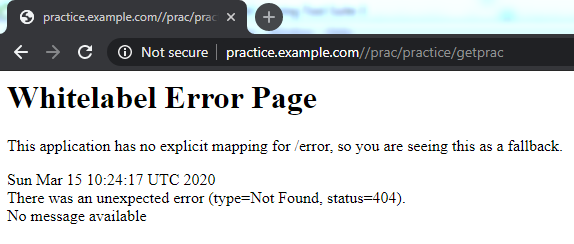
当我试图接触其中一个服务前。http://test.practice.com/prac/practice/getprac,它不起作用
但是,当我尝试访问而没有侵入路径http://test.practice.com/practice/getprac时,它可以工作。
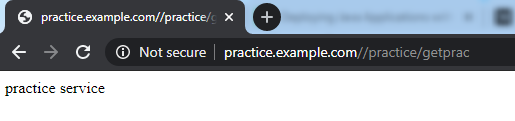
我无法理解为什么在进入路径下,它不能工作,其他服务也会发生同样的情况
微型服务1(9090港)
apiVersion: apps/v1
kind: Deployment
metadata:
  name: customer
  namespace: practice
  labels:
    app: customer
spec:
  replicas: 5
  selector:
    matchLabels:
      app: customer
  template:
    metadata:
      labels:
        app: customer
    spec:
      imagePullSecrets:
      - name: testkuldeepsecret
      containers:
      - name: customer
        image: kuldeep99/customer:v1
        ports:
        - containerPort: 9090
          hostPort: 9090

---
apiVersion: v1
kind: Service
metadata:
  name: customer-service
  namespace: practice
  labels:
spec:
  ports:
  - port: 9090
    targetPort: 9090
    protocol: TCP
    name: http
  selector:
    app: customer
微型服务2(端口8000)
apiVersion: apps/v1
kind: Deployment
metadata:
  name: prac
  namespace: practice
  labels:
    app: prac
spec:
  replicas: 4
  selector:
    matchLabels:
      app: prac
  template:
    metadata:
      labels:
        app: prac
    spec:
      imagePullSecrets:
      - name: testkuldeepsecret
      containers:
      - name: prac
        image: kuldeep99/practice:v1
        ports:
        - containerPort: 8000
          hostPort: 8000

---
apiVersion: v1
kind: Service
metadata:
  name: prac-service
  namespace: practice
  labels:
spec:
  ports:
  - port: 8000
    targetPort: 8000
    protocol: TCP
    name: http
  selector:
    app: prac
服务(客户服务和公共服务)
NAME               TYPE        CLUSTER-IP      EXTERNAL-IP   PORT(S)    AGE
customer-service   ClusterIP   10.97.203.19    <none>        9090/TCP   39m
ngtest             ClusterIP   10.98.74.149    <none>        80/TCP     21h
prac-service       ClusterIP   10.96.164.210   <none>        8000/TCP   15m
some-mysql         ClusterIP   None            <none>        3306/TCP   2d16h
入口
apiVersion: extensions/v1beta1
kind: Ingress
metadata:
  name: practice-ingress
  namespace: practice
  annotations:
    nginx.ingress.kubernetes.io/rewrite-target: /
spec:
  rules:
  - host: practice.example.com
    http:
      paths:
      - backend:
          serviceName: customer-service
          servicePort: 9090
        path: /customer
      - backend:
          serviceName: prac-service
          servicePort: 8000
path: /prac回答 3
Stack Overflow用户
发布于 2020-03-15 10:56:15
Stack Overflow用户
发布于 2021-05-20 05:49:49
在讨论中,我注意到了一件事。我们不应混淆
apiVersion: networking.k8s.io/v1
kind: Ingress
和
apiVersion: networking.k8s.io/v1beta1
kind: Ingress
首先,确保我们使用的是哪个入侵控制器,并在此基础上决定apiVersion。我用的是“入口这个版本支持"apiVersion: networking.k8s.io/v1beta1“,并根据”阿森纳“的评论进行了工作。
这个宏yaml文件与“Ingress nginx”侵入控制器一起工作。
apiVersion: networking.k8s.io/v1beta1
kind: Ingress
metadata:
  annotations:
    kubernetes.io/ingress.class: nginx
    nginx.ingress.kubernetes.io/rewrite-target: /$2

  name: k8-exercise-03-two-app-ingress
spec:
  rules:
    - host: ex03.k8.sb.two.app.ingress.com
      http:
        paths:
          - backend:
              serviceName: k8-excercise-01-app-service
              servicePort: 8080
            path: /one(/|$)(.*)
          - backend:
              serviceName: k8-exercise-03-ms-service
              servicePort: 8081
            path: /two(/|$)(.*)
但是,这个输入yaml文件不使用“Ingress”侵入控制器。
apiVersion: networking.k8s.io/v1
kind: Ingress
metadata:
    name: k8-exercise-03-two-app-ingress
    annotations:
       kubernetes.io/ingress.class: "nginx"
#       nginx.ingress.kubernetes.io/use-regex: "true"
       ingress.kubernetes.io/rewrite-target: /$2
spec:
#  ingressClassName: nginx
  rules:
 #192.168.1.5 ex03.k8.sb.com is mapped in host file. 192.168.1.5 is Host machine IP
  - host: ex03.k8.sb.two.app.ingress.com
    http:
        paths:
        - backend:
            service:
                name: k8-excercise-01-app-service
                port:
                    number: 8080
          path: /one(/|$)(.*)
          pathType: Prefix

        - pathType: Prefix
          path: /two(/|$)(.*)
          backend:
            service:
                name: k8-exercise-03-ms-service
                port:
                    number: 8081
我可以按如下方式访问调用:
应用程式1:
http://ex03.k8.sb.two.app.ingress.com/one/
Result: App One - Root

http://ex03.k8.sb.two.app.ingress.com/one/one
Result: App One - One API

http://ex03.k8.sb.two.app.ingress.com/one/api/v1/hello
Result: App One - Hello API
应用程序2:
http://ex03.k8.sb.two.app.ingress.com/two/message/James%20Bond
Result: App Two- Hi James Bond API
最后,如果有人知道如何更改"apiVersion: networking.k8s.io/v1“yaml以支持”ingress“控制器,将不胜感激。谢谢。抱歉内容太长了
Stack Overflow用户
发布于 2021-04-24 07:18:25
我花了一天的时间来解决这个问题。问题只是安装了错误的nginx。我用helm found 这里安装了nginx-ingress
安装它,请使用头盔第3版:
helm repo add ingress-nginx https://kubernetes.github.io/ingress-nginx
helm repo update

helm install ingress-nginx ingress-nginx/ingress-nginx一旦运行,您将在日志中看到一个片段,说明您的入口应该是什么样的。如果您想要这样做,您可以按照上面建议的注释,从今以后,您可以按照教程这里来实现更多的内容,比如重写。
我的集群是使用GKE部署在GCP上的。
完成后,这是输出日志:
NAME: ingress-nginx
LAST DEPLOYED: Sat Apr 24 07:56:11 2021
NAMESPACE: default
STATUS: deployed
REVISION: 1
TEST SUITE: None
NOTES:
The ingress-nginx controller has been installed.
It may take a few minutes for the LoadBalancer IP to be available.
You can watch the status by running 'kubectl --namespace default get services -o wide -w ingress-nginx-controller'

An example Ingress that makes use of the controller:

  apiVersion: networking.k8s.io/v1beta1
  kind: Ingress
  metadata:
    annotations:
      kubernetes.io/ingress.class: nginx
    name: example
    namespace: foo
  spec:
    rules:
      - host: www.example.com
        http:
          paths:
            - backend:
                serviceName: exampleService
                servicePort: 80
              path: /
    # This section is only required if TLS is to be enabled for the Ingress
    tls:
        - hosts:
            - www.example.com
          secretName: example-tls

If TLS is enabled for the Ingress, a Secret containing the certificate and key must also be provided:

  apiVersion: v1
  kind: Secret
  metadata:
    name: example-tls
    namespace: foo
  data:
    tls.crt: <base64 encoded cert>
    tls.key: <base64 encoded key>
  type: kubernetes.io/tls
安装之后,它现在的样子如下:
apiVersion: networking.k8s.io/v1beta1
kind: Ingress
metadata:
  annotations:
    kubernetes.io/ingress.class: nginx
    nginx.ingress.kubernetes.io/rewrite-target: /$2

  name: example
  # namespace: foo
spec:
  rules:
    - host: [your ip address].sslip.io
      http:
        paths:
          - backend:
              serviceName: registry-app-server
              servicePort: 8761
            path: /eureka/(.*)
          - backend:
              serviceName: api-gateway-server
              servicePort: 7000
path: /api(/|$)(.*)如您所见,我正在使用kubernetes(gke)部署spring微服务。与内置的gke入口相比,使用nginx-ingress有很多好处,而且它比其对应方更受欢迎。
https://stackoverflow.com/questions/60691946
复制相似问题
腾讯云开发者

Copyright © 2013 - 2026 Tencent Cloud. All Rights Reserved. 腾讯云 版权所有
深圳市腾讯计算机系统有限公司 ICP备案/许可证号:粤B2-20090059  粤公网安备44030502008569号
腾讯云计算(北京)有限责任公司 京ICP证150476号 | 京ICP备11018762号