
如何访问Xcode中的Spotlight搜索字段?
如何访问Xcode中的Spotlight搜索字段?
提问于 2020-03-20 14:15:34
使用Xcode 11与iPhone 11模拟器。试图在Spotlight搜索中输入一些文本:
let springboard = XCUIApplication(bundleIdentifier: "com.apple.springboard")
springboard.swipeDown()

let spotlightSearchField = springboard.searchFields["SpotlightSearchField"]
spotlightSearchField.typeText("Some text")无法找到具有可访问性标识符SpotlightSearchField的元素,尽管Spotlight搜索面板是可见的。如果我调用debugDescription,元素树中也不存在。DebugDescription输出不包含任何带有聚光灯和siri建议的下拉面板元素--仅包含主屏幕元素。
但是AccessibilityInspector可以找到聚光灯搜索字段并显示它的标识符。
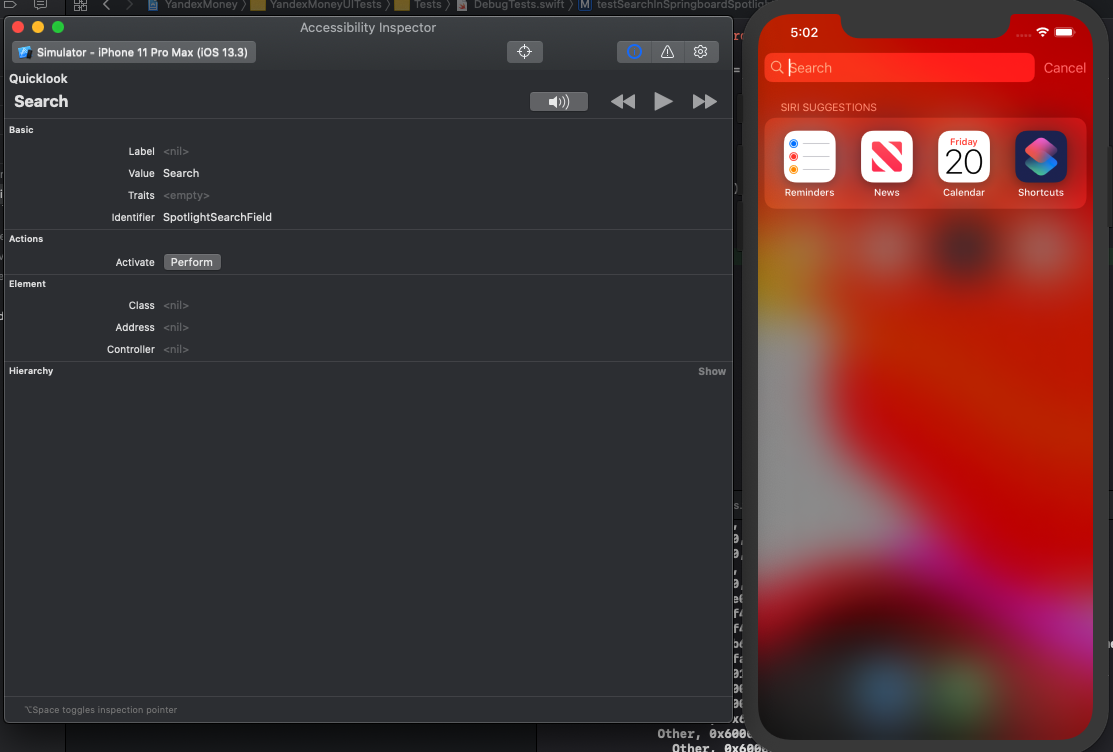
我可以用代码访问这个字段吗?
回答 1
Stack Overflow用户
回答已采纳
发布于 2020-03-24 19:16:37
SpotlightSearchField是Spotlight的一部分,而不是SpringBoard。
您应该像这样与它交互:
let spotlight = XCUIApplication(bundleIdentifier: "com.apple.Spotlight")
let spotlightSearchField = spotlight.textFields["SpotlightSearchField"]
spotlightSearchField.typeText("Some text")
祝好运!
页面原文内容由Stack Overflow提供。腾讯云小微IT领域专用引擎提供翻译支持
原文链接:
https://stackoverflow.com/questions/60775901
复制相关文章
相似问题
腾讯云开发者

Copyright © 2013 - 2026 Tencent Cloud. All Rights Reserved. 腾讯云 版权所有
深圳市腾讯计算机系统有限公司 ICP备案/许可证号:粤B2-20090059  粤公网安备44030502008569号
腾讯云计算(北京)有限责任公司 京ICP证150476号 | 京ICP备11018762号